CCP-1116 Commentary Control Panel – Quick Guide 1.2
Page 4
1 CONTROL ELEMENTS - DESCRIPTION
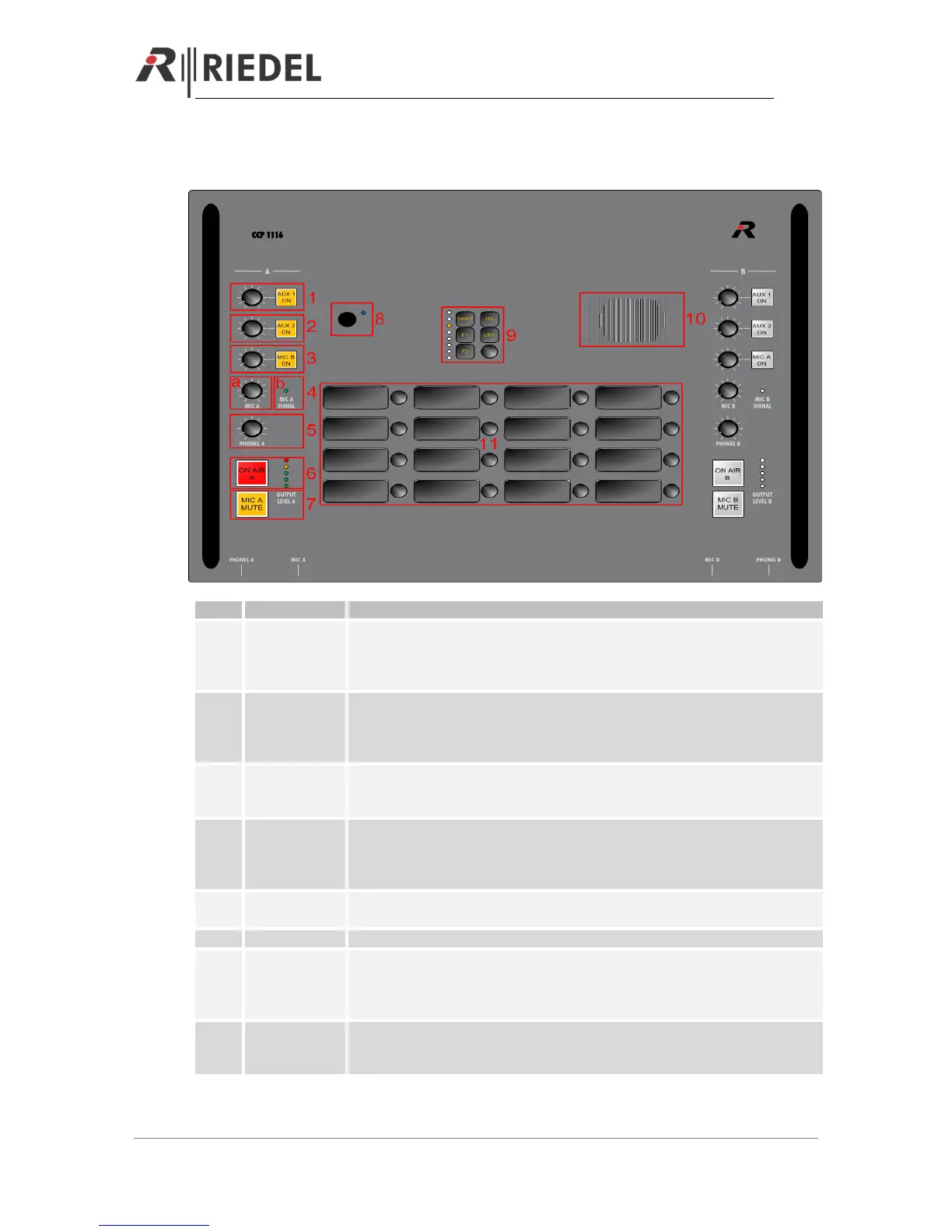
Activating the button: Mixes analog input „AUX 1“ from the rear side to the
Headphones (depending of the dip-settings on the rear side to the left-, right- or
both ears). The button will light up in yellow. With the Levelmeter you can adjust
the listen level.
Activating the button: Mixes analog input „AUX 2“ from the rear side to the
Headphones (depending of the dip-settings on the rear side to the left-, right- or
both ears). The button will light up in yellow. With the Levelmeter you can adjust
the listen level.
Activating the button: Mixes the MIC B from 2
nd
commentator to the Headphones
(depending of the dip-settings on the rear side to the left-, right- or both ears). The
button will light up in yellow. With the Levelmeter you can adjust the listen level.
Sidetone: Mixes the “MIC A” signal to the Headphones A (depending of the dip-
settings on the rear side to the left-, right- or both ears). With the Dip switch
“Always” you can choose to activate the Sidetone always or only when ON AIR is
pressed
Indicates green, as soon a signal from MIC A is coming into the CCP-1116. LED-
color changes to orange, when the signal is clipping
Adjust the outgoing volume to Phones A
Activates the “ON AIR” function. When activated, the Button light up red. The “MIC
A” is sent to the analog outputs “AIR A OUT” and “AIR A+B OUT”. Also GPI IN 1 is
internally activated and can be used within the Artist configuration. The Level
meter is showing the ON AIR Mic level with green and orange LEDs
Mute the “MIC A” input. When activated the button light up yellow. If “ON AIR” is
activated, also this button changes color to yellow. The “MIC MUTE” buttons can
also be activated via GPO 1 (A) and 2 (B) within the Artist configuration


 To Next Page