CCP-1116 Commentary Control Panel – Quick Guide 1.2
Page 12
5.2 GPIO functions
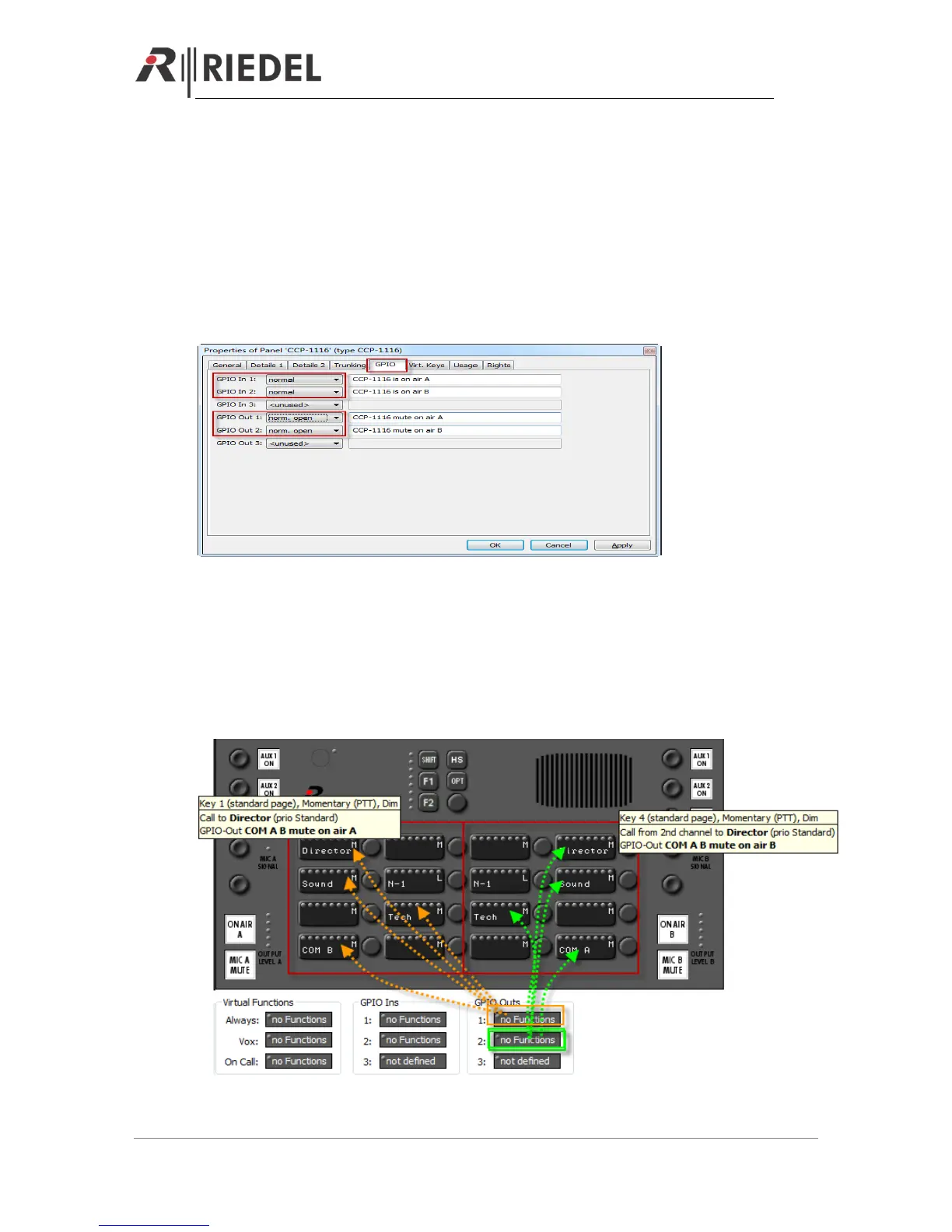
Open the „Properties“ of the CCP-1116 to define the GPIOs.
GPIO IN 1 and 2 can be used within the Artist system to signalize activated „ON AIR“ buttons on
the CCP-1116 somewhere and somehow in the system.
GPIO Out 1 and 2 are used internally in the CCP-1116 to activate the “MIC Mute” buttons, for
example when the Commentator is talking to an Intercom destination while he is on air.
Both GPIOs will be labeled automatically with the panel name and functionality.
GPIO IN 3 and GPIO OUT 3 are the only ones, which can be used individually.
The GPIO 3 is available on a XLR5 pin connector on the rear side of the CCP-1116.
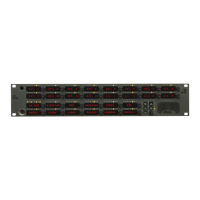
Now you can drag and drop GPO 1 and 2 to all the intercom buttons, that are able to activate the
microphone of the panel (Call to Port, Call to Group, Call to Conference), to automatically activate
the On Air “MIC MUTE” button of the corresponding Commentator-side.
For only listen functions (Listen to) an assigned GPO is not necessary.


 To Next Page