CCP-1116 Commentary Control Panel – Quick Guide 1.2
Page 7
3 REAR SIDE - DIP SWITCHES
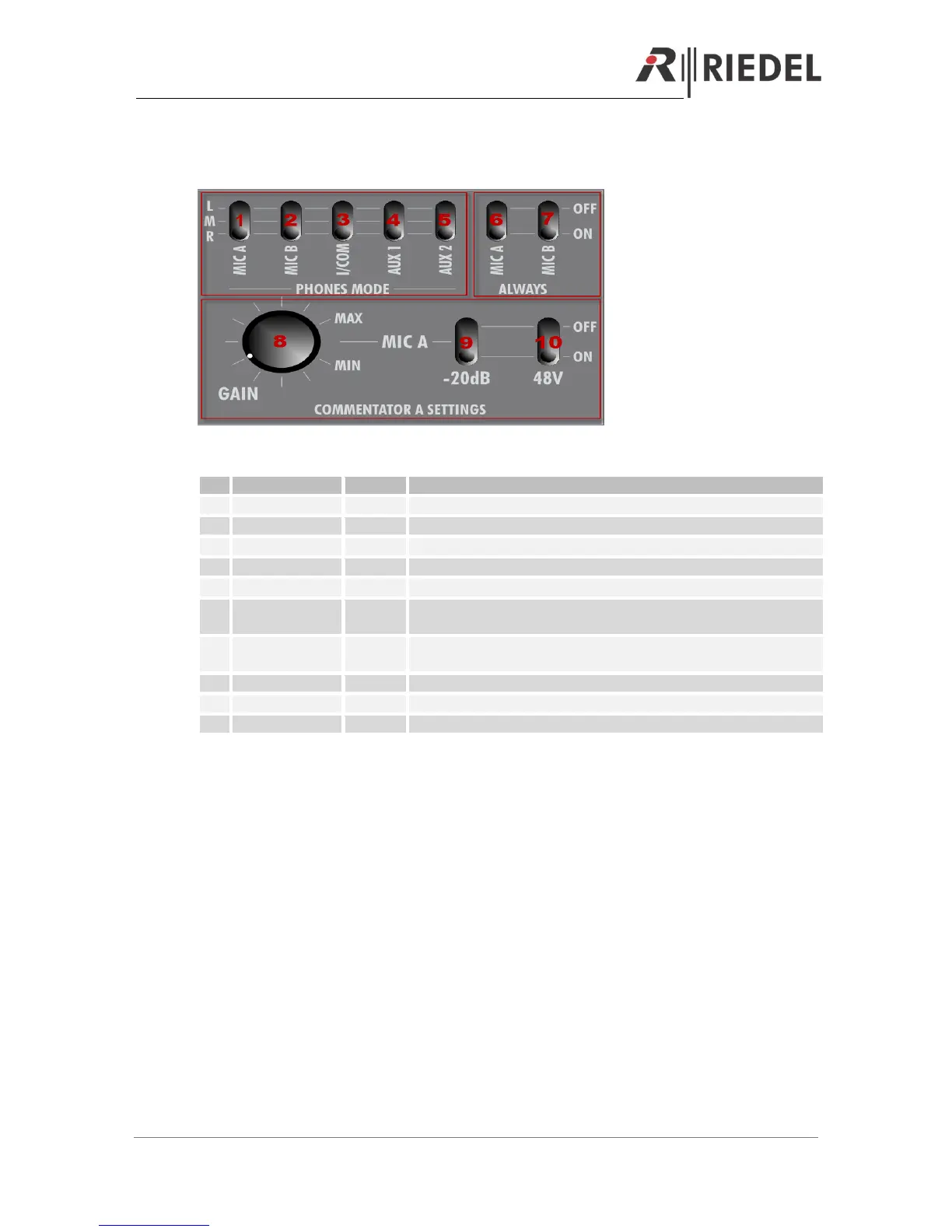
Example for Commentator A. Identical functionality for Commentator B
Routes MIC A signal (Sidetone) to left-(L), right- (R), or both ears (M)
Routes MIC B signal to left-(L), right- (R), or both ears (M)
Routes Intercom signal to left-(L), right- (R), or both ears (M)
Routes AUX 1 signal to left-(L), right- (R), or both ears (M)
Routes AUX 2 signal to left-(L), right- (R), or both ears (M)
Sidetone MIC A: Always routed to the phones A, or only when “ON AIR
A” is pressed
MIC B signal always routed to the phones or only when “ON AIR B” is
pressed. Only works when “MIC B ON” is activated.
Switch between Dynamic- (OFF) and Electret Microphone (-20dB ON)
Switch 48V Phantom power ON/OFF


 To Next Page