23
NSA-002A User Manual A00
5.3 Riedel-NMOS-Explorer
The NMOS Explorer is a tool to discover, manage and connect IP Media devices following AMWA IS-04 and IS-05.
It allows IS-04 discovery in registered mode (default) and peer to peer discovery, when no registry is available.
IS-05 parameters can be read and set individually, so it can also be used to connect senders and receivers.
By offering an import/export SDP option, the NMOS Explorer can also be used to connect devices that do not
support IS-04/05, but can exchange SDP objects.
Download the NMOS-Explorer from the Riedel website and install it on your windows PC.
Ø
After starting the NMOS-Explorer:
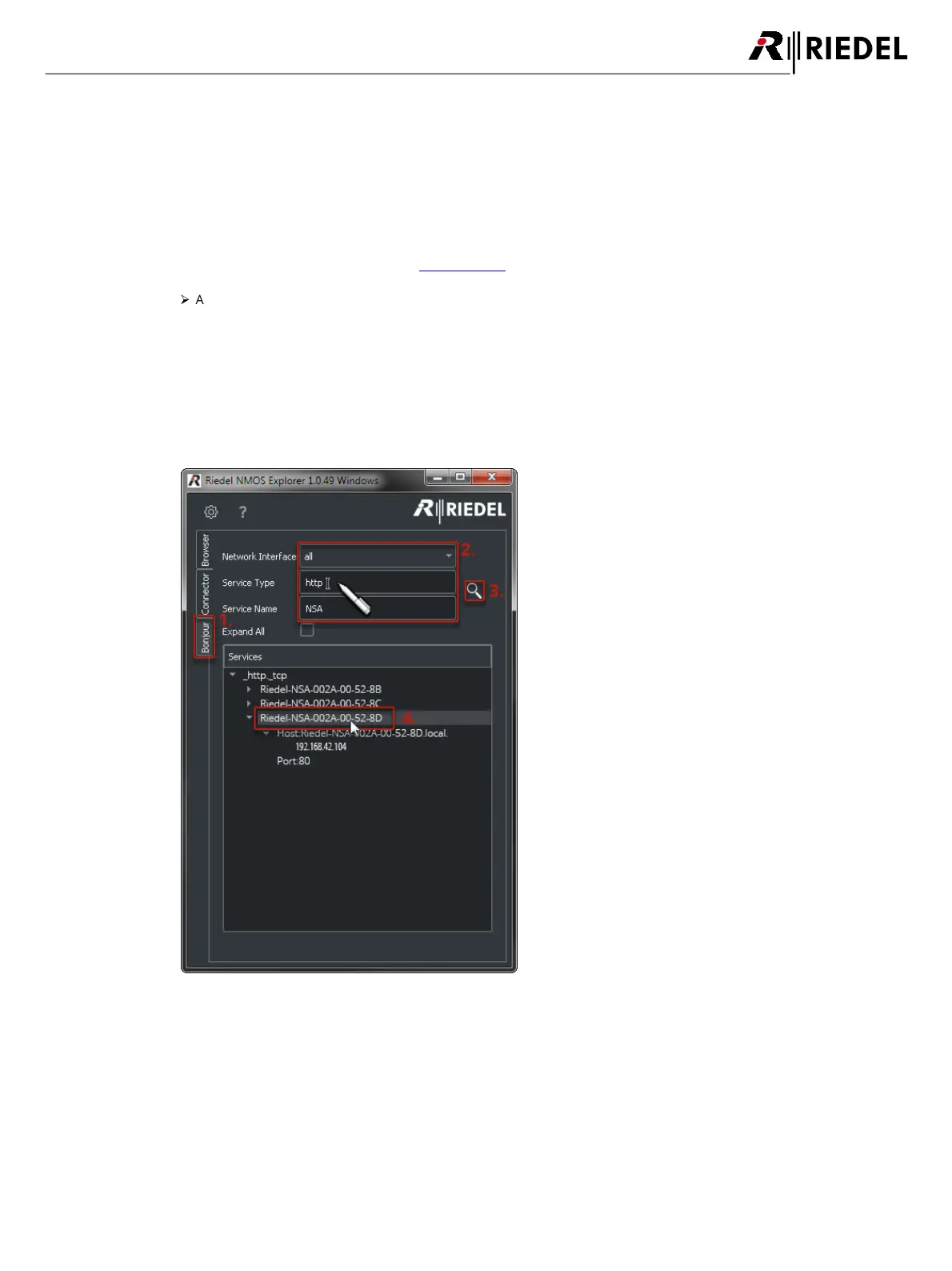
1. Select the index 'Bonjour'.
2. If necessary, select your network adaptor in the field 'Network Interface' that is attached to the NSAs network.
Limit the amount of results by entering 'http' in the field 'Service Type' and 'NSA' in the field 'Service Name'.
3. Click on the magnifier. All found devices will be listed. The NSAs announce themselves with the name "Riedel-
NSA-002A-xx-xx-xx". The last three places represents the NSA's MAC address.
4. Double-clicking a device will open the web interface. The devices IP address is displayed by opening the
respective tree structure.


 To Next Page