Software setup example: MMTTY and DX4WIN 15
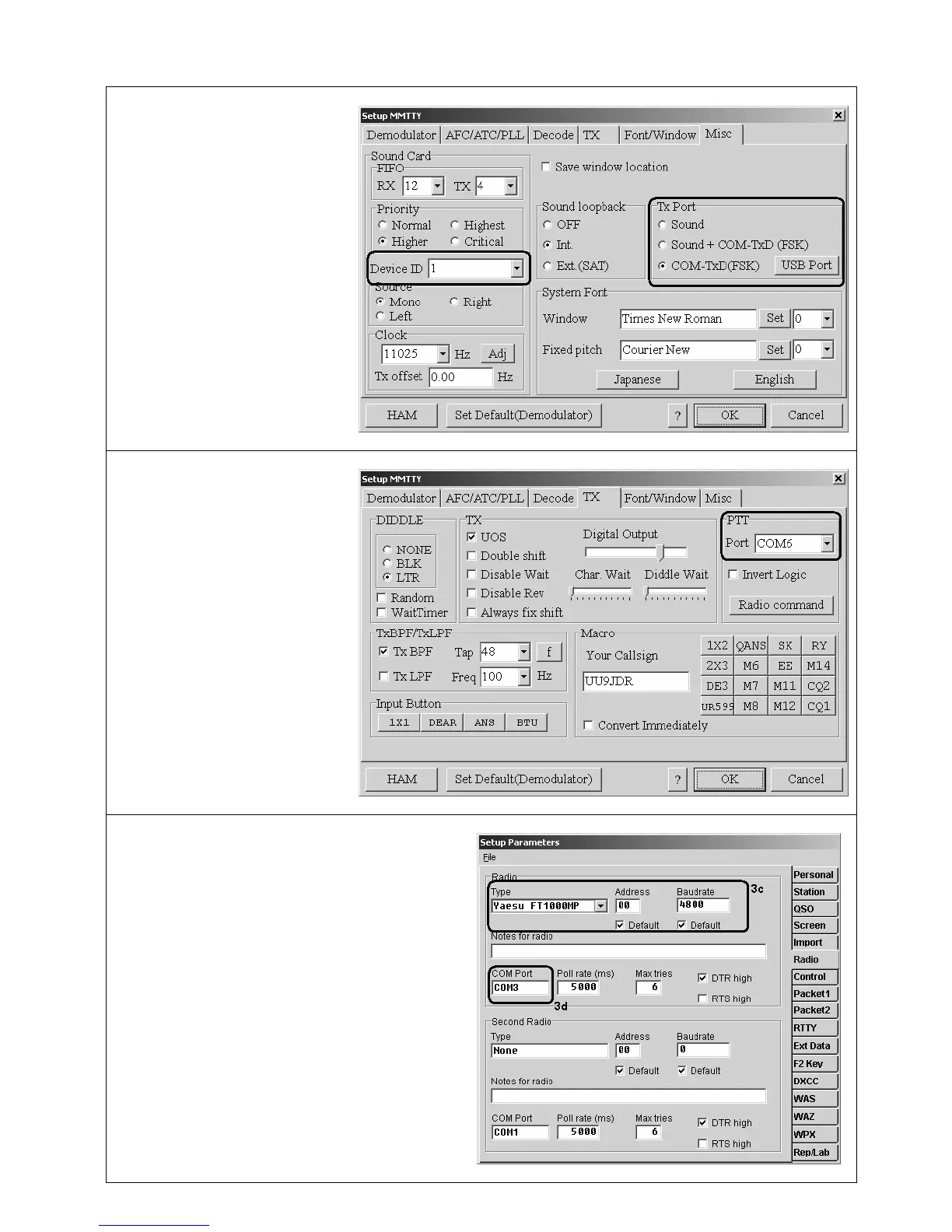
1. Perform audio in/out settings
1a. In MMTTY, go to Options –
Setup MMTTY menu.
1b. In the Setup MMTTY dialog,
select the Misc tab.
1c. Select Device ID to match the
RigExpert Standard sound card
(usually, 0 or 1).
1d. Select COM-TxD (FSK) as a
Tx Port. This setting will let
MMTTY transmit RTTY via the
FSK port.
If you prefer the soundcard mode
to be used instead of FSK, select
Sound in the Tx Port area.
2. Set up FSK port number
2a. In the Setup MMTTY dialog,
select the TX tab.
2b. Choose the Port in the PTT
area to match the RigExpert
Standard FSK Port (see the
driver configuration guide).
If using the soundcard mode (i.e.
not FSK), select PTT/CW port of
RigExpert Standard in the PTT
area.
3. Set up CAT system
3a. In the DX4WIN software, go to File –
Preferences menu.
3b. In the Setup Parameters dialog, open the Radio
tab.
3c. Select your transceiver Type and parameters
according to the transceiver manual.
3d. Select COM Port to match the RigExpert
Standard CAT Port (see the driver configuration
guide).
3e. Perform other settings according to the
DX4WIN manual, if needed.


 To Next Page