Setup instructions 7
There are several steps needed to get ready to operate using RigExpert Standard device:
1) Insure the RigExpert Standard is unplugged from both computer and transceiver.
2) Windows users: Insert the RigExpert Standard CD into your CD-ROM drive. If the CD
does not auto-start, run SetupRES from the CD. All necessary software will be copied on
your hard drive. Windows 98/ME, as well as Mac OS and Linux users will have to install
the drivers manually from the Drivers folder on the supplied CD.
3) Plug the RigExpert Standard device into the computer’s USB port using supplied USB cable.
4) Windows 98/Me users: When the Found New Hardware Wizard appears asking for
drivers, click Browse and select \Drivers\Win98ME on the CD as a driver files location.
See the following Driver Installation Guides for details, if needed. Repeat this step until
all components of RigExpert Standard are installed.
5) Set up the serial port numbers and parameters, according to the Driver Configuration
Guides, if needed.
6) Connect RigExpert Standard to your transceiver using the supplied transceiver cable.
Please turn off your transceiver while doing this. Perform this step carefully, since
incorrect cable connection may harm the RigExpert Standard device or your transceiver.
7) Set up MixW2, DigiPan or other soundcard software (see the following examples).
8) For additional info and troubleshooting, see the RigExpert Standard website:
www.rigexpert.ua.
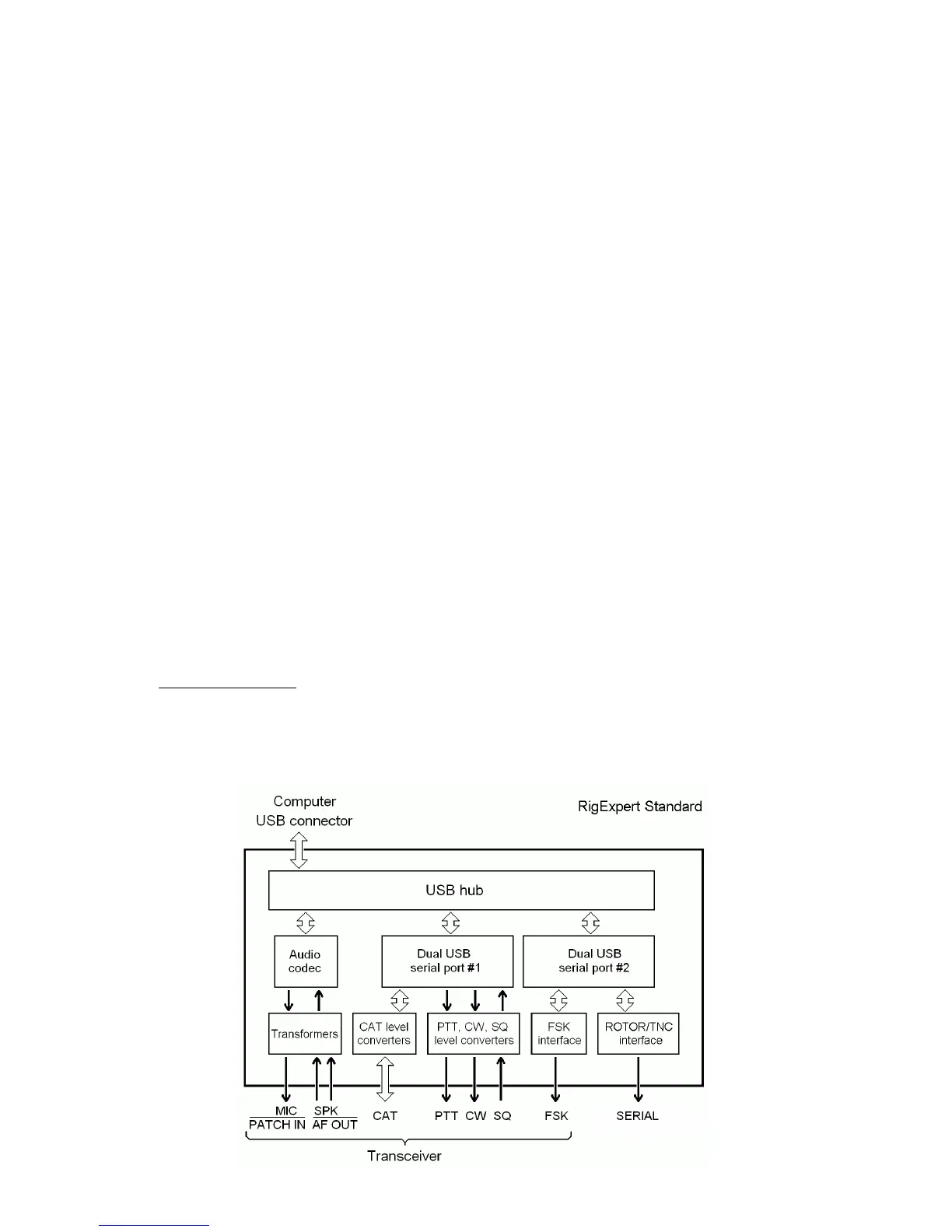
RigExpert Standard structure diagram


 To Next Page