Software setup example: EchoLink 16
This example describes the use of RigExpert Standard in Sysop mode. Please see the EchoLink manual for
additional information.
Please notice that RigExpert Standard cable diagrams do not show the connection between the transceiver’s
squelch output and pin 5 of the 25-pin connector on the back of RigExpert Standard. You will need to add
this connection if you want to use the transceiver’s squelch in EchoLink.
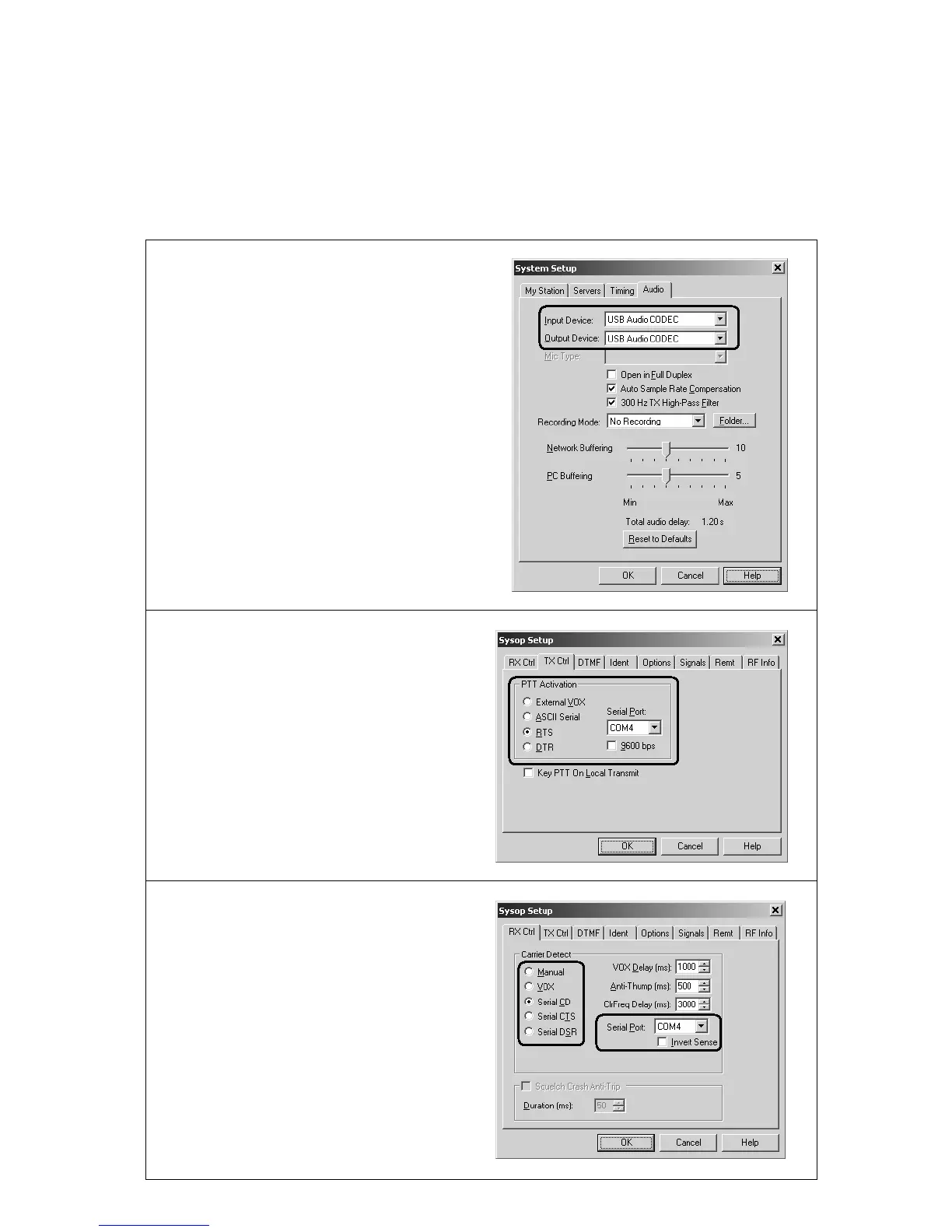
1. Open Audio tab in the System Setup
dialog.
Choose USB audio CODEC as input and
output devices.
2. Open Sysop Setup dialog and select
the TX Ctrl tab.
Select RTS in the PTT Activation area,
then select the Serial Port number to
match the RigExpert Standard PTT/CW
port (see the driver configuration guide).
3. Select the RX Ctrl tab. To use a
hardware carrier detect (squelch) feature,
select Serial CD in the Carrier Detect
area, then select Serial Port to match the
RigExpert Standard PTT/CW port (see
the driver configuration guide). You may
need to check the Invert Sense check-
box for some transceivers.
However, in some cases it is better to
check the VOX check-box not to use the
transceiver’s squelch.


 To Next Page