Appendix A 17
Changing audio input or output gain, FSK baudrate and other
jumper settings
In some cases, it is necessary to change audio input or output gain to satisfy transceiver
requirements, or perform other additional settings.
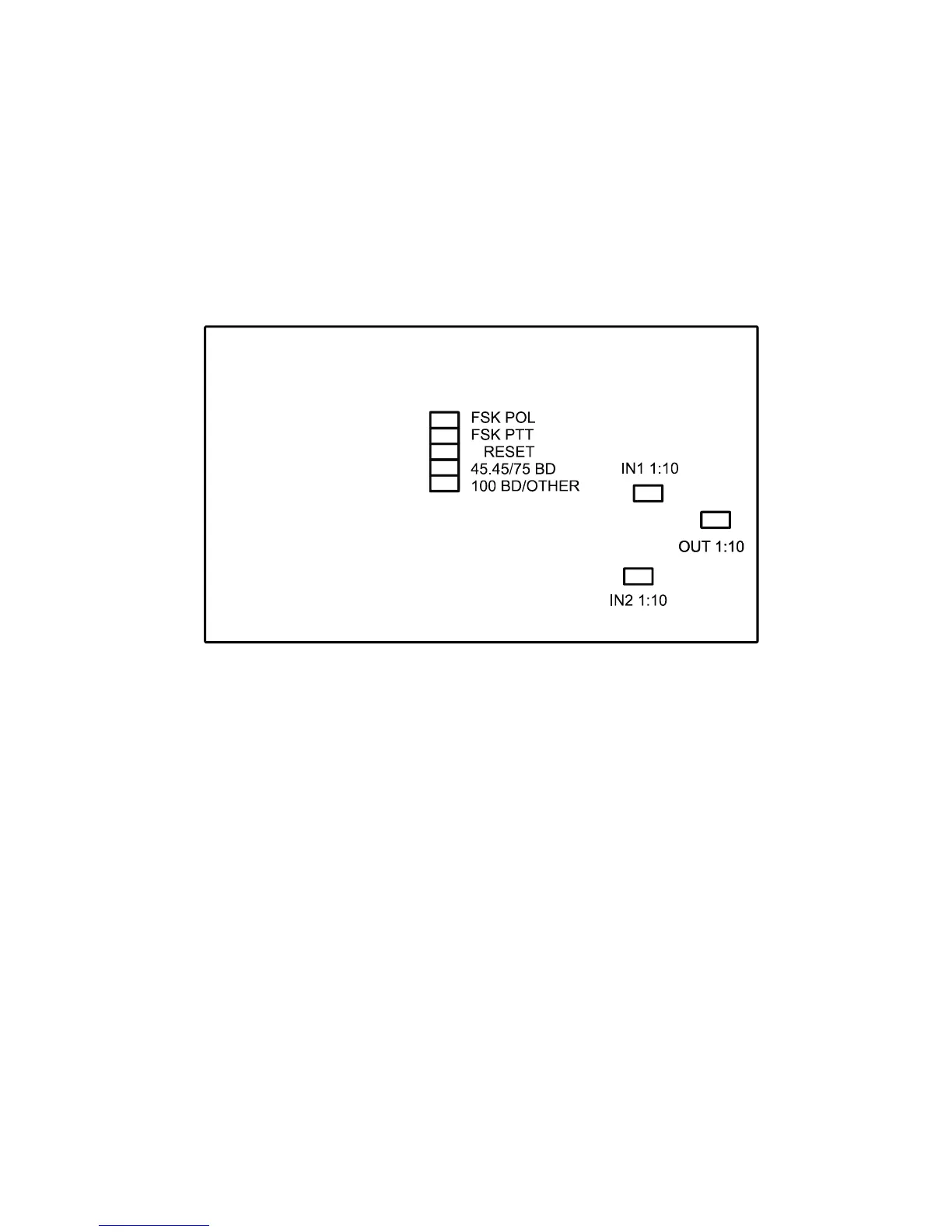
Open the RigExpert Standard box with a screwdriver. Find a corresponding jumper and
set it to a new position according to the following picture.
RigExpert Standard board
1. FSK POL. Open/close this jumper to change the output FSK signal polarity.
2. FSK PTT. Close this jumper if you want the transceiver PTT line be activated by
transmitting FSK.
3. RESET. Not used.
4. 45.45BD/75BD. Open this jumper to set the FSK baudrate to 75 baud. Close this
jumper to set the baudrate to 45.45 baud.
5. 100BD/OTHER. Close this jumper to set the FSK baudrate to 100 baud. Open this
jumper for other baudrate.
6. IN1 1:10. Channel 1 (main receiver) attenuator (1:10).
7. IN2 1:10. Channel 2 (sub receiver) attenuator (1:10).
8. OUT 1:10. Transmitter attenuator (1:10).
Factory defaults:
• FSK PTT is ON
• Receiver and transmitter attenuators are ON
• FSK baudrate is set to 45.45 baud


 To Next Page