66 KBP Series Manual
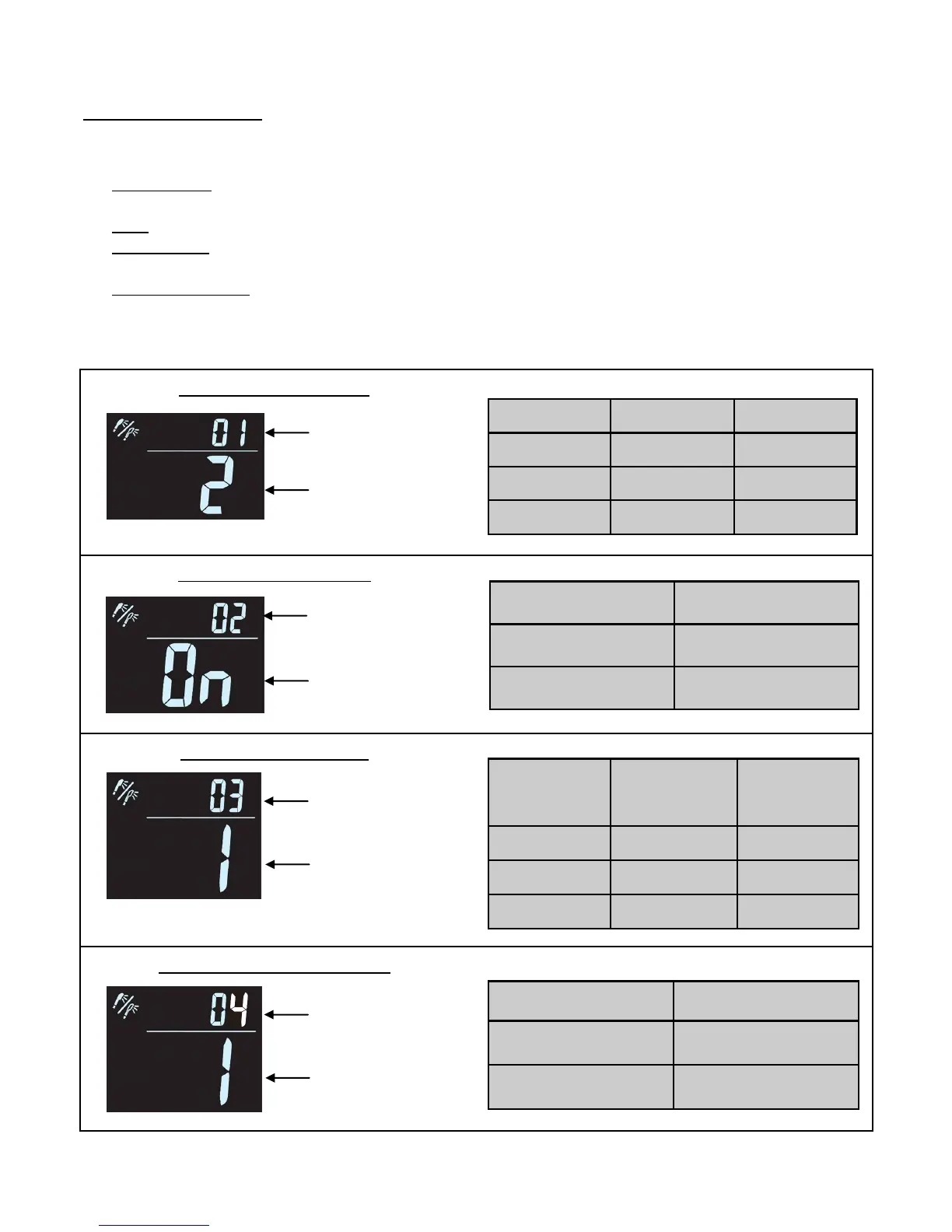
Pressing the “FUNCTION” while the controller is “ON” (with “TIMER” funcon deacvated ), will allow the user
to set following 4 funcons:
1. - Allows for conservaon of energy by dimming the display. Over me the display will go o
with only the green operaon light being on.
2. - Deacvates the Beep sound that would normally occur when a buon is pressed.
3. - Allows the user to choose if the clock funcon will be shown while the controller is “On” and/
or “OFF”.
4. - Allows the user to adjust the temperature scale between Fahrenheit and Celsius.
Each me “FUNCTION” is pressed the display will proceed to the next funcon. While in a funcon use the “UP”
and/or “DOWN” buons to select which mode the funcon is desired to be in.
Controller Funcons
Funcon 1. Power Saving
Funcon 2. Beep ON/OFF
Funcon 3. Clock Display
Funcon 4. Temperature Scale
Funcon Number
Mode
Mode Display O Time
1 Dim Aer 10 Min
2 Bright Aer 20 Min
OFF Bright Remains On
Mode
Controller
ON
Controller
OFF
1 Clock No Clock
2 Clock Clock
OFF No Clock No Clock
Mode Beep
ON Beep Acve
OFF Silence
Mode Temperature
1 °F
2 °C
Funcon Number
Mode
Funcon Number
Mode
Funcon Number
Mode



 To Next Page
 Loading...