5
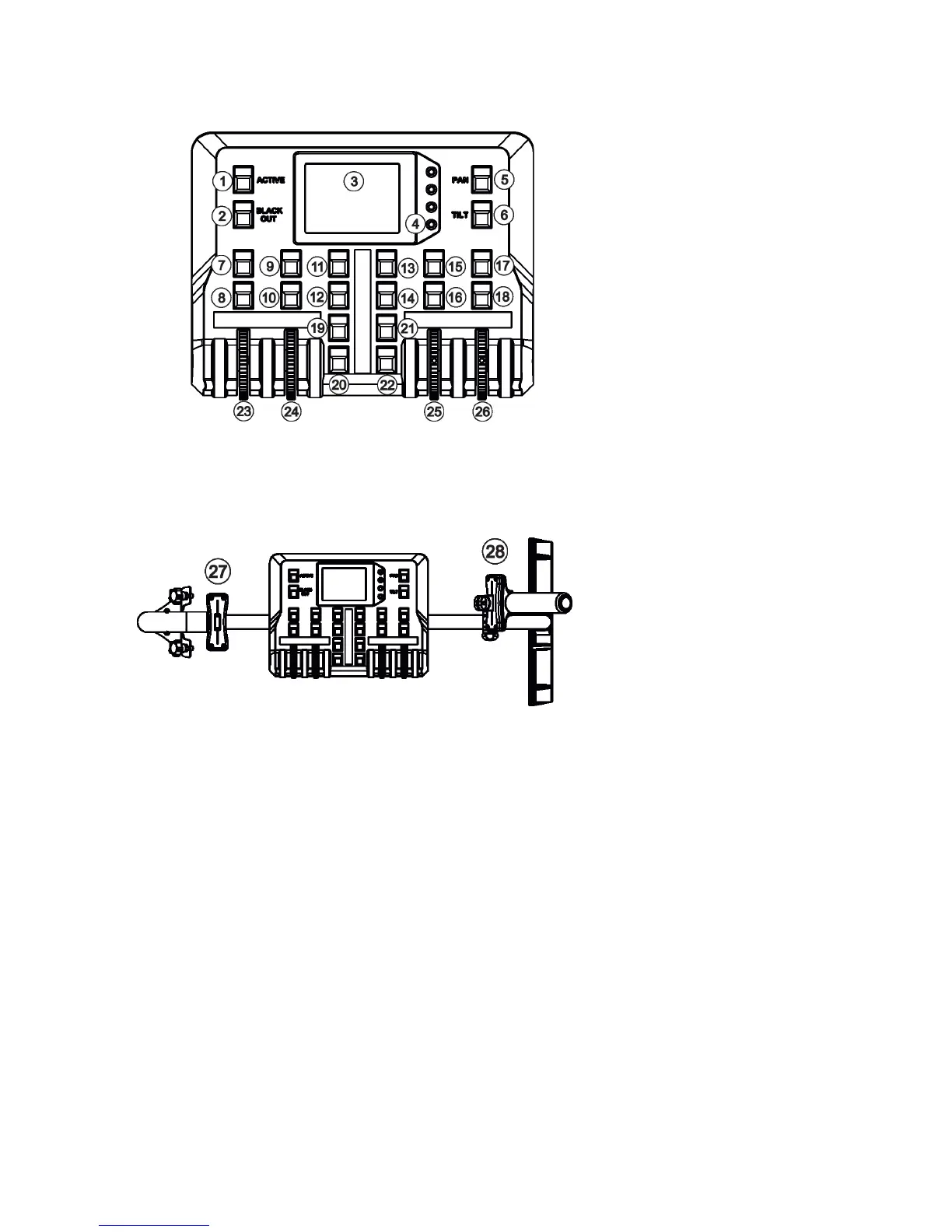
2.1 Control elements of the FollowSpot controller
1 - Active button (actives
the FollowSpot Controller)
2 - BlackOut button
3 - Graphic touch screen
4 - Switch On screen button
5 - Pan button(switches pan and tilt
motors from soft mode to
hard mode
6 - Tilt button(switches pan and tilt
motors from soft mode to
hard mode)
7 - Preset button
8 - Activating button for jog-wheel
(23)
9 - Preset button
10 - Activating button for rotary
jog-wheel (24)
11 - Preset button
12 - Preset button
13 - Preset button
14 - Preset button
15 - Preset button
16 - Activating button for
jog-wheel (25)
17 -Preset button
18 - Activating button for
jog-wheel (26)
19 - Preset button
20 - Preset button
21 - Preset button
22 - Preset button
23 - Jog-wheel
24 - Jog-wheel
25 - Jog-wheel
26 - Jog-wheel
27 - Left fader
28 - Right fader



 To Next Page