6
3. Installation
The Robin BMFL LightMaster has to be installed by a qualied worker on
the following xtures only: Robin BMFL FollowSpot, Robin BMFL Spot, Robin BMFL
Blade, Robin BMFL WashBeam.
Important!
Switch the Robin BMFL xture to the Follow Spot Mode (option Soft) before
installing the Robin BMFL LightMaster.
Robin BMFL LightMaster Side
1. Switch the BMFL xture to the Soft option of the Follow Spot Mode (Personality-->Follow Spot Mode -->Soft).
2. Disconnect the xture from mains and place it on a at surface (e.g. table). Move the head to a horizontal
position and lock the tilt movement.
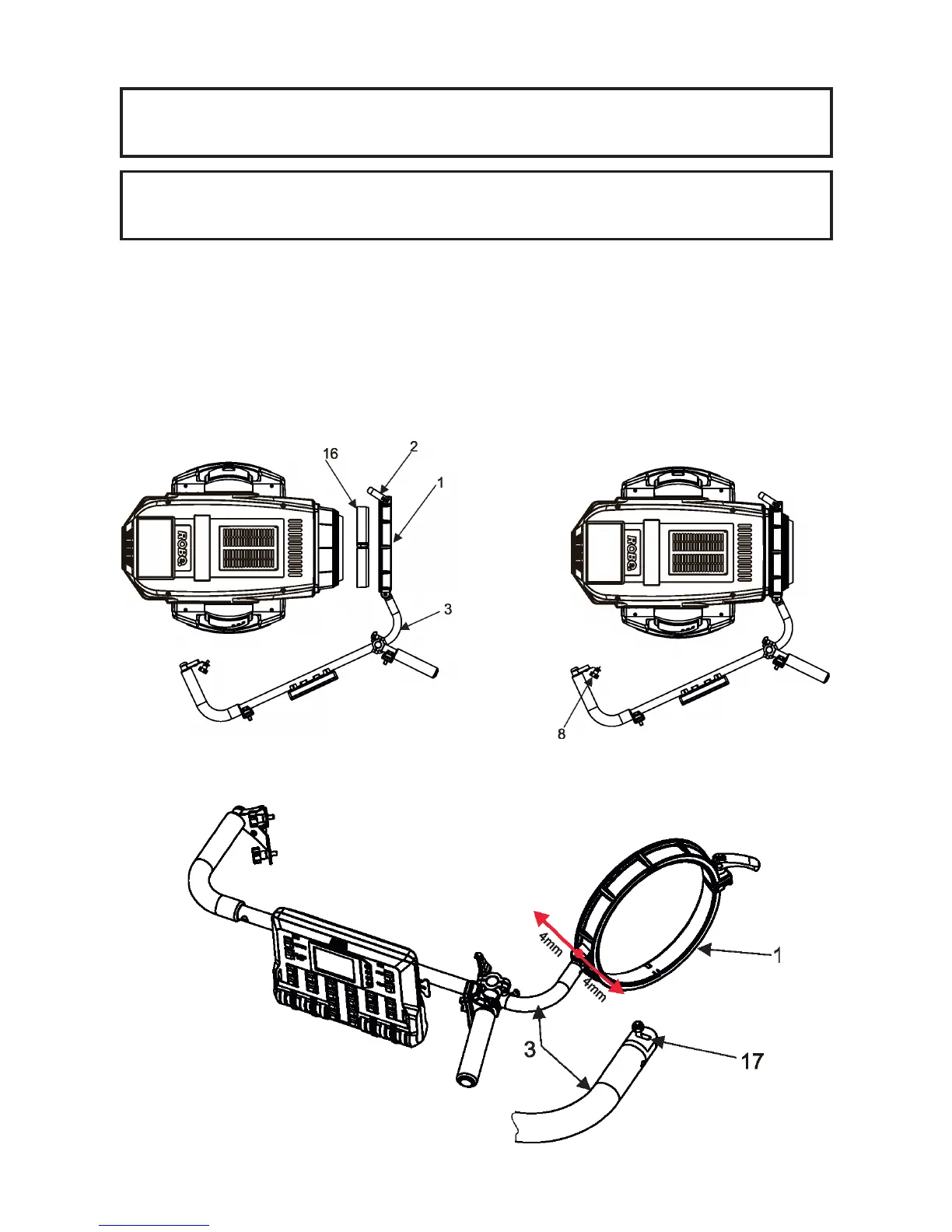
3. Place the collar (1) of the handle (2) on the front part of the xture head.
If you install the Robin BMFL LightMaster on the Robin BMFL WashBeam, remove the rubber ring (16) from
the collar (1).
4. Fasten the second side of the handle bar (2) to the head by means of two screws (8).
5. Secure the collar (1) on the head by means of the collar lock (2).
Note: There is a groove (17) in the handle bar (3). The groove allows movement of the collar (1) in the range of
8 mm in order to place the collar on the xture head correctly (especially on the BMFL Spot/FollowSpot head).



 To Next Page