12
4. Operation
After installing the ROBIN BMFL LightMaster on the xture and connecting with the xture via USB cable,
connect the xture to mains and leave it to perform resets (except pan/tilt reset).
After nishing resets, the xture is in the FollowSpot mode with pan/tilt motors in the Soft mode.
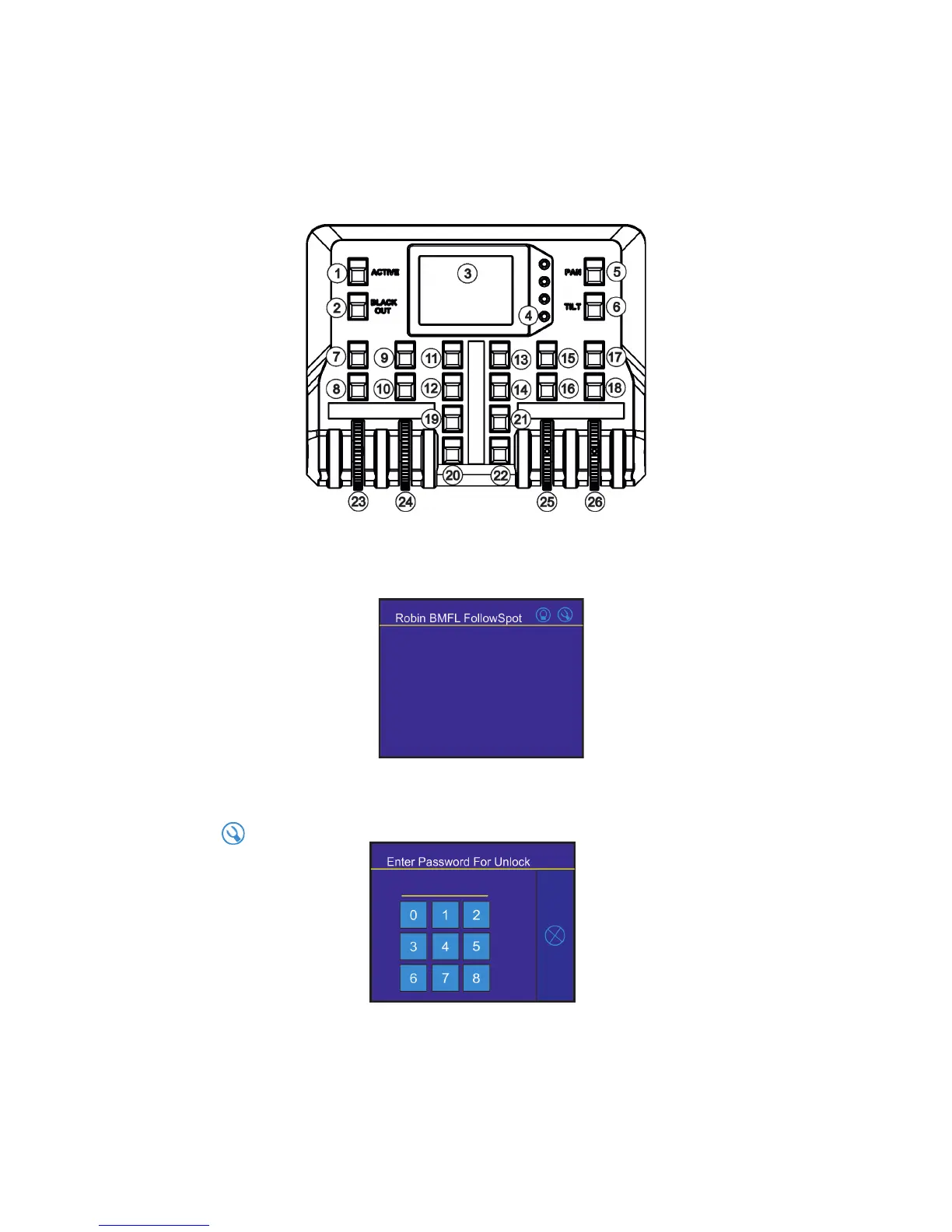
Press the button ACTIVE (1) in order to activate the FollowSpot Controller. By pressing either the PAN button
(5) or the TILT button (6) you will switch both pan and tilt motors of the xture to the Hard mode of the Follow-
Spot mode.
The button BLACK OUT (2) closes light output of the xture.
4.1 Functions mapping
After switching the xture on, the touch screen of the FollowSpot Controller shows the initial screen:
Note: the massage "Waiting for controller" means the FollowSpot Controller is not connected with the xture
via USB cable.
Touch the icon to display the password entering screen:
Enter the password (default password is 5242) to enter the main menu of the FollowSpot Controller. The pass-
word prevents unauthorized person from changing setting of the FollowSpot Controller.
Enter the menu "Functions Mapping". The list of available eects will appear:
If the message" Please Activate FollowSpot Controller!" will appear, press the ACTIVE button (1) on the Follow
Spot Controller.



 To Next Page