9
Manual tuning - DAB
Manual tuning allows you to tune your radio to a particular DAB frequency
in Band III. Any new stations found will be added to the station list. This
function can also be used to assist the positioning of the aerial or the radio
WRRSWLPLVHUHFHSWLRQIRUDVSHFL¿FFKDQQHORUIUHTXHQF\
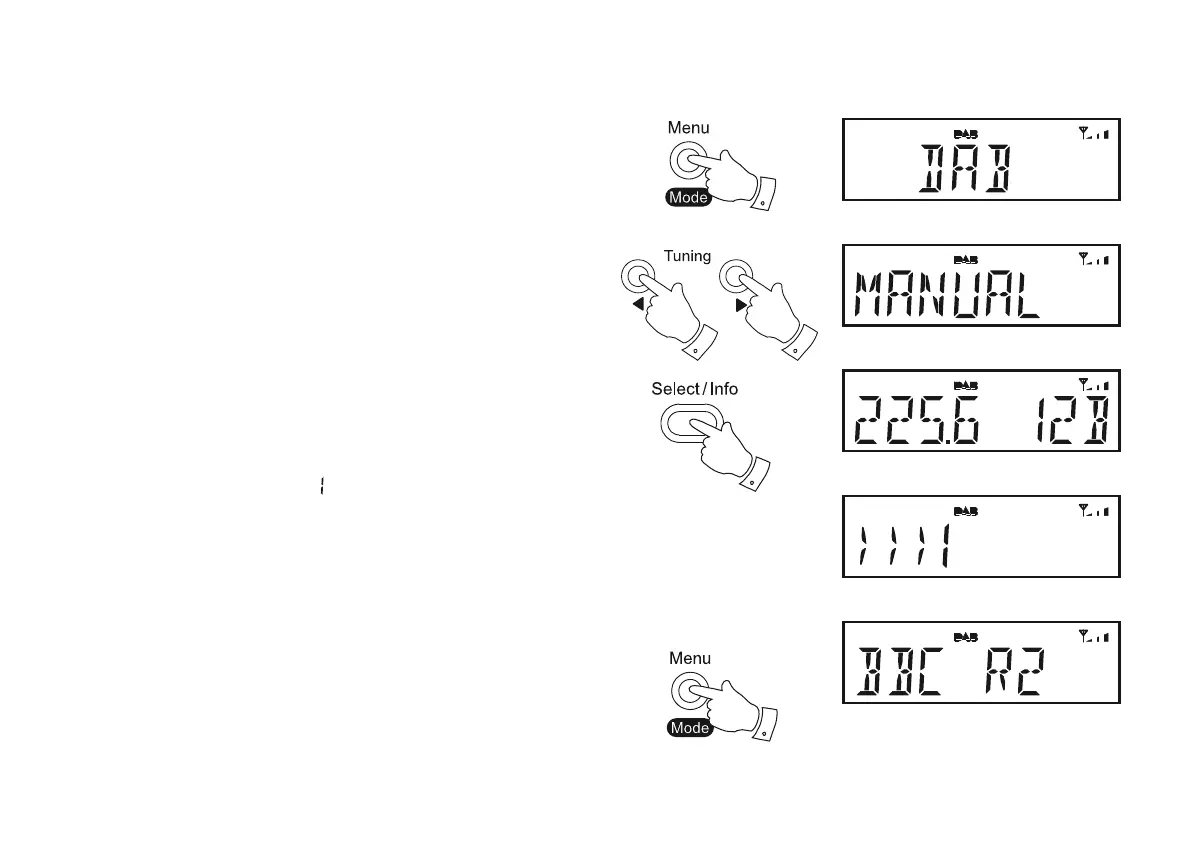
1. If you are listening in FM mode, give a long press on the Menu/Mode
button until the 'DAB' mode is selected.
2. Press the Menu/Mode button. The DAB menu will show on the display.
3. Press the Tuning Up or Down buttons until the display shows 'MANUAL'.
Press the Select button to enter the manual tune mode.
4. Press the Tuning Up or Down buttons to select the desired DAB
channel. Press the Select button to tune to the chosen frequency.
5. If a signal is present, this will be indicated on a signal strength display.
The minimum signal marker (
) shows the minimum signal strength
needed for good DAB reception. The signal indicator chevrons increase
or decrease showing the changing signal strength as you adjust the
aerial or your radio position.
6. When a DAB signal is found, as shown by the signal indicator chevrons,
any new radio stations found with this signal will be added to the list
stored in the radio.
7. Press the Menu/Mode button to be able to manually tune to a different
frequency. Alternatively, press the Menu/Mode button a second time
in order to return to the normal playing mode.
3,4
1,2
3,4
3,4
7













 To Next Page