10
Dynamic Range Control (DRC) settings - DAB
The DRC facillity can make quieter sounds easier to hear when your radio
is used in a noisy environment.
1. Press the On/Off button to switch on your radio.
2. If you are listening in FM mode, give a long press on the Menu/Mode
button until the 'DAB' mode is selected.
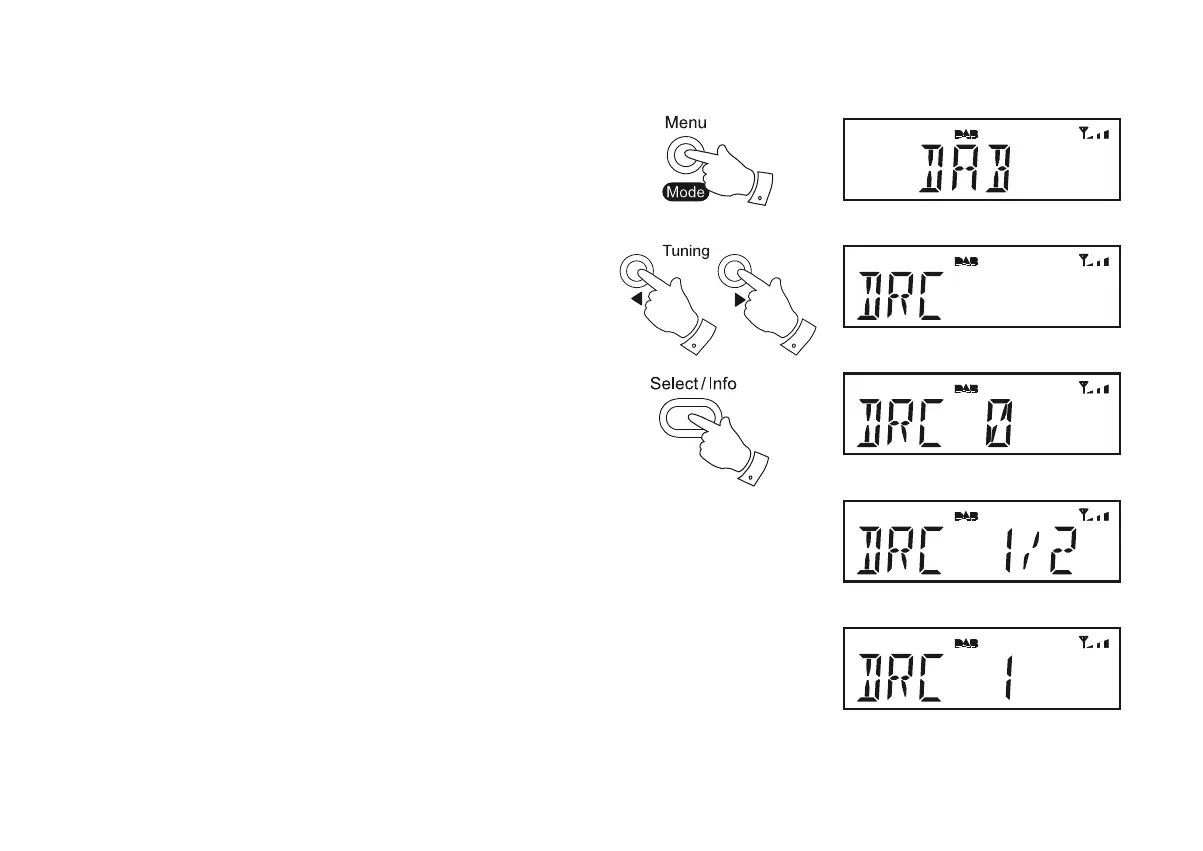
3. Press the Menu/Mode button. The DAB menu will show on the display.
4. Press the Tuning Up or Down buttons until 'DRC' shows on the display.
5. Press the Select button to enter adjustment mode.
6. Press the Tuning Up or Down buttons to select the required DRC setting
(default is 0).
DRC 0 DRC is switched off, Broadcast DRC will be ignored.
DRC 1/2 DRC level is set to 1/2 that sent by broadcaster.
DRC 1 DRC is set as sent by broadcaster.
7. Press the Select EXWWRQWRFRQ¿UPWKHVHWWLQJ7KHGLVSOD\ZLOOUHWXUQ
to the station name display after several seconds.
Note: Not all DAB broadcasts use the DRC function. If the broadcast
does not provide DRC information, then the DRC setting in the radio will
have no effect.
4,6
2,3
4,6
5,7













 To Next Page