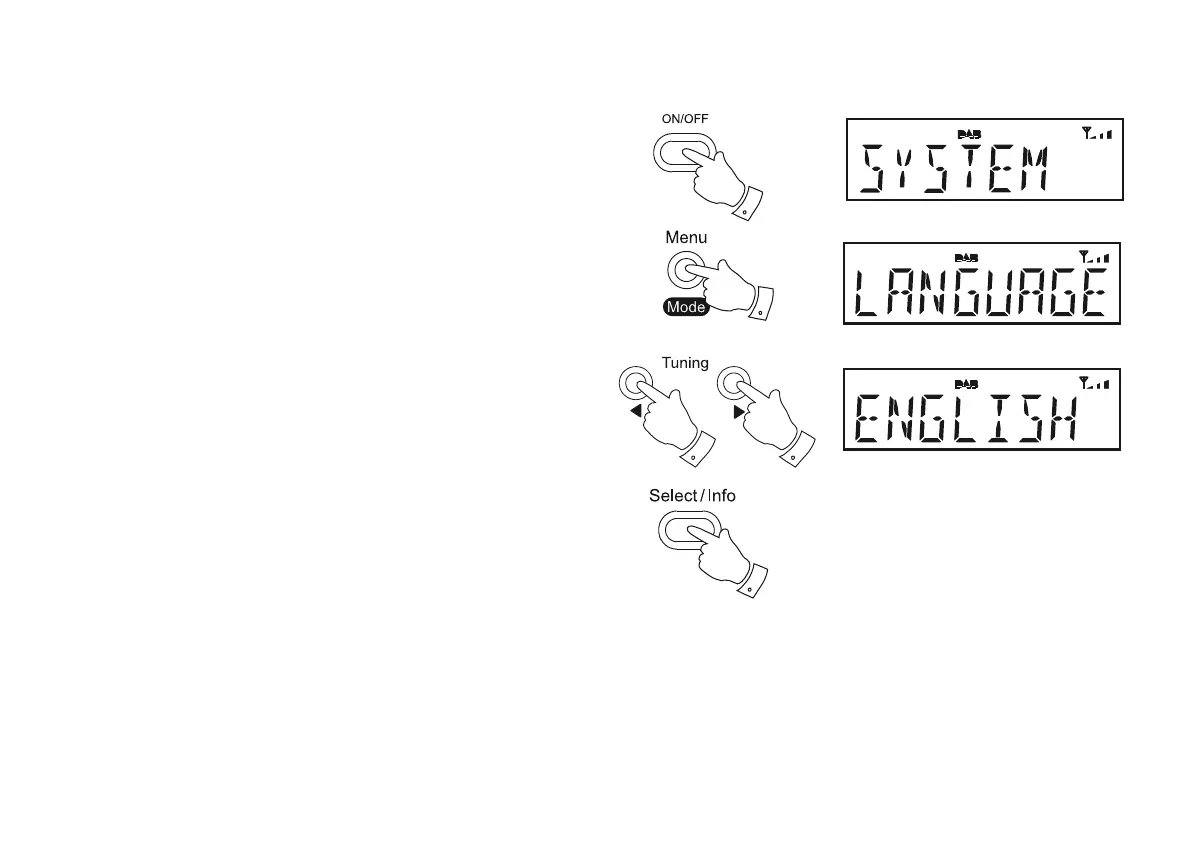
Language function
<RXUUDGLRVPHQXVFDQEHFRQ¿JXUHGWRDGLIIHUHQWODQJXDJH
1. Press the On/Off button to switch on the radio.
2. Press the Menu/Mode button. The main menu will show on the display.
3. Press the Tuning Up or Down buttons until 'SYSTEM' appears on
the display. Press the Select button.
4. Press the Tuning Up or Down buttons until 'LANGUAGE' appears on
the display. Press the Select button to enter the language adjustment
menu.
5. Press the Tuning Up or Down buttons until your desired language
appears on the display.
6. Press the Select EXWWRQWRFRQ¿UP\RXUFKRLFH7KHGLVSOD\ZLOOFKDQJH
to the chosen language.
7. Press the Menu/Mode button as needed to exit.
19
1
3-5
2,7
3-5
3-6













 To Next Page