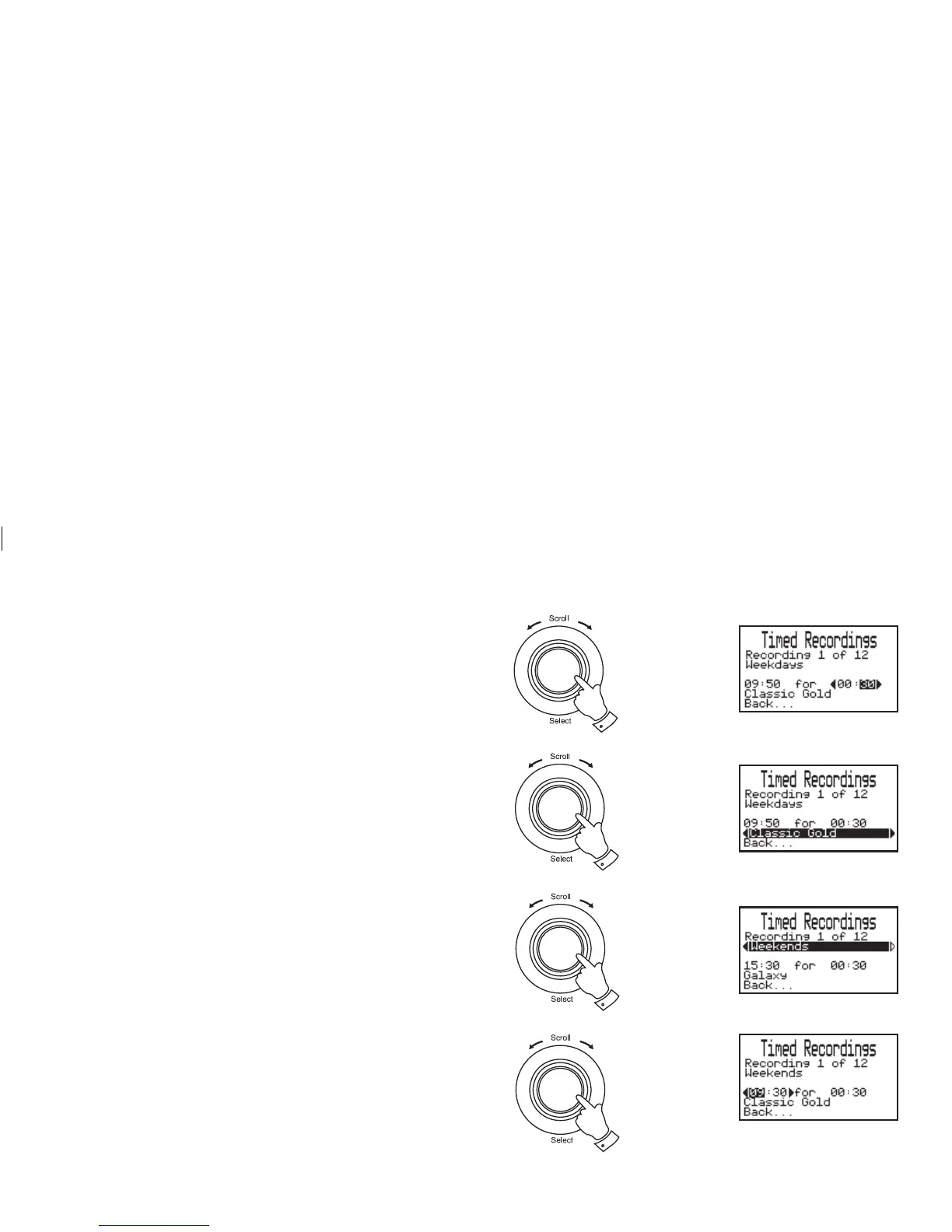
8. Rotate the Tuning/Select control until the duration minute digits
are highlighted on the display. Press and release the Tuning/Select
control.
9. Rotate the Tuning/Select control to select the required minute.
Press and release the Tuning/Select control.
10. Rotate the Tuning/Select control until the station is highlighted
on the display. Press and release the Tuning/Select control.
11. Rotate the Tuning/Select control to select the required station.
Press and release the Tuning/Select control.
12. Press the Menu/Back button or select the "Back..." option to exit
back a menu or screen.
Timer set to weekends
1. Rotate the Tuning/Select control until "Weekends" is highlighted
on the display. Press and release the Tuning/Select control.
2. Rotate the Tuning/Select control until the hour digits are
highlighted on the display. Press and release the Tuning/Select
control.
3. Rotate the Tuning/Select control to select the hour digits . Press
and release the Tuning/Select control.
8,9
1
2,3
10,11
25
continued on next page














 To Next Page