1615
Chapter 4 Android Device setting
4. 1 Download and install Android APP
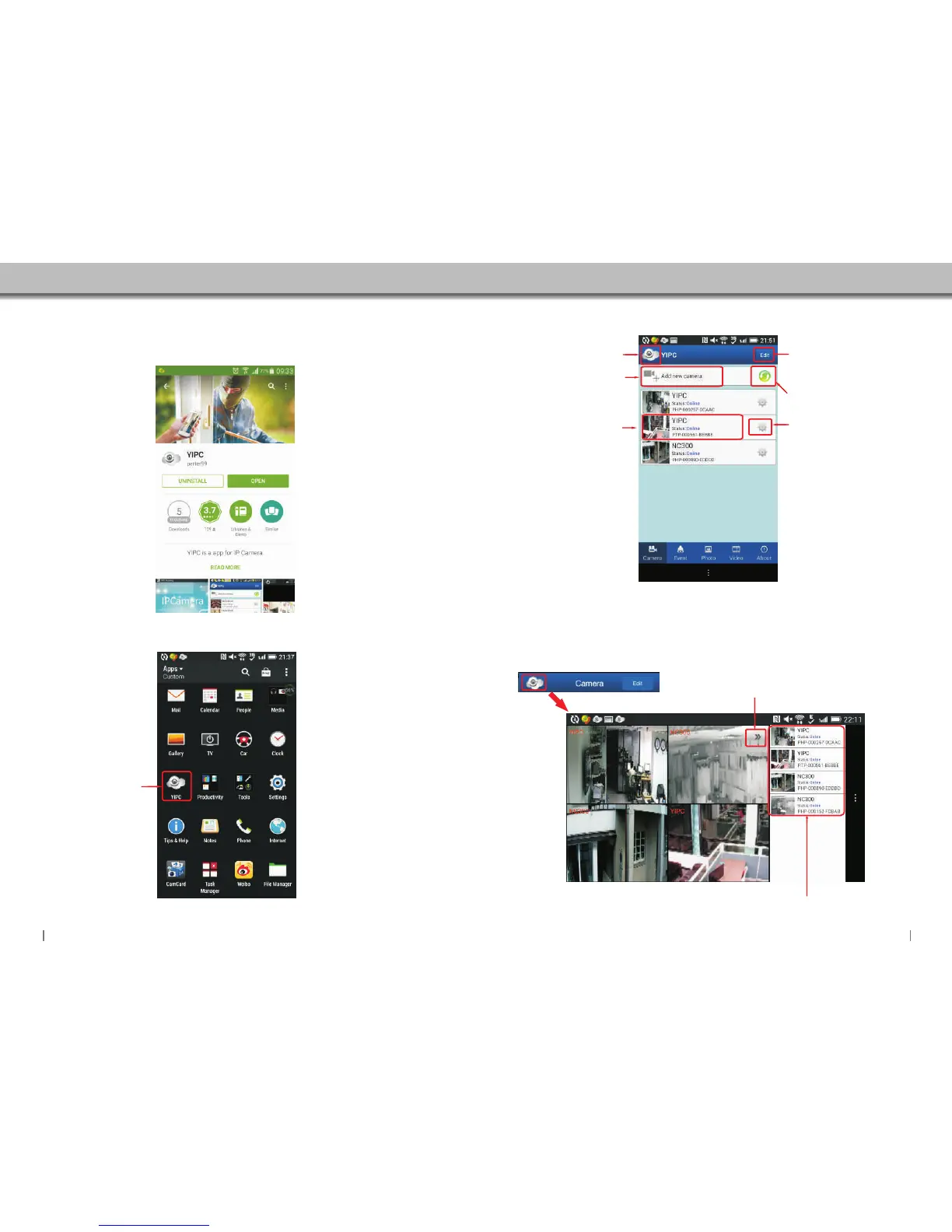
Enter the google play, search download “YIPC”.and install
4. 2 APP Features introduction
Click here to run APP
4 camera viewing mode.
Click the camera list to view real-time video monitoring.
You can add maximum of 4 cameras to the viewing mode.
Click here to get full screen display
Click here to add new camera.
Click here to initialize the camera.
1 2 3
4
5
1.Camera:Click this icon to
return to main menu list.
3.Photo:To check the recorded
photos.
2.Event:Displays alarm logs.
Click the icon of <4 cameras viewing mode> enter 4 cameras viewing mode.
Click here to enter Real-time
video monitoring screen.
Edit the camera which is on the
camera
list,you can delete the
camera from the camera list or
re-enter the password or user
name when it says Invalid user
or password.
Click to access camera settings
interface.
4.Video:To check the video
recordings.
5.Information about the
applications.


 To Next Page