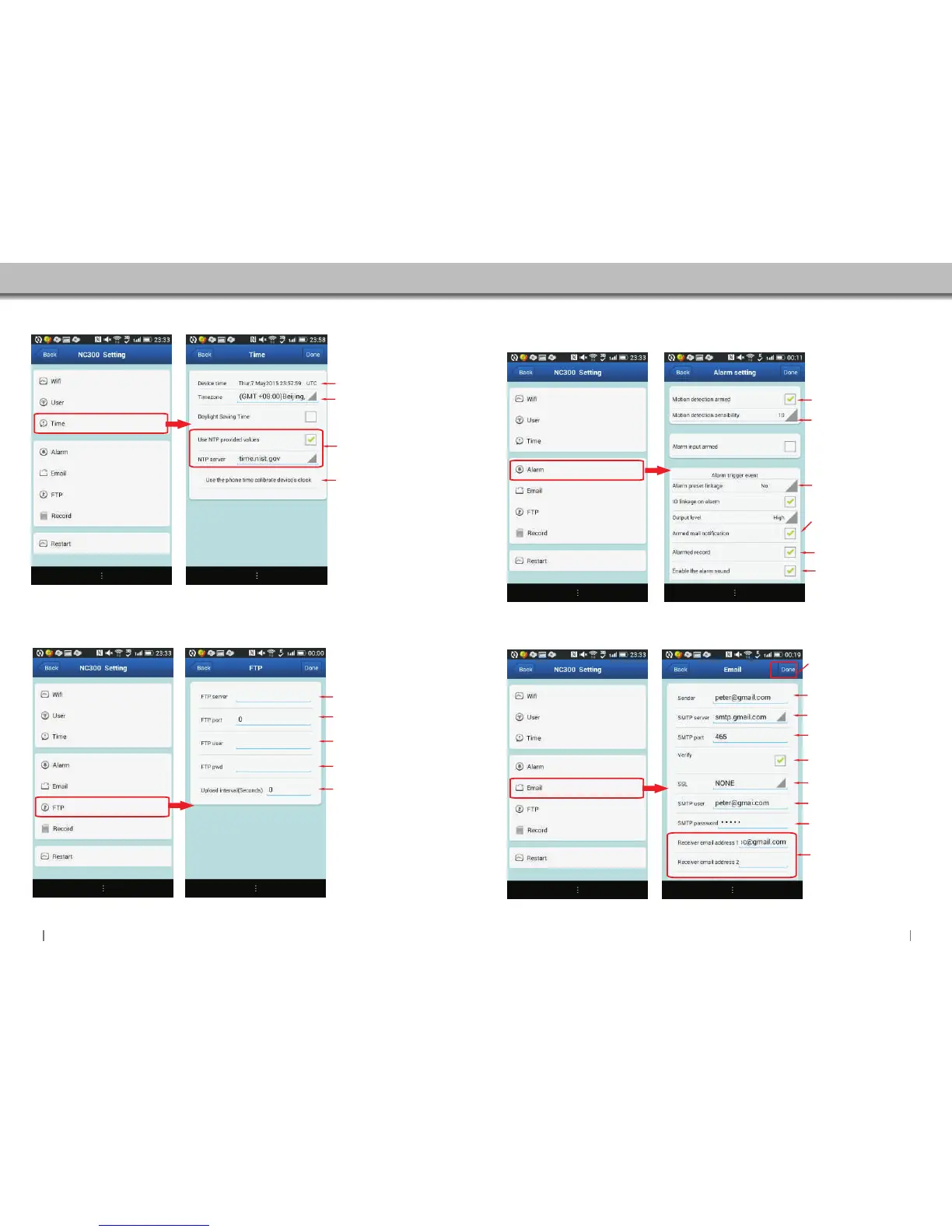
4.5.3 Time Setting
Click to access Time settings.
4.5.4 FTP Setting
Click to access FTP settings.
Displays the actual
time of the camera.
Select the TimeZone.
NTP Time values setting,
camera will get the time
value from the server
once settings are done.
Sync the camera's time
to your phone.
Input FTP Server adress.
Input FTP port.
Input FTP user name.
Setting upload Interval.
Input FTP password.
4.5.6 Email Setting
Click to access Email settings.
4.5.5 Alarm Setting
Click to access Alarm settings.
The sensibility setting.
the bigger number, the
higher the sensibility.
Enable:Camera will send
email notification when
alarm is activated.
Enable:Camera will start
to record automatically.
Enable/Disable alarm
sound.
Enable/Disable motion
detection setting.
When the alarm is enable.
you have the option of 16
presets in total.
Input the email that you want to
send alarm notification.
Input the SMTP server of
your sender’s email.or click
the icon to choose a server.
Input the SMTP port of your
sender email
Enable
Input the sender’s email again.
Select your email protocol.
Input the password of your
sender’s email.
You can set up to 4 email
receivers in total.
Click “Done”to store and enable
all settings at the end.
Click “Done”to store and
enable all settings.
2221


 To Next Page