07
3.3 Add Camera
on the same network
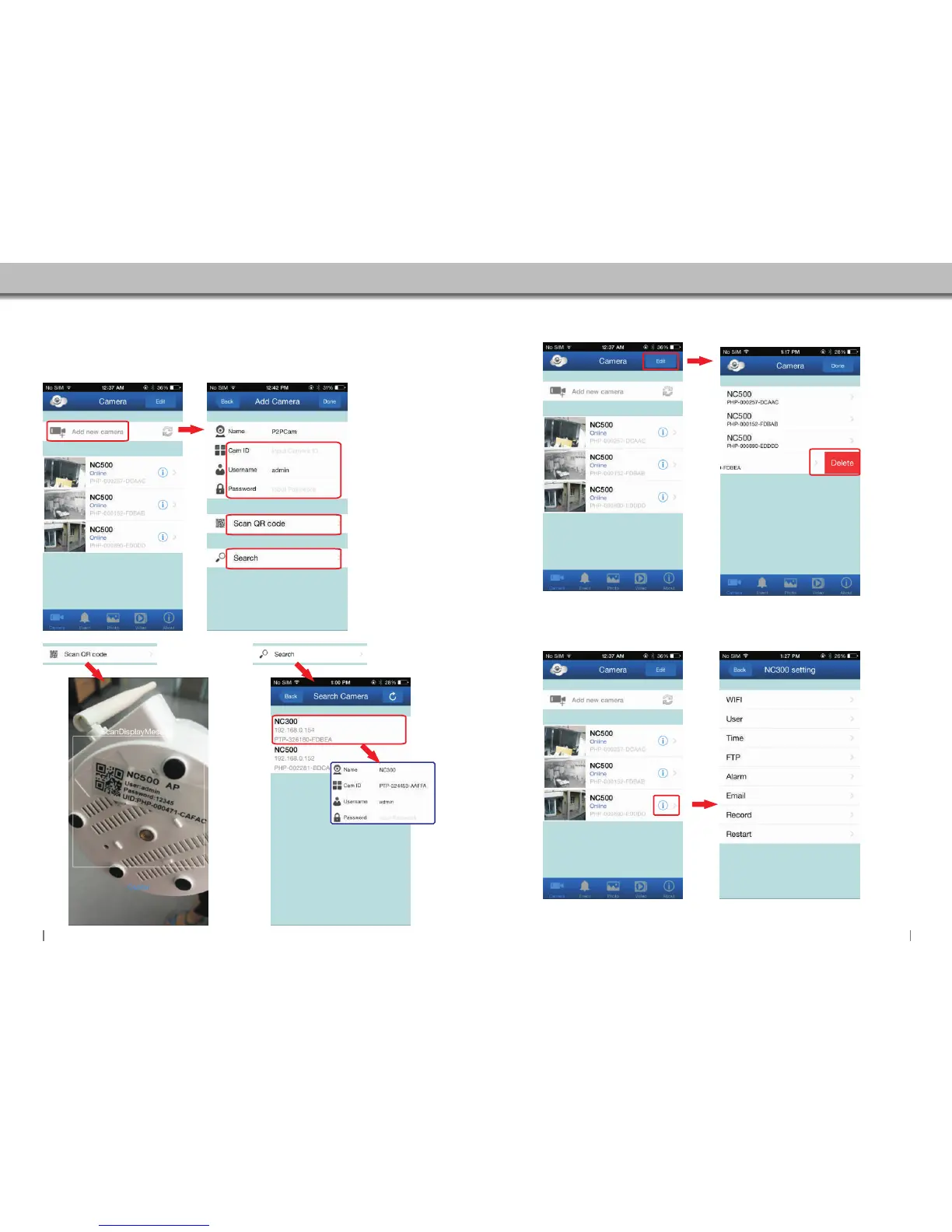
There are 3 methods to add cameras:
Method 1 - Input the UID username and password directly.
Method 2 - Scan QR Code.
Method 3 - Search camera .
Method 1: Enter the UID
Username and password
directly.
3.4 Delete Camera
Click here to add new camera
Method 2: Scan QR code
to add Camera.
(Figure 3.31)
Method 3:Search camera
on the same network.
(Figure 3.32)
Scan QR code to add Camera.
Figure 3.31
Figure 3.32
Note:The camera and your
iphone have to be on the same
network.
Select the camera that you
want.Then enter the usename
and password.
Click here to edit camera settings
Swipe the arrow to the left to
expose the delete button.
Then click to delete the camera.
3.5 Camera Setting
Click to access camera settings.
08


 To Next Page