11
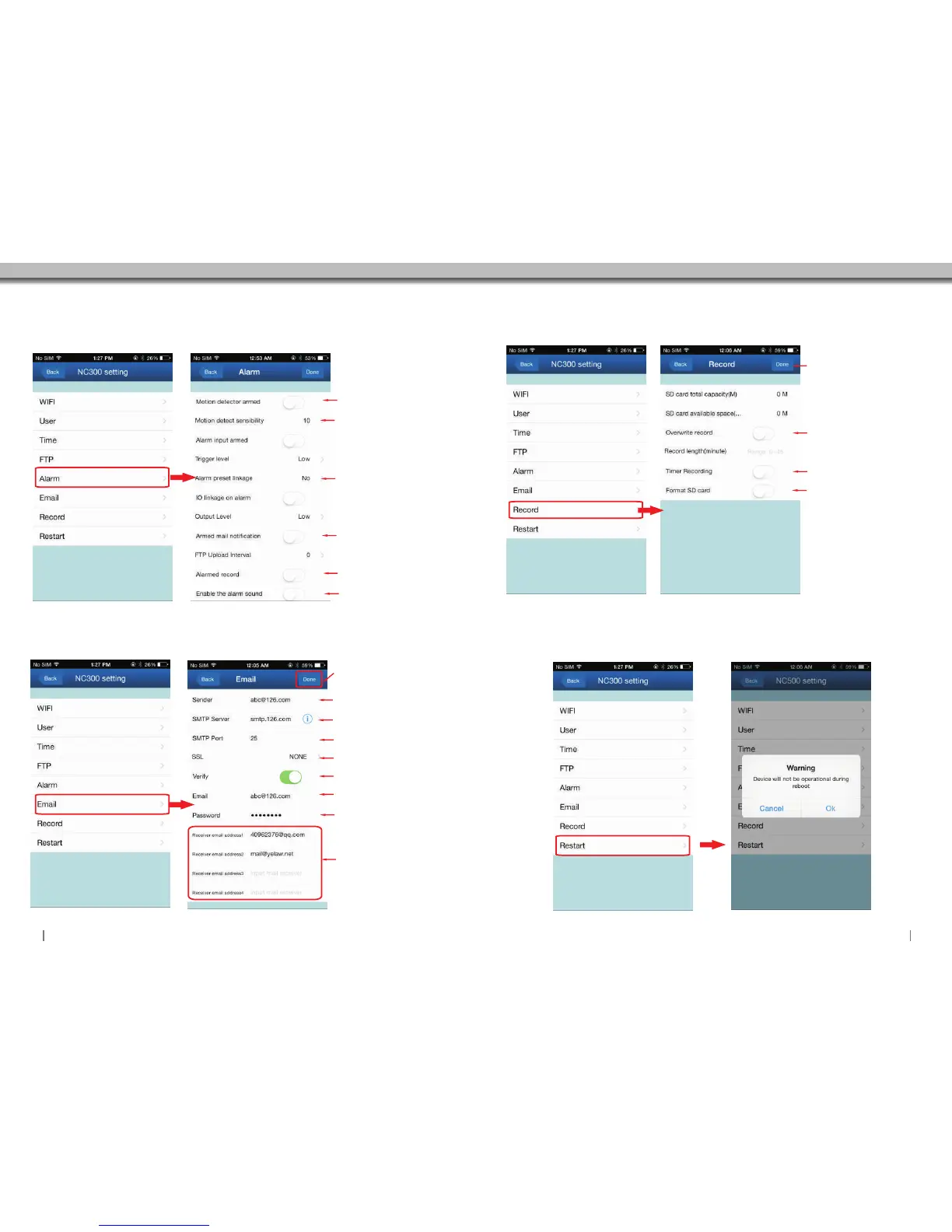
3.5.6 Email Setting
Click to access Email settings.
3.5.7 Record Setting
Click to access Recording settings.
3.5.8 Reboot
Click to Reboot Camera.
3.5.5 Alarm Setting
Click to access Alarm settings.
The sensibility setting.
The bigger number, the
higher the sensibility.
Enable:Camera will send
email notification when
alarm is actived.
Enable:Camera will start
to record automatically.
Enable/Disable alarm
sound.
Enable/Disable motion
detection setting.
When the alarm is enable.
you have the option of 16
presets in total.
Input the email that you want to
send alarm notifications to.
Input the SMTP server of
your sender’s email.or click
the icon to choose a server.
Input the SMTP port of your
sender email.
Enable
Select your email protocol.
Input the sender’s email again.
Input the password of your
sender’s email.
You can set up to 4 email
receivers in total.
Click “Done”to store and enable
all settings at the end.
Click “Done”to store and
enable all settings.
Enable:SD Card recordings will
be overwritten when SD Card's
capacity is full.
(SD card not included)
Start time and end time can be
set on your camera.This mode
will automatically record on
those set times.
It's better to format the SD Card
before recording.
12
Click “Done”to store and
enable all settings.


 To Next Page