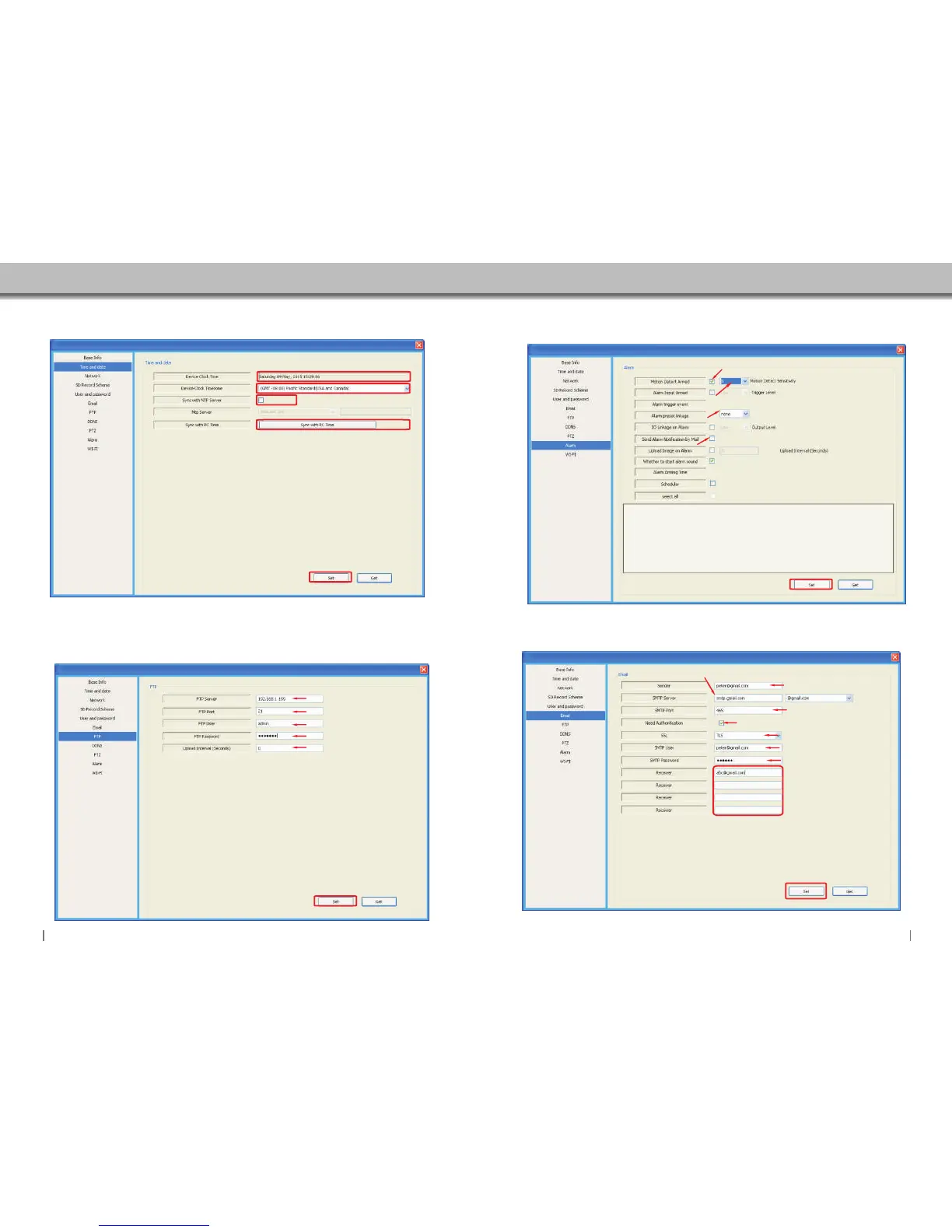
5.5.3 Time Setting
1. Displays the recent time of the camera.
2. Select the TimeZone.
3. NTP Time values settings,camera will get the time
value from the server once settings done.
4. Sync the camera's time to your phone.
1
2
3
4
Click “Set” to store and enable all settings.
5.5.4 FTP Setting
Input FTP Server adress.
Input FTP port.
Input FTP user name.
Setting upload Interval.
Input FTP password.
Click “Set” to store and enable all settings.
5.5.5 Alarm Setting
Sensibility set,the bigger number,the higher sensibility.
Enable:Camera will send email notification when alarm is actived.
Enable/Disable motion detection
When the alarm is enable.you have the option of 16 presets in total.
Click “Set”to store and enable all settings at the end.
5.5.6 Email Setting
Input the email that you want to
send alarm notifications to.
Input the SMTP server of your sender’s email.
or click the icon to choose server.
Input the SMTP port of your
sender email
Enable
Select your email protocol.
Input the sender’s email again.
Input the password of your
sender’s email.
You can set up to 4 email
receivers in total.
Click “Set”to store and enable all settings at the end.
3231


 To Next Page