25
R9V
5.4.4 Change the Temperature
of the Service Boiler
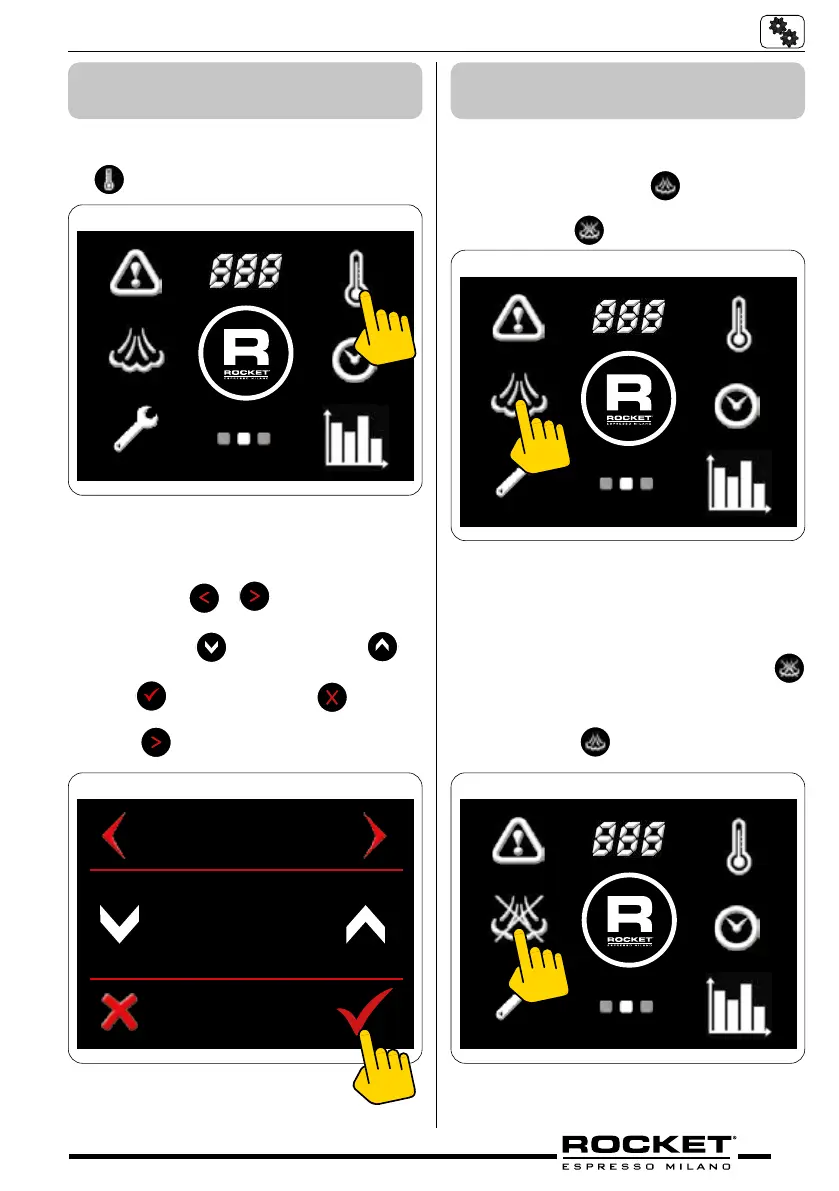
Screen 2 - Temperature Symbol
■ Go to the second screen menu and press
symbol
g_5.15
Steam Temp adjust screen
■ Press either
or to navigate through
to the steam temp screen.
■ Press either
to decrease or to
increase the service boiler temperature.
■ Press
to conrm or press to cancel
and return to home screen. Alternatively
press
to scroll to the next setting.
STEAM TEMP
123° C
g_5.16
5.4.5 Switch Service Boiler
On/Off
Screen 2 - Steam On
■ Go to the second screen menu
■ Press the symbol
to turn it off.
Steam symbol with a cross through it
will appear
g_5.17
Screen 2 - Steam O
■ To turn the service boiler on press
symbol.
The steam symbol without a cross through
it will appear
g_5.18


 To Next Page