26
R9V
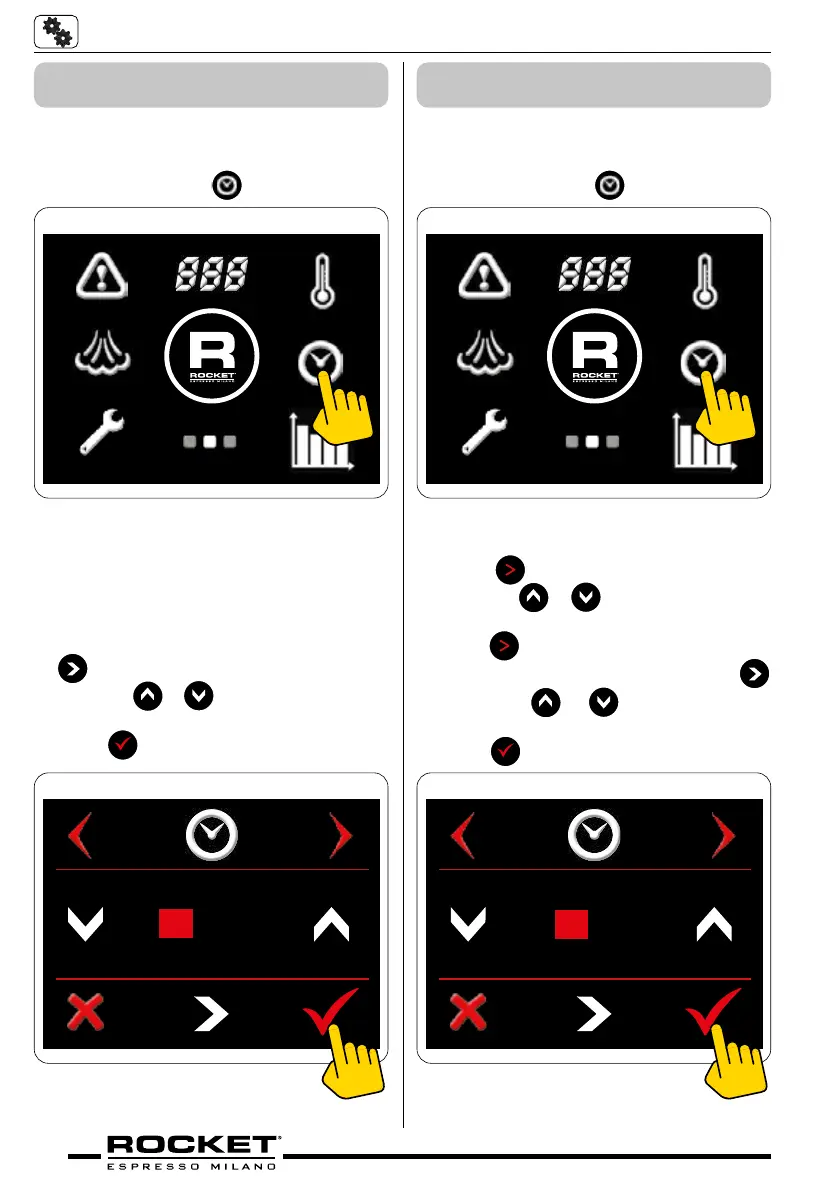
5.4.6 Setting the Date
Screen 2 - Clock
■ Go to the second screen menu
■ Press the symbol
g_5.19
Date adjust screen
■ To scroll between year/month/day press
.
■ Press the
or arrows to change year/
month/day.
■ Press
to save.
20 20 OCT 13
g_5.20
5.4.7 Setting the Day and Time
Screen 2 - Clock
■ Go to the second screen menu
■ Press the symbol
g_5.21
Time adjust screen
■ Press
to select day.
■ Press the
or arrows to change day
if necessary.
■ Press
to select time adjustment screen
■ To scroll between hours/minutes press
■ Press the or arrows to change
hours/minutes.
■ Press
to save.
10 : 50
g_5.22


 To Next Page