27
R9V
5.5
How to program auto ON/OFF
Each day the machine can be programmed
to turn on and o twice.
For example:
■ T1 – the machine turns on at 6.30am and
turns o at 10.30am
■ T2 – the machine turns on at 5pm and turns
o at 11pm
To programme your machine follow the
instructions listed below in sequential order.
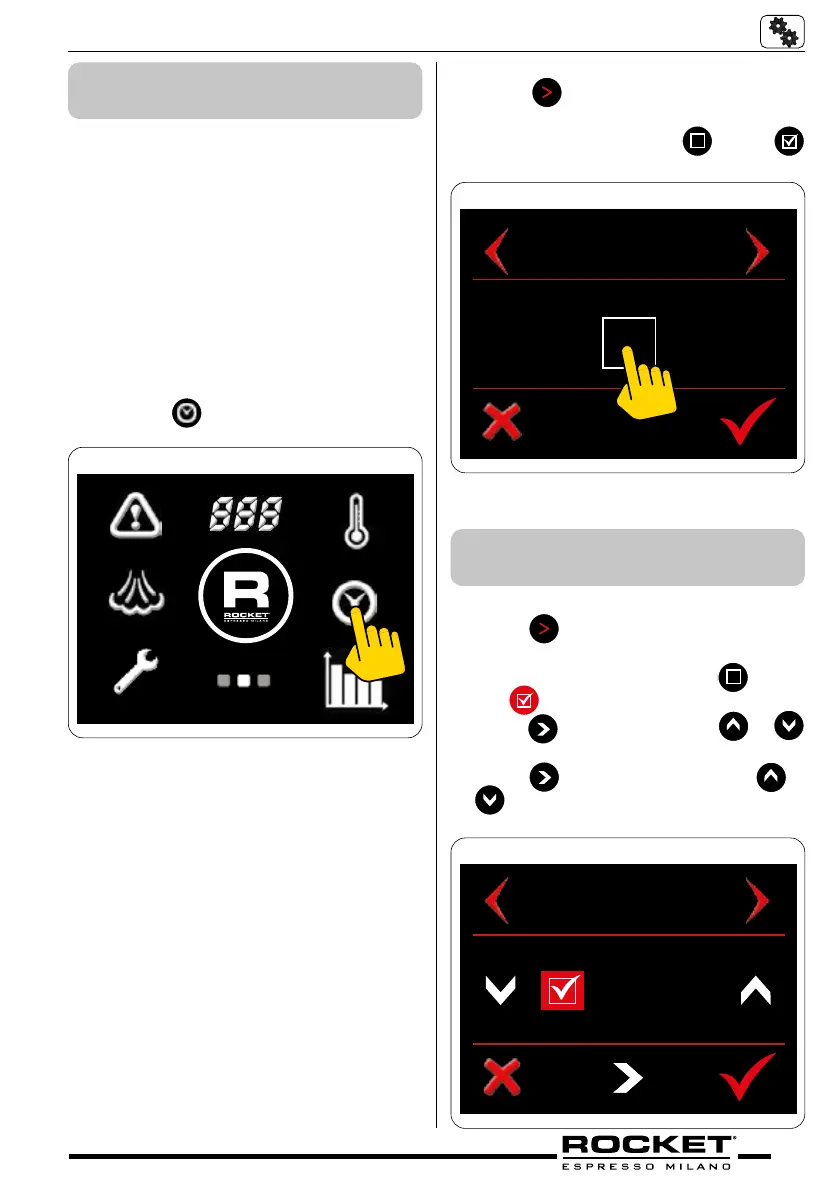
Screen 2 – Clock symbol
■ Navigate to the second screen menu.
■ Press the
symbol.
g_5.23
Automatic Start – O
■ Press
to navigate through to the
automatic start menu.
■ To enable feature press
so that
appears and the graphic displays ON.
AUTOMATIC START
OFF
g_5.24
Monday T1 – Start time
■ Press
once to navigate to Monday
T1 menu
■ To enable ‘Monday T1’ press
box so
that
appears
■ Press
to set hour. Press or
to advance or decrease hour.
■ Press
to set minutes. Press or
to advance or decrease minutes
MONDAY T1
START
06
:
30
g_5.25
5.5.1 Day & Time Auto Settings
‘T1’


 To Next Page