31
R9V
5.8.1 USING THE MACHINE IN
MANUAL MODE
To use the machine manually and create you
own prole.
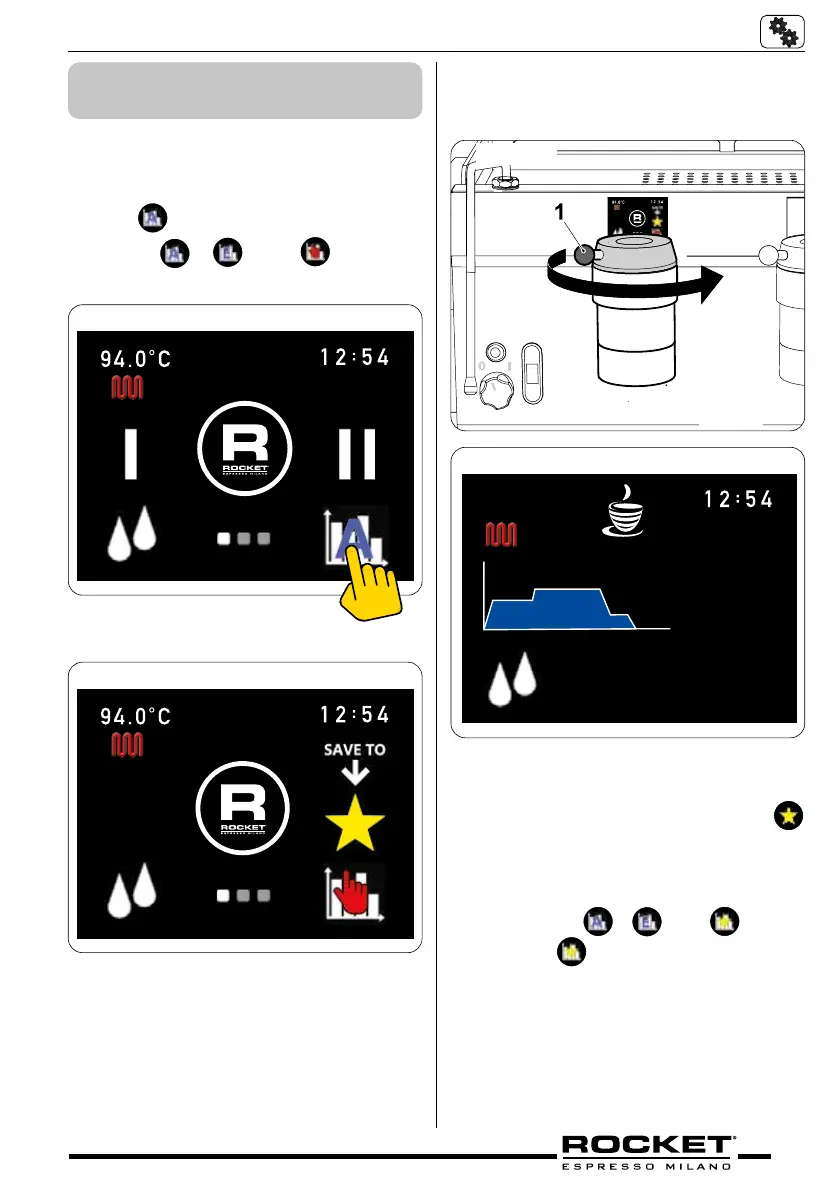
Screen 1 – Graph symbol
1. Press
symbol and cycle through graph
pro les
– to the symbol.
g_5.34
g_5.35
Screen 1 – Manual mode symbol
2. The machine is now in manual mode.
3. Load the portalter with coee and insert
into the group head.
4. Turn the group paddle (1 - g._5.36) to
start the extraction (the further the paddle is
turned the greater the pressure created) as
indicated by the prole on the screen. The
display will allow you to monitor pressure,
time and water volume.
51.2°C
10.0 bar
48 ml
11 s
g_5.37
5. At this point it is possible to save the man-
ual prole you have just created.
6. To save the manual profile press
symbol. The display will show Last prole
saved.
7. To recall the saved prole scroll through the
graph proles
– to the symbol.
8. Press the
symbol graph and the ma-
chine will recall the last saved prole
g_5.36


 To Next Page