EN | 19
Teaching Modes
Beginner Course:
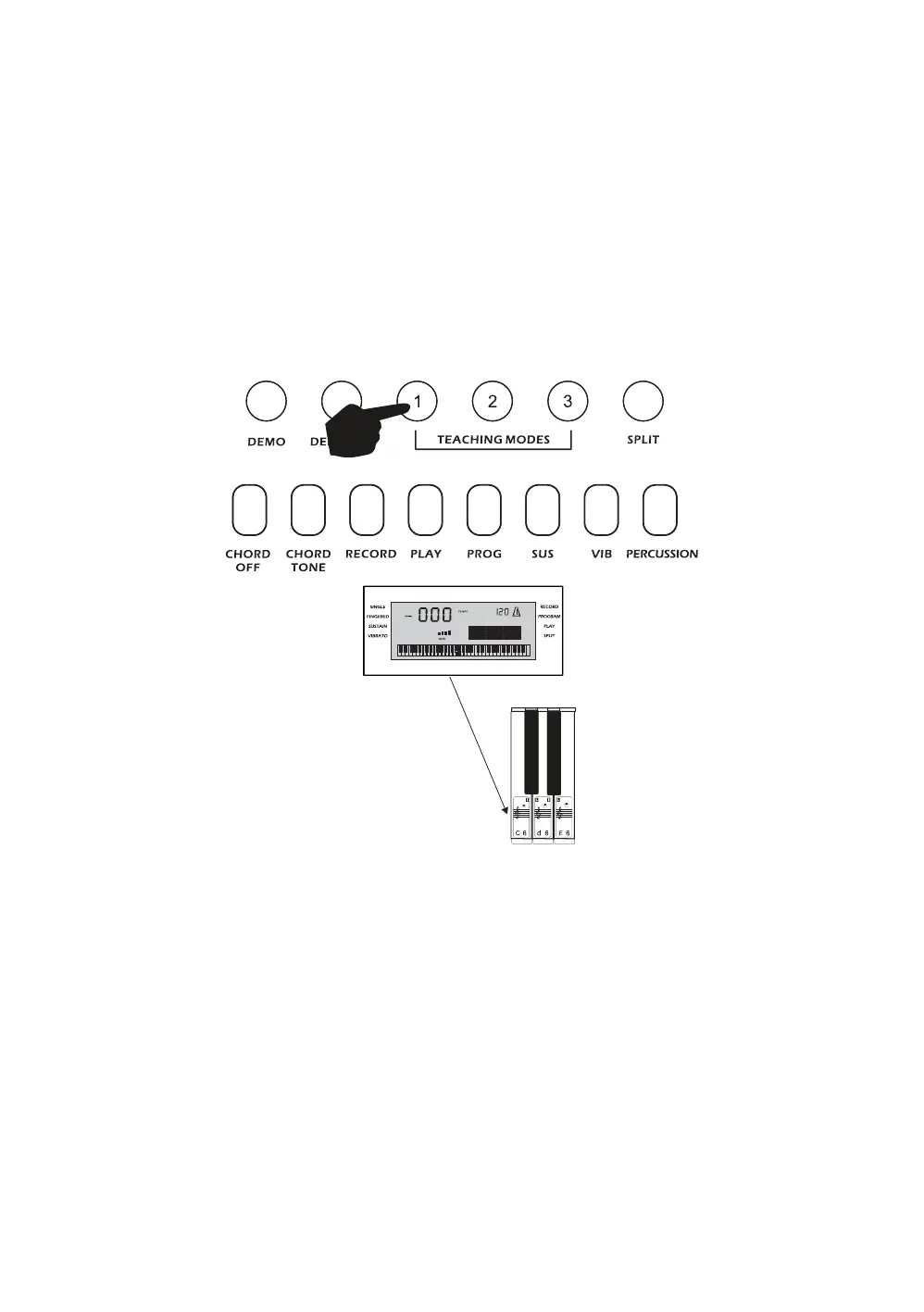
Touch the [TEACH 1] button to enter the Beginner Course teaching mode. This mode is suitable for
beginners to familiarise themselves with the rhythm and tempo of the song The LCD display will show the
number of the song selected, from 00 to 49 (refer to Appendix IV for the list of songs). Use the keypad or
+ - keys to select the desired song. The beat point will flash on the LCD display to indicate the tempo. The
LCD display will indicate which key should be pressed, for example C 6. Use the key stickers provided
with the keyboard applied to the keys in order to know which key to press. The keyboard will play the main
melody in time with any key presses, even incorrect ones.
Intermediate Course:
Touch the [TEACH 2] button to enter the Intermediate Course teaching mode. This mode is suitable for
intermediate users. The LCD display will show the number of the song selected, from 00 to 49 (refer to
Appendix IV for the list of songs). Use the keypad or + - keys to select the desired song. The beat point
will flash on the LCD display to indicate the tempo. The LCD display will indicate which key should be
pressed, for example C 6. Once the correct key has been pressed it will then move onto the next section
of the song. Use the key stickers provided with the keyboard applied to the keys in order to know which
key to press.



 To Next Page