55
5.5 Access to Loco Functions
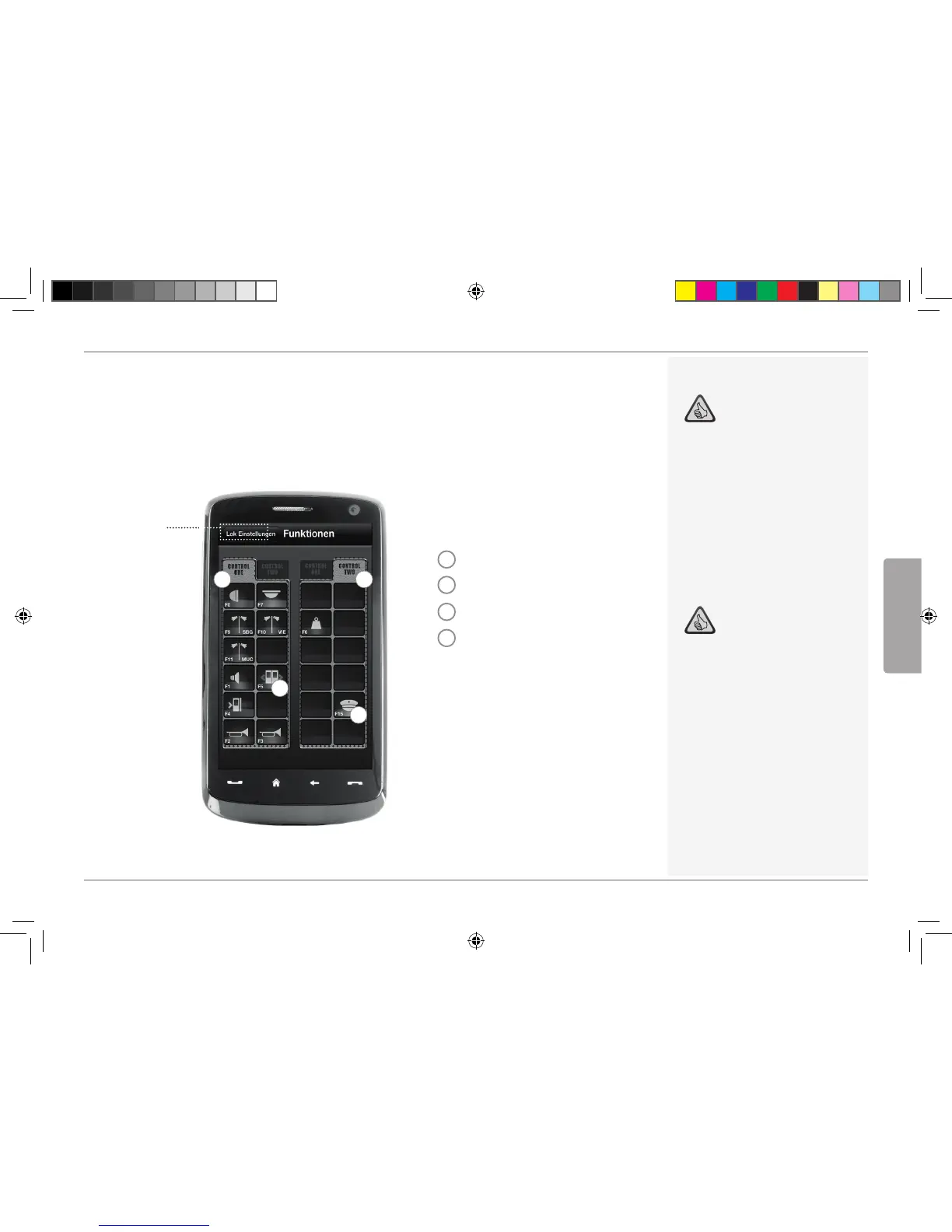
Through the register card “Functions”, you can access the digital functions of your locomotives
easily and quickly. Instead of having to input complicated codes, just touch the unambiguous icons –
makes driving trains twice the fun.
Back to
loco library
(see Page 53)
1
3
4
2
Loco Functions:
1
Function Panel 1
2
Function Panel 2
3
Function icon
4
Function icon
Z21 Mobile App
Highlights:
Quick access to all digital functions of
your locos
Activation by touch
Intuitive icons ensure easy handling
Customized arrangement of icons on
two panels
Configurable function names help
keeping track
Notes on Operation:
To create a new function, touch an
empty field in the panel.
To relocate functions, drag over to the
desired field.
To delete a function, keep it de-
pressed until “X” appears, then touch
the “X”.
English
8041500920.indd 55 14.12.2017 09:48:52


 To Next Page