GS Format Sound Selection Instructions
The leading-edge MIDI capabilities
of
the 595 organ from Rodgers include a function known as
GS
Format
Sound Selection. GS Format Sound Selection greatly increases the control that Rodgers
owners have with MIDI.
To this point, MIDI has used 128 different
Program
Change messages to select sounds. Page
10
of
this Owner's Manual contains instructions on using Program Change messages to select
sounds in a separate MIDI sound module.
However, some sound modules have more than 128 sounds. The
GS
Format Sound Selection
was developed to allow MIDI users access to more sounds. With the GS Format Sound Selection
feature on your Rodgers organ, you have the ability to select 16,384 different sounds!
Rodgers is the first manufacturer in the organ market to introduce this powerful capability. By
following these steps, you will be able to put this exciting feature to work.
How does
GS
Format
Work?
In the past, MIDI has used 128 Program Change messages to select sounds. Each
of
these
program changes is still used in the
GS
Format; however, 128 Variation Select messages are now
used to select variations
of
each sound.
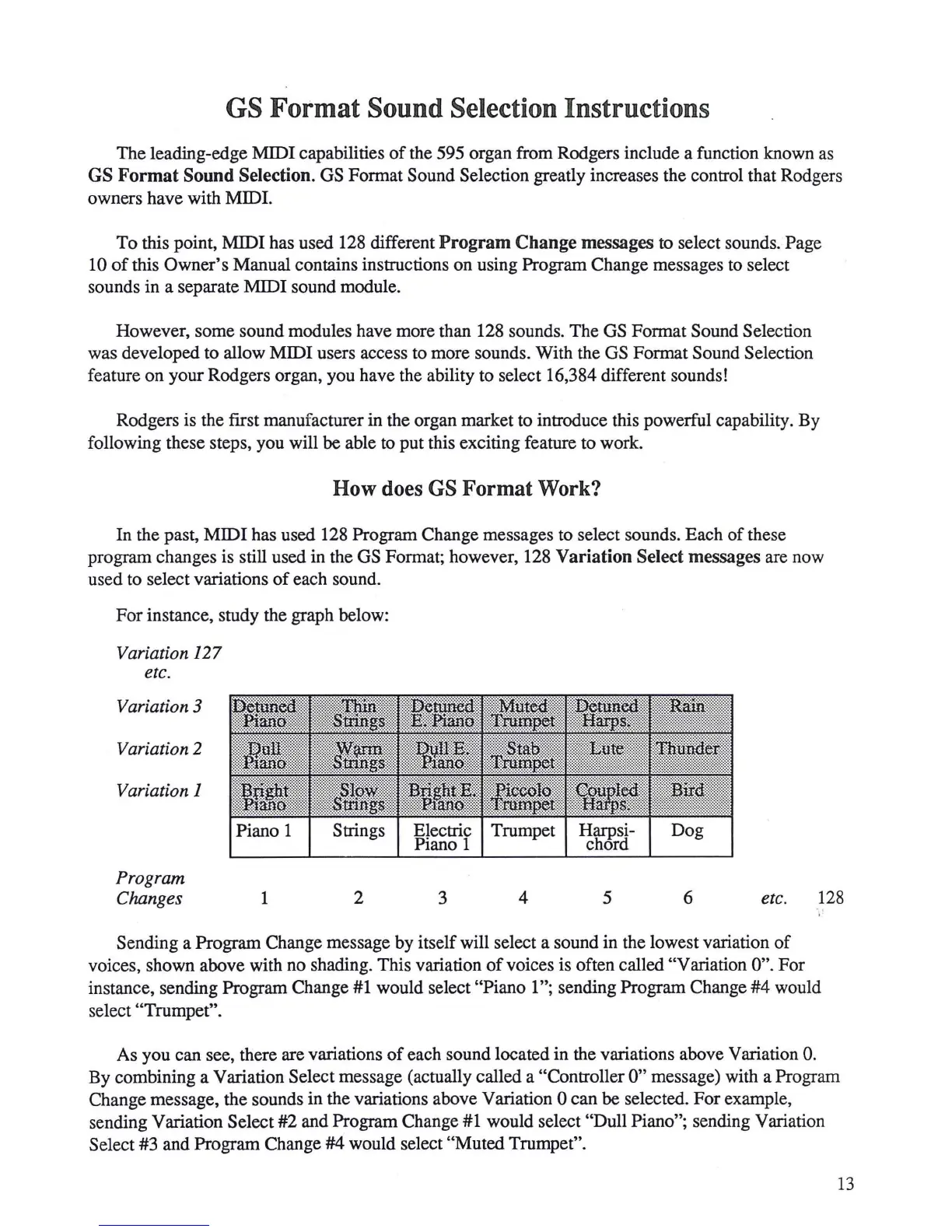
For instance, study the graph below:
Variation
127
etc.
Variation 3
Variation 2
Variation 1
Program
Changes
1
2
3
4
5
6 etc. 128
.,
,.
Sending a Program Change message by itself will select a sound in the lowest variation
of
voices, shown above with no shading. This variation
of
voices is often called "Variation 0". For
instance, sending Program Change
#1
would select "Piano 1 "; sending Program Change
#4
would
select
"Trumpet".
As you can see, there are variations
of
each sound located in the variations above Variation 0.
By combining a Variation Select message (actually called a "Controller
0"
message) with a Program
Change message, the sounds in the variations above Variation
0 can be selected. For example,
sending Variation
Select #2 and Program Change #1 would select "Dull Piano"; sending Variation
Select #3 and Program Change #4 would select "Muted Trumpet".
13







 To Next Page