28
Preparing a CD
Here’s how to prepare a CD-R/RW disc for recording or a music CD for playback.
1
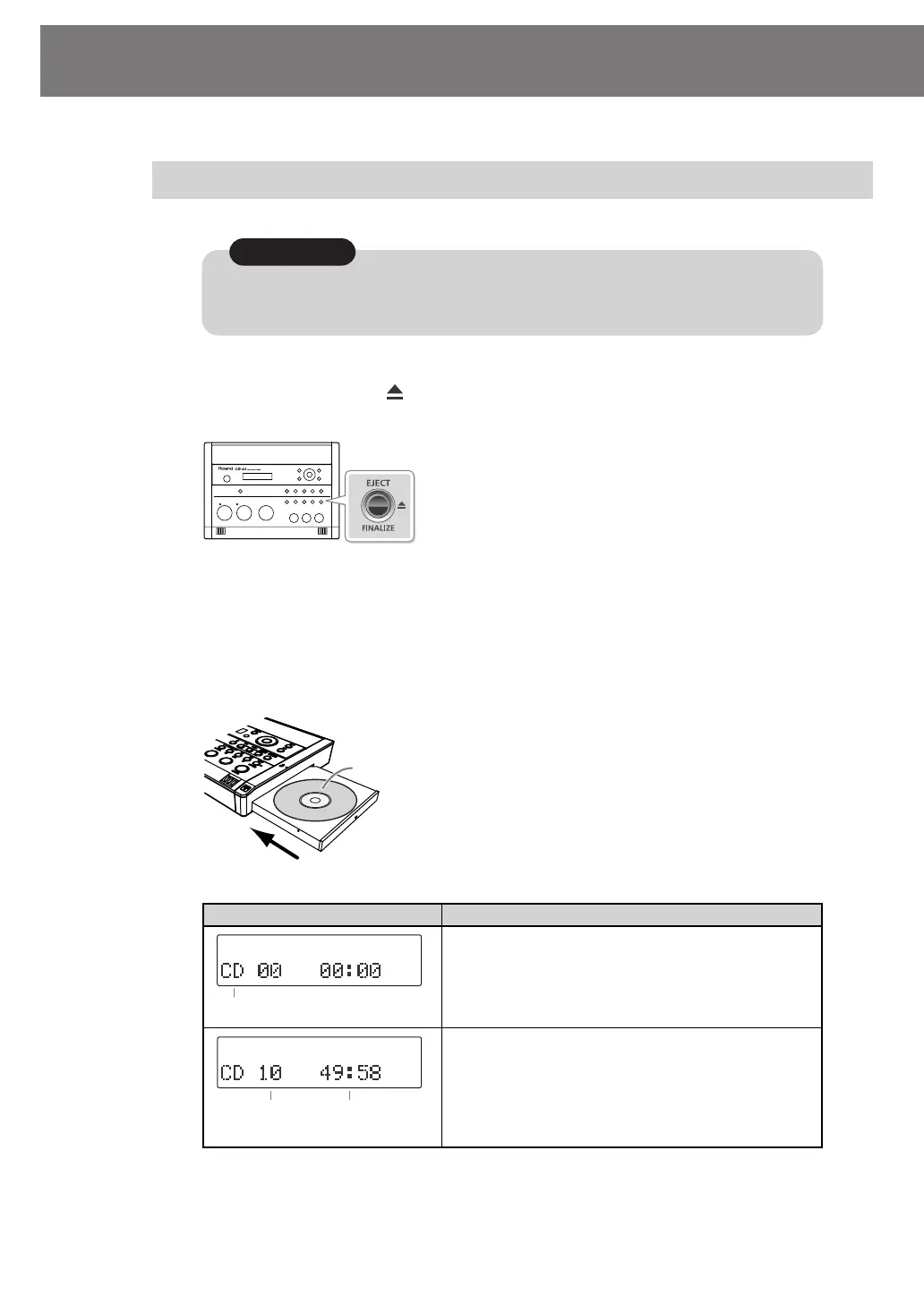
Press the [CD EJECT ( )] button.
The tray will open partially. Use your hand to pull it open.
2
Place the CD in the tray.
Make sure that the CD is securely locked onto the spindle.
3
Press the tray inward to close it.
fig.CD01.eps
Inserting a CD
Screen display CD status
Nothing has been recorded yet.
Songs have been recorded (or written).
* In the case of an already-recorded (or written) CD-R/
RW disc or music CD, the total number of songs and
the total playback time will be displayed once the CD
information has been read.
Do not use CDs that have a CD label or sticker affixed to them. You may be unable to remove
the CD, or it may cause the CD-2i to malfunction.
Note
Insert with the label surface facing upward.
Audio source
Total number
of tracks
Total playback time
CD-2i_e.book 28 ページ 2010年3月15日 月曜日 午前10時15分




 To Next Page