Designing Sounds
Creating a Tonewheel Organ Sound
(Edit Tone Wheel)
1. Press the [SONG] and [RHYTHM] buttons simultaneously.
2. Press the [ ] [ ] (SLOW/FAST) buttons to select “Edit Tone
Wheel.”
3. Use the [–] [+] buttons to select the tonewheel organ tone
that you want to edit.
4. Press the [METRONOME] button.
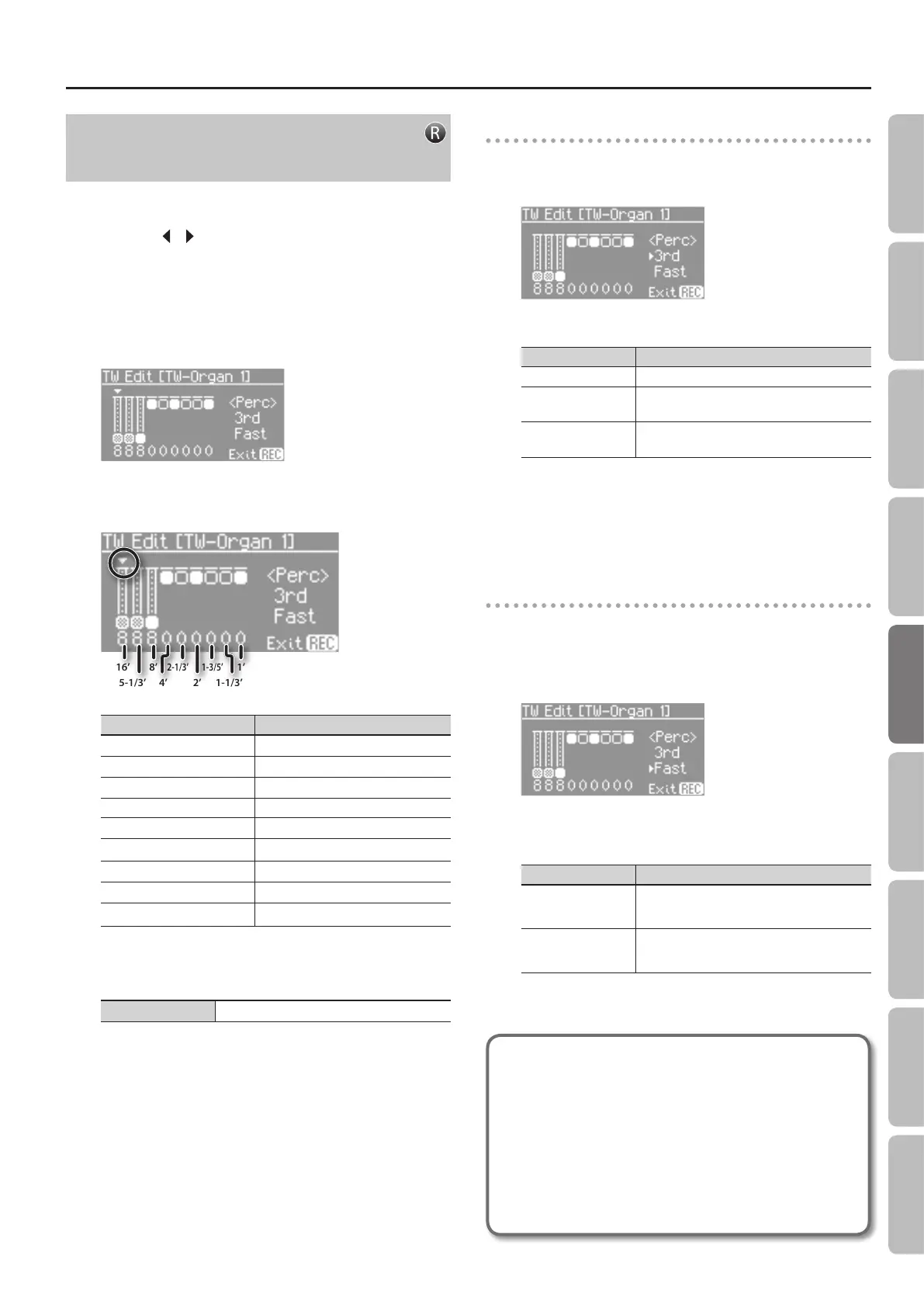
The TW Edit screen appears.
5. Select the desired footage by pressing the corresponding
button.
16’
5-1/3’
8’
4’
2-1/3’
2’ 1-1/3’
1-3/5’
1’
Button Footage
[PIANO] button
16
’
[E. PIANO] button
5-1/3
’
[STRINGS] button
8
’
[ORGAN] button 4’
[OTHER] button
2-2/3
’
[REGISTRATION] button
2
’
[SPLIT] button
1-3/5
’
[TRANSPOSE] button
1-1/3
’
[AMBIENCE] button
1’
6. Use the [–] [+] buttons to adjust the volume of the
footage.
Value 0–8
7. Repeat steps 5–6 to create your own personalized organ
sound.
8. Press the [SONG] and [RHYTHM] buttons simultaneously
to nish.
Adding sparkle to the sound (percussion)
1. From the TW Edit screen, press the [EQUALIZER] button.
The cursor moves to the switch that selects the percussion type.
2. Use the [–] or [+] buttons to select the percussion type.
Value Explanation
OFF Percussion will not sound.
2ND
Percussion sounds at a pitch one octave above
that of the key pressed.
3RD
Percussion sounds at a pitch an octave and a fth
above that of the key pressed.
Pressing the [REC] button will take you back to the previous screen.
* The Percussion is applied only to the Upper Tone.
* When percussion is on, the 1’ pitch will not be produced.
Adjusting the rate at which the percussion
decays
1. From the TW Edit screen, press the [MIC HARMONY]
button.
The cursor moves to the switch that selects the speed at which the
percussion sound will decay.
2. Use the [–] [+] buttons to select the speed at which the
percussion sound will decay.
Value Explanation
SLOW
The percussion sound will decay slowly.
The percussion will have a more gentle attack.
FAST
The percussion sound will decay quickly.
The percussion will have a sharper attack.
Pressing the [REC] button will take you back to the previous screen.
What is Percussion?
Percussion adds an attack-type sound to the beginning of
the note to give the sound more sparkle.
When notes were played legato (smoothly and connectedly),
percussion was applied only to the rst-played note.
When notes were played staccato (articulating each note
separately), percussion was applied to all notes. This
method is referred to as single trigger algorithm, and is a
very important element in organ performance. The FP-80
faithfully simulates this characteristic.
33
Operation Guide Getting Ready Performing Recording Designing Sounds Microphone Registrations AppendixSettings


 To Next Page