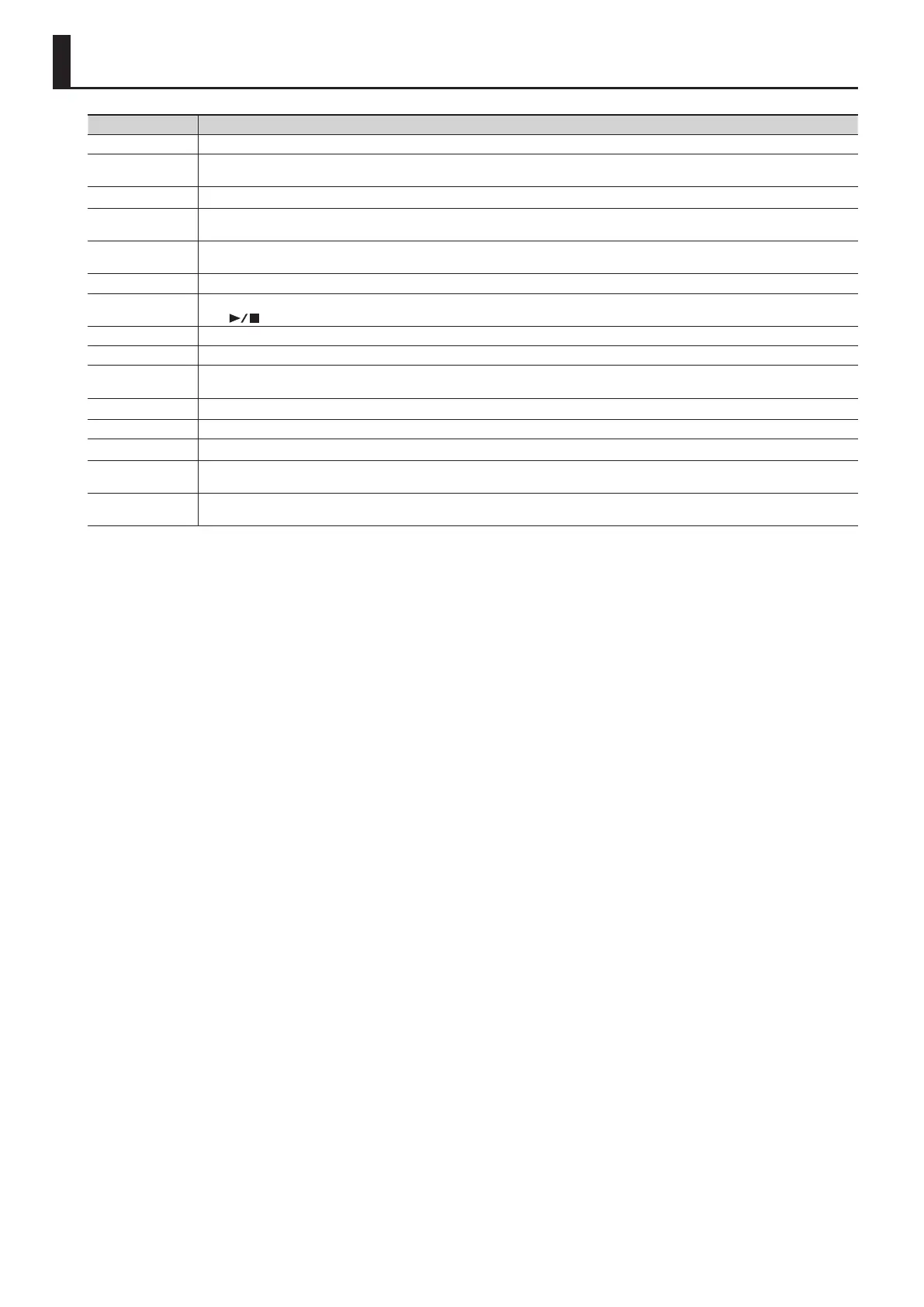
Display Meaning
Error: 1 The music le you attempted to save is read-only. It cannot be saved.
Error: 2
An error occurred while writing. It may be that the protect tab of the external media is in the “Protect (write prohibit)” position, or that the
external media has not been formatted.
Error: 10 No USB ash drive connected. Connect a USB ash drive and try the operation again.
Error: 11
There is insucient free space at the save destination. Either connect a dierent USB ash drive, or delete unwanted data (song data, registration
sets) and try the operation again.
Error: 14
An error occurred while reading. The USB ash drive may be damaged. Connect a dierent USB ash drive and try the operation again. You may
also format the USB ash drive (p. 43).
Error: 15 The le could not be read. The data format is not compatible with the FP-80.
Error: 16
The data could not be read fast enough during song playback. After waiting several seconds, you may be able to play back the song by pressing
the [
] button once again.
Error: 18 This audio format is not supported. Please use WAV format, 44.1 kHz, 16-bit linear audio les.
Error: 30 The FP-80’s internal memory is full.
Error: 40
The FP-80 cannot deal with the excessive MIDI data sent from the external MIDI device. Reduce the amount of data being transmitted by the
external MIDI device.
Error: 41 A MIDI cable was disconnected. Connect the MIDI cable correctly.
Error: 43 An error occurred during MIDI communication. Check the MIDI cable and the connected MIDI device.
Error: 46 The access point is not supported. Please use WPA or WPA2 authentication.
Error: 51
The system may have malfunctioned. Try the operation again. If this indication still appears after trying the operation several times, contact a
Roland Service Center.
Error: 65
The USB MEMORY port was subjected to excessive current. Verify that there is no malfunction in the USB ash drive, and then turn the power o,
then on again (p. 13).
Error Messages
56


 To Next Page