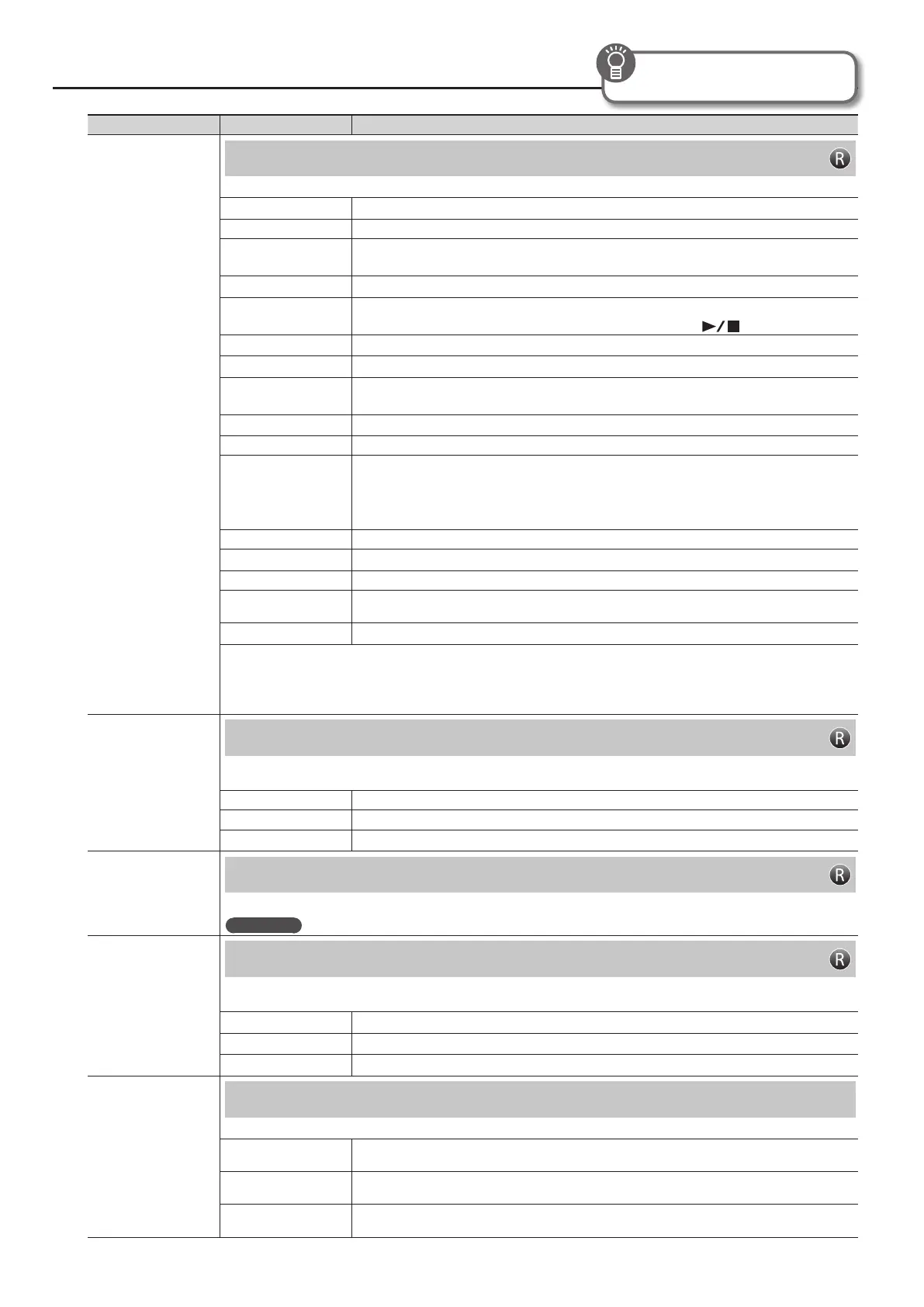
Detailed Function Settings (Function Mode)
Parameter Value Explanation
Center Pedal Func
(Center Pedal Function)
Changing the Function of the Center Pedal (Center Pedal Function)
Use this feature to change the function of the pedal connected to the SOSTENUTO/C jack.
Sostenuto *1 Sets function to sostenuto pedal.
Soft *2 Sets function to soft pedal.
Expression *3
Allows control of the volume. You may nd it convenient to connect an expression pedal (EV-5: sold separately).
Does not change the volume of rhythm play or recorded performance play.
Master Expression Controls the overall volume of the FP-80.
Start/Stop
When the [RHYTHM] button is lit: Starts and stops rhythm play (same function as the [START/STOP] button).
When the [SONG] button is lit: The pedal will have the same function as the [
] button.
Intro/Ending *4 The pedal will have the same function as the [INTRO/ENDING] button.
Variation *4 The pedal will have the same function as the [VARIATION] button.
Reset/Start (Rhythm
Reset/Start) *4
When you depress the pedal, the selected rhythm begins playing from the top.
This is convenient when you lose the beat or forget where you are in the song.
Chord Hold *4 Turns chord holding on and o.
Fill-In *4 Inserts a ll-in.
Leading Bass
Allows control of the on/o of leading bass function. It is turned on while the pedal is depressed.
What is the leading bass function?
The function that sounds the lowest note of a ngered chord as the bass tone is called “Leading Bass.”
* The Leading Bass feature is always on while Split is o, or while Chord Pattern is on.
Bend Up *3 Pitch rises when pedal is depressed.
Bend Down *3 Pitch is lowered when pedal is depressed.
Modulation *3 Vibrato is added when pedal is depressed.
Harmony Sw (Harmony
Switch)
The pedal will turn Harmony on/o.
Rotary Sw When using the rotary eect, switches the rotary eect between slow and fast.
*1 Only works on the Center Pedal Function.
*2 Only works on the Left Pedal Function.
*3 Works only on the tone set as the corresponding pedal part (Center Pedal Part or Left Pedal Part).
*4 Available when using a rhythm.
Center Pedal Part
Changing How the Pedal Eects Are Applied (Center Pedal Part)
When you press the pedal connected to the SOSTENUTO/C jack during Dual Play or Split Play, the pedal eect is normally applied to both
tones, but you can also select the tone to which the eect is to be applied.
Right & Left All enabled
Right Applied only to the Tone 1 (in Dual Play mode)/Right-hand Tone (in Split Play mode)
Left Applied only to the Tone 2 (in Dual Play mode)/Left-hand Tone (in Split Play mode)
Left Pedal Func
(Left Pedal Function)
Changing the Function of the Left Pedal (Left Pedal)
Use this feature to change the function of the pedal connected to the SOFT/L jack.
REFERENCE
For a list of available functions, refer to “Changing the Function of the Center Pedal (Center Pedal Function)” (p. 46).
Left Pedal Part
Changing How the Pedal Eects Are Applied (Left Pedal Part)
When you press the pedal connected to the SOFT/L jack during Dual Play or Split Play, the pedal eect is normally applied to both tones,
but you can also select the tone to which the eect is to be applied.
Right & Left All enabled
Right Applied only to the Tone 1 (in Dual Play mode)/Right-hand Tone (in Split Play mode)
Left Applied only to the Tone 2 (in Dual Play mode)/Left-hand Tone (in Split Play mode)
Regist. Pedal Shift
Using a Pedal to Switch Registrations (Pedal Shift)
You can assign a pedal to successively switch registrations. Each time you press the pedal, you will switch to the next registration.
O
Pressing a pedal connected to the SOFT/L jack or SOSTENUTO/C jack will not switch registrations. The
functions assigned to the SOFT/L jack and SOSTENUTO/C jack will be available for use (p. 46).
Left Pedal
The pedal connected to the SOFT/L jack can be used only for switching registrations. In this case, the function
assigned to the SOFT/L jack cannot be used.
Center Pedal
The pedal connected to the SOSTENUTO/C jack can be used only for switching registrations. In this case, the
function assigned to the SOSTENUTO/C jack cannot be used.
For details about how to make function
mode settings, see p. 44.
46


 To Next Page