EasyManua.ls Logo

Roland FP-9 - Page 15

Roland FP-9
40 pages
Print Icon
To Next Page IconTo Next Page
To Previous Page IconTo Previous Page
Loading...
Changing
the
Tones
Played
Split
Pianot
Piano2
EPiano
Harpsi
Vibes
Bass
Strings
Voice
SE
Chorus
Reverb
O
O00000000
0
0-0
Lowor
Pedai
while
holding
down
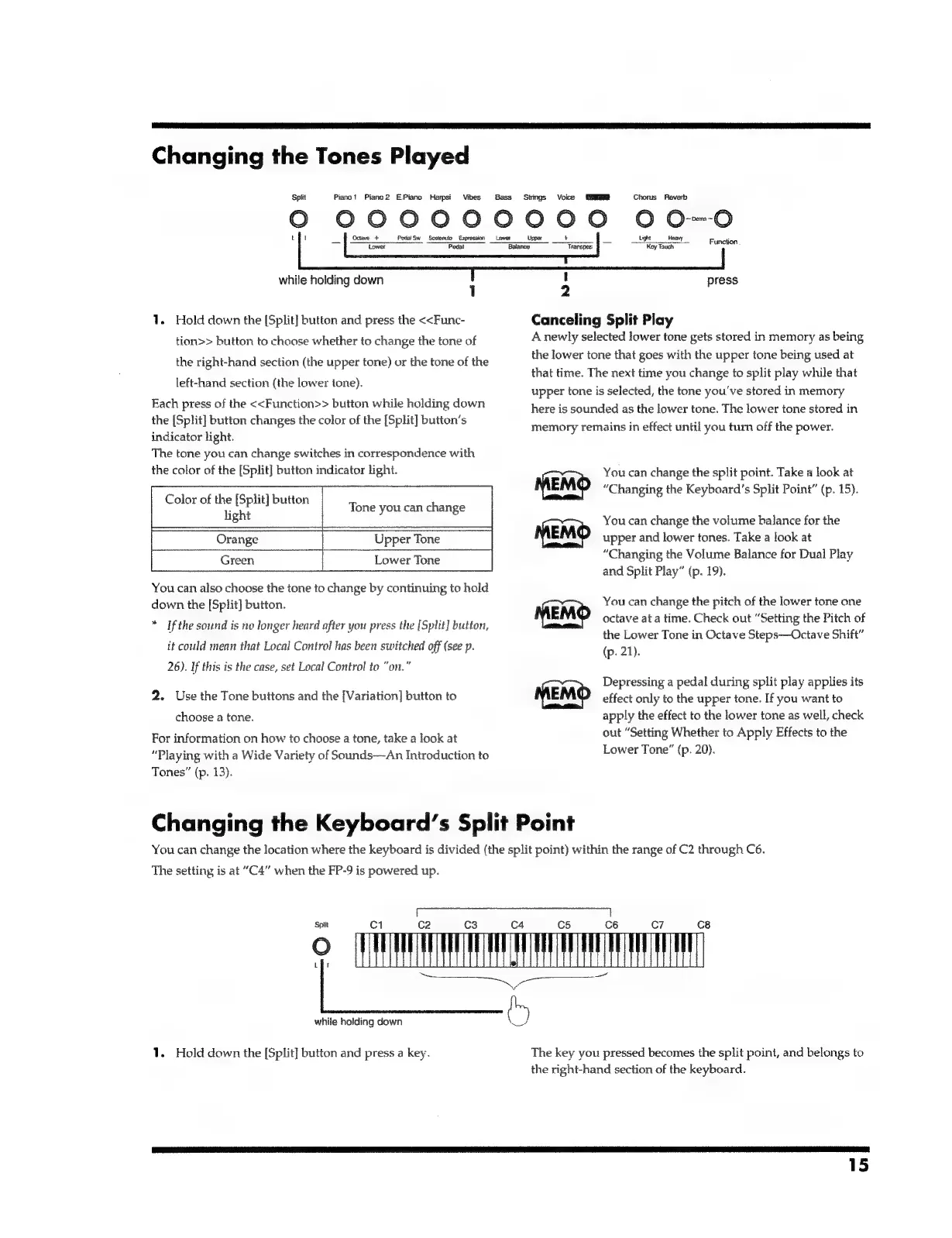
1.
Hold
down
the
[Split]
button
and
press
the
<<Func-
tion>>
button
to
choose
whether
to
change
the
tone
of
the
right-hand
section
(the
upper
tone)
or
the
tone
of
the
left-hand
section
(the
lower
tone).
Each
press
of
the
<<Function>>
button
while
holding
down
the
[Split]
button
changes
the
color
of
the
[Split]
button’s
indicator
light.
The
tone
you
can
change
switches
in
correspondence
with
the
color
of
the
[Split]
button
indicator
light.
Color
of
the
[Split]
button
light
Tone
you
can
change
Orange
Upper
Tone
Green
Lower
Tone
You
can
also
choose
the
tone
to
change
by
continuing
to
hold
down
the
[Split]
button.
*
If
the
sound
is
no
longer
heard
after
you
press
the
[Split]
button,
it
could
mean
that
Local
Control
has
been
switched
off
(see
p.
26).
If
this
is
the
case,
set
Local
Control
to
“on.”
2.
Use
the
Tone
buttons
and
the
[Variation]
button
to
choose
a
tone.
For
information
on
how
to
choose
a
tone,
take
a
look
at
“Playing
with
a
Wide
Variety
of
Sounds--An
Introduction
to
Tones”
(p.
13).
Octave
+
Pedal
Sw
Sostemto
Expression
=
Lower
Light
ven
Function
aan
Kay
Tauck
!
press
2
Canceling
Split
Play
A
newly
selected
lower
tone
gets
stored
in
memory
as
being
the
lower
tone
that
goes
with
the
upper
tone
being
used
at
that
time.
The
next
time
you
change
to
split
play
while
that
upper
tone
is
selected,
the
tone
you've
stored
in
memory
here
is
sounded
as
the
lower
tone.
The
lower
tone
stored
in
memory
remains
in
effect
until
you
turn
off
the
power.
You
can
change
the
split
point.
Take
a
look
at
“Changing
the
Keyboard’s
Split
Point”
(p.
15).
You
can
change
the
volume
balance
for
the
upper
and
lower
tones.
Take
a
look
at
“Changing
the
Volume
Balance
for
Dual
Play
and
Split
Play”
(p.
19).
You
can
change
the
pitch
of
the
lower
tone
one
octave
at
a
time.
Check
out
“Setting
the
Pitch
of
the
Lower
Tone
in
Octave
Steps—Octave
Shift”
(p.
21).
Depressing
a
pedal
during
split
play
applies
its
effect
only
to
the
upper
tone.
If
you
want
to
apply
the
effect
to
the
lower
tone
as
well,
check
out
“Setting
Whether
to
Apply
Effects
to
the
Lower
Tone”
(p.
20).
a
IB
AG
Changing
the
Keyboard’s
Split
Point
You
can
change
the
location
where
the
keyboard
is
divided
(the
split
point)
within
the
range
of
C2
through
C6.
The
setting
is
at
“C4”
when
the
FP-9
is
powered
up.
Spiit
Ci
while
holding
down
1.
Hold
down
the
[Split]
button
and
press
a
key.
cs
©
Mi
ia
The
key
you
pressed
becomes
the
split
point,
and
belongs
to
the
right-hand
section
of
the
keyboard.
15

Related product manuals