EasyManua.ls Logo

Roland FP-9 - Changing How the Pedals Work; Setting Whether to Apply Effects to the Lower Tone

Roland FP-9
40 pages
Print Icon
To Next Page IconTo Next Page
To Previous Page IconTo Previous Page
Loading...
Changing
How
the
Pedals
Work
When
you
connect
a
pedal
to
the
Soft
pedal
jack,
it
normally
works
as
a
soft
pedal
(see
p.
10).
However,
you
can
change
it
to
make
it
work
as
a
sostenuto
pedal
or
an
expression
pedal.
For
use
as
a
sostenuto
pedal,
connect
the
supplied
DP-6
pedal.
For
use
as
an
expression
pedal,
connect
the
separately
available
EV-5
expression
pedal.
Hampsi
Vibes.
Bass
Strings
Vaice
000000
00-0
Lower
Upper
Chorus Reverb
Hea
a
Function
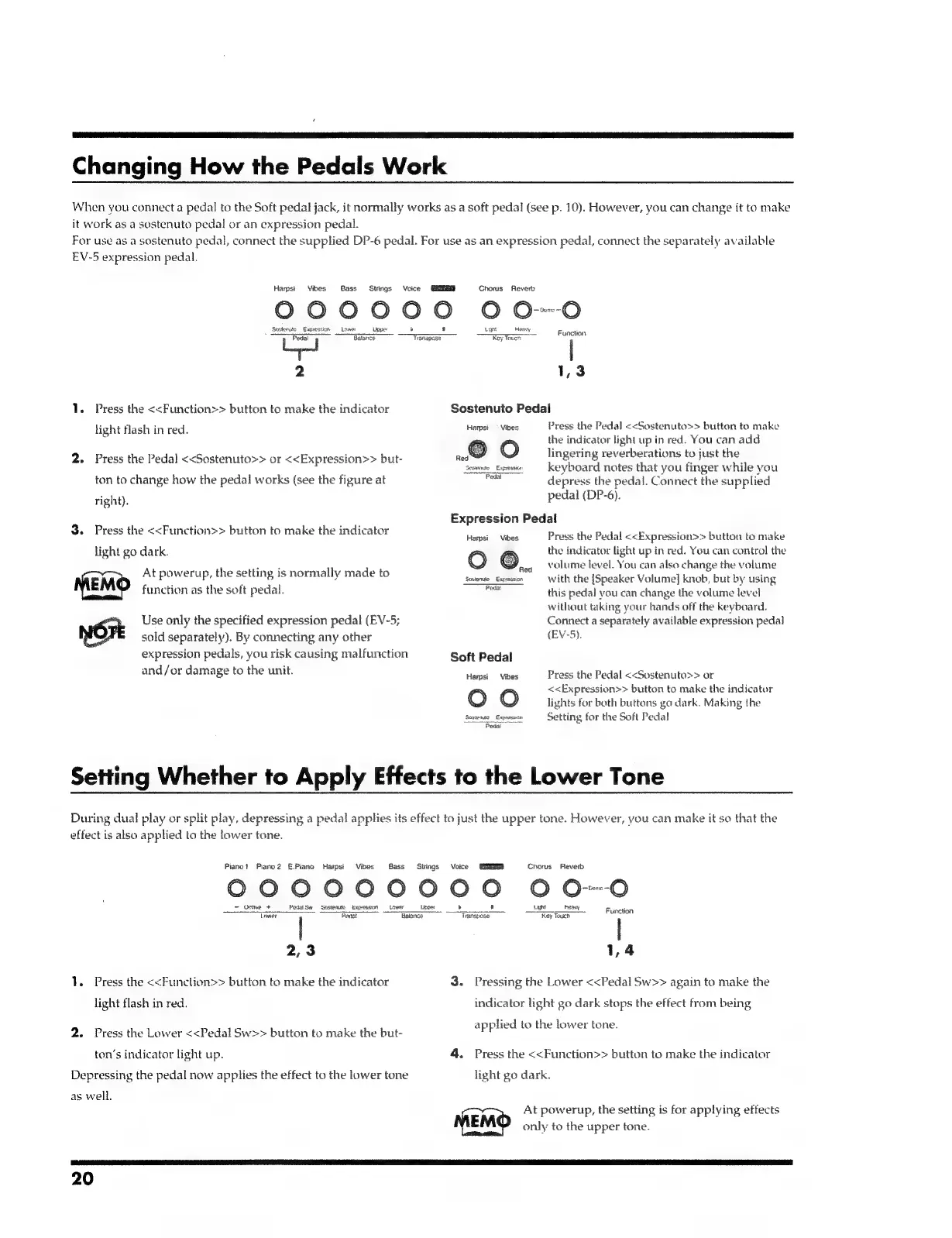
1.
Press
the
<<Function>>
button
to
make
the
indicator
light
flash
in
red.
2.
Press
the
Pedal
<<Sostenuto>>
or
<<Expression>>
but-
ton
to
change
how
the
pedal
works
(see
the
figure
at
right).
3.
Press
the
<<Function>>
button
to
make
the
indicator
light
go
dark.
At
powerup,
the
setting
is
normally
made
to
MEMO
function
as
the
soft
pedal.
Use
only
the
specified
expression
pedal
(EV-5
NOrE
sold
separately).
By
connecting
any
other
expression
pedals,
you
risk
causing
malfunction
and/or
damage
to
the
unit.
Batance
%
anspese
7
Toucs
l
1,3
Sostenuto
Pedal
Press
the
Pedal
<<Sostenuto>>
button
to
make
the
indicator
light
up
in
red.
You
can
add
lingering
reverberations
to
just
the
keyboard
notes
that
you
finger
while
you
depress
the
pedal.
Connect
the
supplied
pedal
(DP-6).
Harpst
=
Vibes
~~
O
Seatemace
_
Exprssice
Pedal
Expression
Pedal
Press
the
Pedal
<<Expression>>
button
to
make
the
indicator
light
up
in
red.
You
can
control
the
volume
level.
You
can
also
change
the
volume
with
the
[Speaker
Volume]
knob,
but
by
using
this
pedal
you
can
change
the
volume
level
without
taking
your
hands
off
the
keyboard.
Connect
a
separately
available
expression
pedal
(EV-5).
Harpsi
Vibes
O
©..
Sesionuto
Expreasion
Peda!
Soft
Pedal
Harpsi
Vibes
OO
Seswis
Expressian
Pedal
Press
the
Pedal
<<Sostenuto>>
or
<<Expression>>
button
to
make
the
indicator
lights
for
both
buttons
go
dark.
Making
the
Setting
for
the
Soft
Pedal
Setting
Whether
to
Apply
Effects
to
the
Lower
Tone
During
dual
play
or
split
play,
depressing
a
pedal
applies
its
effect
to
just
the
upper
tone.
However,
you
can
make
it
so
that
the
effect
is
also
applied
to
the
lower
tone.
Pianot
Piano
2
E.Piano
Harpsi
Vibes
Bass
Strings
Voice
Chorus
Reverb
000000000
0
OO
=
Ostve
+
Pett
Se
Sostenum
Expression
Light
heavy
Function
Tawar
|
Badal
ame
ae
Key
Touch
2,3
1,4
1.
Press
the
<<Function>>
button
to
make
the
indicator
light
flash
in
red.
2.
Press
the
Lower
<<Pedal
Sw>>
button
to
make
the
but-
ton’s
indicator
light
up.
Depressing
the
pedal
now
applies
the
effect
to
the
lower
tone
as
well.
3.
Pressing
the
Lower
<<Pedal
Sw>>
again
to
make
the
indicator
light
go
dark
stops
the
effect
from
being
applied
to
the
lower
tone.
4.
Press
the
<<Function>>
button
to
make
the
indicator
light
go
dark.
At
powerup,
the
setting
is
for
applying
effects
MEMO
only
to
the
upper
tone.
20

Related product manuals