EasyManua.ls Logo

Roland FP-9 - Whats MIDI; How to Enjoy MIDI and the Steps for Making Connections; Eee Ee Re Ee Ee Ee

Roland FP-9
40 pages
Print Icon
To Next Page IconTo Next Page
To Previous Page IconTo Previous Page
Loading...
IF
YOU’RE
CONNECTING
THE
FP-9
TO
A
MIDI
INSTRUMENT
What’s
MIDI?
MIDI
stands
for
“Musical
Instrument
Digital
Interface,”
and
is
a
unified
worldwide
standard
for
the
exchange
of
performance
data
(MIDI
message)
and
other
information
between
electronic
instruments
and
computers.
The
FP-9
is
equipped
with
MIDI
connectors
and
a
Computer
jack
to
let
it
exchange
performance
information
with
external
devices.
These
jacks
can
be
used
to
connect
the
FP-9
to
an
external
device
for
even
greater
versatility.
A
separate
publication
titled
“MIDI
buplementation”
is
also
available.
It
provides
complete
details
concerning
the
way
MIDI
has
been
implemented
on
this
unit.
If
you
should
require
this
publication
(such
as
when
you
intend
to
carry
out
byte-level
programming),
please
contact
the
nearest
Roland
Service
Center
or
authorized
Roland
distributor.
About
MIDI
Connectors
The
FP-9
has
two
types
of
MIDI
connectors.
Connecting
these
*MIDI
OUT
Connector
to
the
MIDI
connectors
on
a
MIDI
instrument
makes
it
Performance
messages
such
as
information
on
what
keys
are
possible
for
the
two
instruments
to
control
each
other.
played
are
sent
to
an
external
MIDI
device
from
here.
For
instance,
you
can
output
sound
from
the
other
instrument
or
switch
tones
on
the
other
instrument.
®
MIDI
IN
Connector
Performance
messages
from
an
external
MIDI
device
are
received
here.
These
incoming
messages
may
instruct
the
receiving
MIDI
Q
Fg,
instrument
to
play
sounds
or
switch
tones.
MIDI
How
to
Enjoy
MIDI
and
the
Steps
for
Making
Connections
How
to
Enjoy
MIDI
Some
of
the
many
ways
you
can
have
fun
using
MIDI
are
described
below.
Using
a
sequencer
(*1)
to
record
perfor-
Fingering
the
FP-9
and
Playing
the
Sound
mance
data
played
on
the
FP-9,
or
automat-
on
Another
MIDI
Sound
Module
(*2)
ically
playing
recorded
performance
data
: .
y
Playing
P
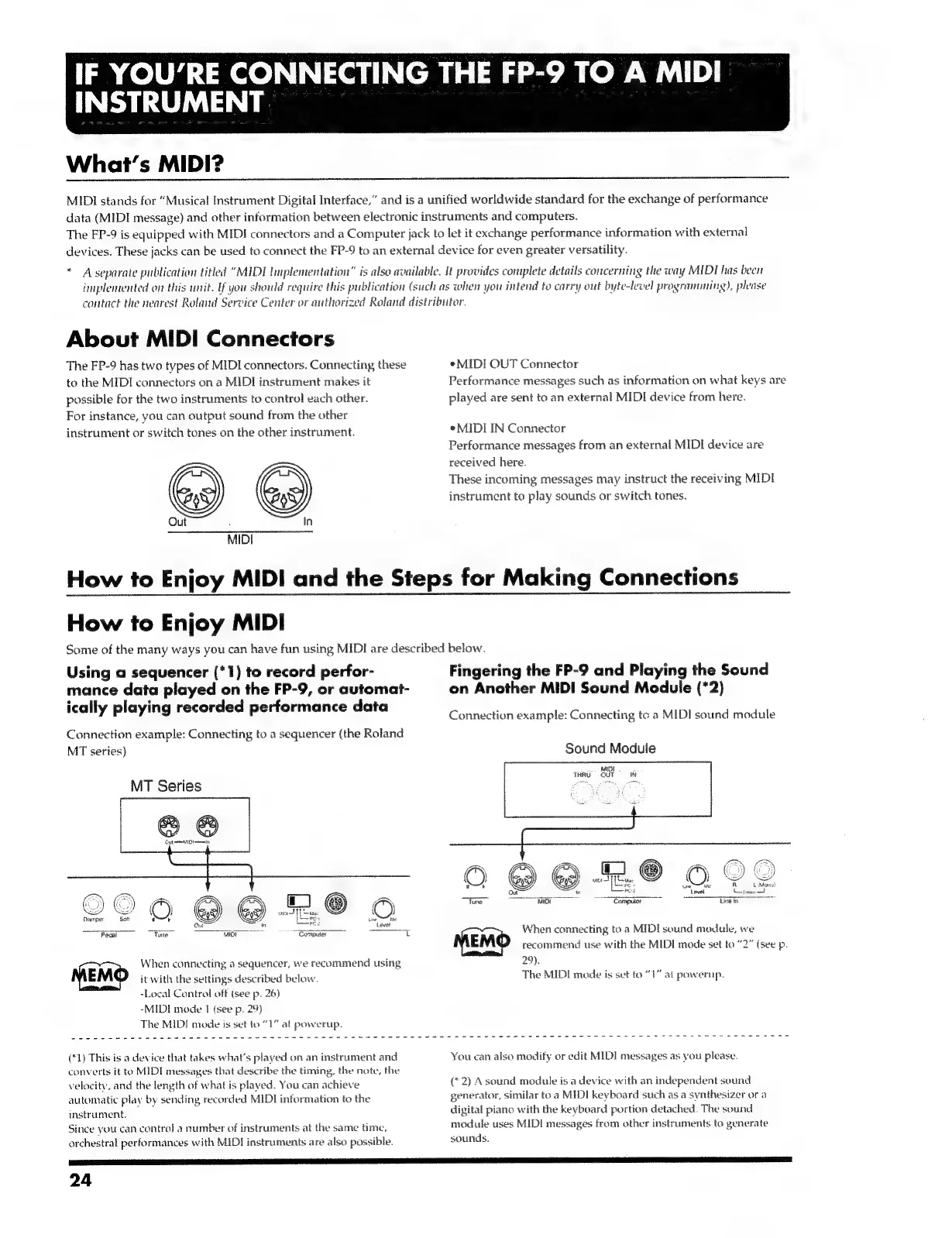
Connection
example:
Connecting
tc
a
MIDI
sound
module
Connection
example:
Connecting
to
a
sequencer
(the
Roland
MT
series)
Sound
Module
MT
Series
@
©
Gut
meet meme
©
@
@
2
OSD
Level
Lan
Seeenes
Pe,
PR
Z
)
ro
ae
a
—Sompaar
ei
O@6
©
aa
wor
ee
-
oe
sy
When
connecting
to
a
MIDI
sound
module,
we
MEMO
recommend
use
with
the
MIDI
mode
set
to
“2”
(see
p.
When
connecting
a
sequencer,
we
recommend
using
29).
MEMO
it
with
the
settings
described
below.
The
MIDI
mode
is
set
to
“1”
al
powernp.
-Local
Control
off
(see
p.
26)
-MIDI
mode
1
(see
p.
29)
The
MIDI
mode
is
set
to
“1
al
powerup.
(*1)
This
is
a
device
that
takes
what's
played
on
an
instrument
and
You
can
also
modify
or
edit
MIDI
messages
as
you
please.
converts
it
to
MIDI
messages
that
describe
the
timing,
the
note,
the
velocity,
and
the
length
of
what
is
played.
You
can
achieve
automatic
play
by
sending
recorded
MIDI
information
to
the
instrument,
Since
you
can
control
a
number
of
instruments
at
the
same
time,
orchestral
performances
with
MIDI
instruments
are
also
possible.
(*2)
Asound
module
is
a
device
with
an
independent
sound
generator,
similar
toa
MIDI
keyboard
such
as
a
synthesizer
or
a
digital
piano
with
the
keyboard
portion
detached.
The
sound
module
uses
MIDI
messages
from
other
instruments
to
generate
sounds.
24

Related product manuals