EasyManua.ls Logo

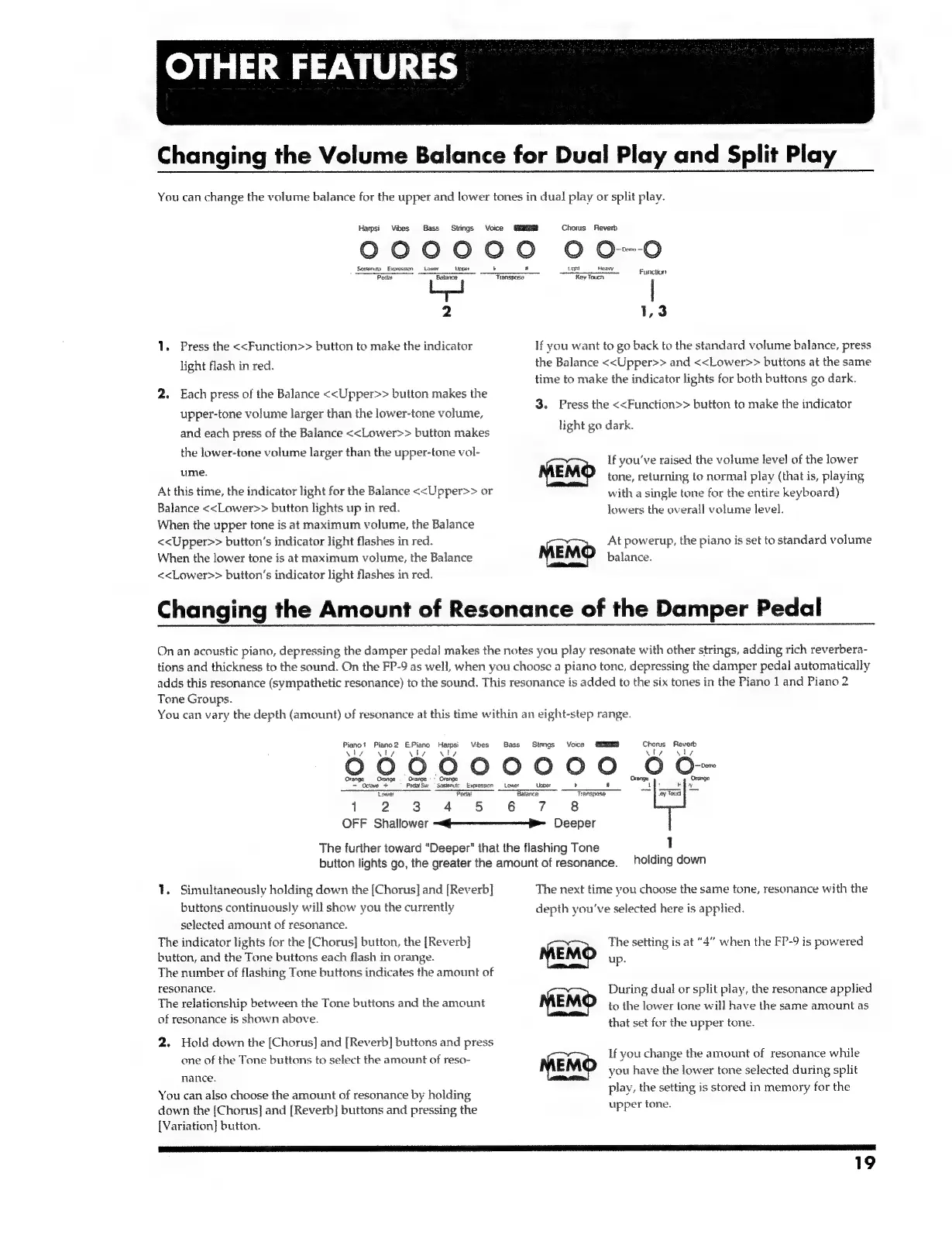
Roland FP-9 - Other Features; Changing the Volume Balance for Dual Play and Splitplay; Changing the Amount of Resonance of the Damper Pedal

Roland FP-9
40 pages
Print Icon
To Next Page IconTo Next Page
To Previous Page IconTo Previous Page
Loading...
OTHER
FEATURES
Changing
the
Volume
Balance
for
Dual
Play
and
Split
Play
You
can
change
the
volume
balance
for
the
upper
and
lower
tones
in
dual
play
or
split
play.
Harpsi
Vibes
Bass
Strings
Voice
PARES
Chorus
Reverb
000000
000
Sosteraty
Exoressios
Lower
Lagat
Heavy
Penis
oy
Sia
Key
Touch
se
2
1,3
1.
Press
the
<<Function>>
button
to
make
the
indicator
If
you
want
to
go
back
to
the
standard
volume
balance,
press
light
flash
in
red.
the
Balance
<<Upper>>
and
<<Lower>>
buttons
at
the
same
time
to
make
the
indicator
lights
for
both
buttons
go
dark.
2.
Each
press
of
the
Balance
<<Upper>>
button
makes
the
2
3.
Press
the
<<Function>>
button
to
make
the
indicator
upper-tone
volume
larger
than
the
lower-tone
volume,
and
each
press
of
the
Balance
<<Lower>>
button
makes
Hentgoatk:
the
lower-tone
volume
larger
than
the
upper-tone
vol-
:
,
B
:
PP
If
you've
raised
the
volume
level
of
the
lower
WINE:
MEMO
tone,
returning
to
normal
play
(that
is,
playing
At
this
time,
the
indicator
light
for
the
Balance
<<Upper>>
or
with
a
single
tone
for
the
entire
keyboard)
Balance
<<Lower>>
button
lights
up
in
red.
lowers
the
overall
volume
level.
When
the
upper
tone
is
at
maximum
volume,
the
Balance
<<Upper>>
button’s
indicator
light
flashes
in
red.
When
the
lower
tone
is
at
maximum
volume,
the
Balance
MEMO
<<Lower>>
button’s
indicator
light
flashes
in
red.
At
powerup,
the
piano
is
set
to
standard
volume
balance.
Changing
the
Amount
of
Resonance
of
the
Damper
Pedal
On
an
acoustic
piano,
depressing
the
damper
pedal
makes
the
notes
you
play
resonate
with
other
strings,
adding
rich
reverbera-
tions
and
thickness
to
the
sound.
On
the
FP-9
as
well,
when
you
choose
a
piano
tone,
depressing
the
damper
pedal
automatically
adds
this
resonance
(sympathetic
resonance)
to
the
sound.
This
resonance
is
added
to
the
six
tones
in
the
Piano
1
and
Piano
2
Tone
Groups.
You
can
vary
the
depth
(amount)
of
resonance
at
this
time
within
an
eight-step
range.
Pianot
Piano2
E.Piano
Harpsi
Vibes
Bass
Stmngs
Voice
SiR
iby
ie
Vly
vl
viv
uty
QGO00000
0
Or
Orange
=
Grange
«=
Omnge
=
Grange,
Drange
Octwe
+
Poda
Sw
Sostenutc
|
Expression:
Lower
Upoer
ower
Padat
Balance
=
TANSHOSe
By
fond
f
1
2
3
4
5 6
7
8
OFF
Shallower
~@———--—-----—-f>-_
Deeper
The
further
toward
“Deeper”
that
the
flashing
Tone
;
1
button
lights
go,
the
greater
the
amount
of
resonance.
holding
down
1.
Simultaneously
holding
down
the
[Chorus]
and
[Reverb]
The
next
time
you
choose
the
same
tone,
resonance
with
the
buttons
continuously
will
show
you
the
currently
depth
you've
selected
here
is
applied.
selected
amount
of
resonance.
The
indicator
lights
for
the
[Chorus]
button,
the
[Reverb]
button,
and
the
Tone
buttons
each
flash
in
orange.
The
number
of
flashing
Tone
buttons
indicates
the
amount
of
resonance.
The
relationship
between
the
Tone
buttons
and
the
amount
of
resonance
is
shown
above.
The
setting
is
at
“4”
when
the
FP-9
is
powered
up.
During
dual
or
split
play,
the
resonance
applied
to
the
lower
tone
will
have
the
same
amount
as
that
set
for
the
upper
tone.
2.
Hold
down
the
[Chorus]
and
[Reverb]
buttons
and
press
=
7
“he
4
Pj
VNC
We
one
of
the
Tone
buttons
to
select
the
amount
of
reso-
If
you
change
the
amount
of
resonance
while
ia
15)
18
ance:
you
have
He
lewer
tone
oe
during
split
play,
the
setting
is
stored
in
memory
for
the
You
can
also
choose
the
amount
of
resonance
by
holding
upper
tone.
down
the
[Chorus]
and
[Reverb]
buttons
and
pressing
the
[Variation]
button.
19

Related product manuals