EasyManua.ls Logo

Roland FP-9 - Setting the MIDI Mode

Roland FP-9
40 pages
Print Icon
To Next Page IconTo Next Page
To Previous Page IconTo Previous Page
Loading...
Setting
the
MIDI
Mode
When
switching
tones
on
the
FP-9,
you
can
switch
what
is
in
the
MIDI
information
being
output
from
the
MIDI
Out
connector
to
a
setting
that
is
suited
to
the
connected
MIDI
instrument.
You
can
choose
either
of
two
types
of
settings.
These
settings
are
called
“MIDI
modes.”
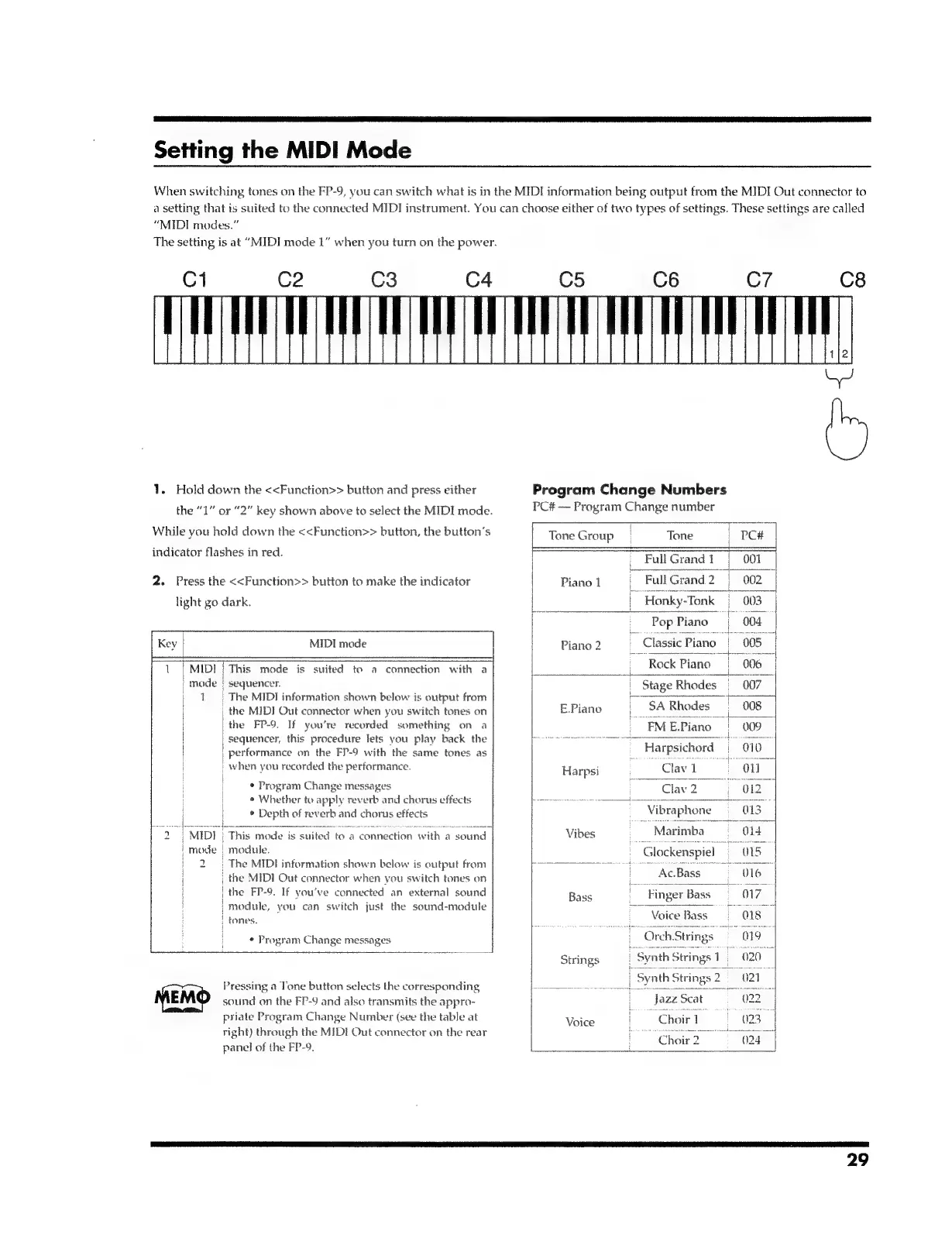
The
setting
is
at
“MIDI
mode
1”
when
you
turn
on
the
power.
1.
Hold
down
the
<<Function>>
button
and
press
either
the
“1”
or
“2”
key
shown
above
to
select
the
MIDI
mode.
While
you
hold
down
the
<<Function>>
button,
the
button’s
indicator
flashes
in
red.
2.
Press
the
<<Function>>
button
to
make
the
indicator
light
go
dark.
MIDI
mode
|
MIDI
This
mode
is
suited
to
a
connection
with
a
mode
|
sequencer.
1
|
The
MIDI
information
shown
below
is
output
from
,
the
MIDI
Out
connector
when
you
switch
tones
on
i
the
FP-9.
If
you're
recorded
something
on
a
|
sequencer,
this
procedure
lets
you
play
back
the
|
performance
on
the
FP-9
with
the
same
tones
as
|
when
you
recorded
the
performance.
|
¢
Program
Change
messages
¢
Whether
to
apply
reverb
and
chorus
effects
*
Depth
of
reverb
and
chorus
effects
i
i
|
i
i
tin
a
ta
a
cca
eee
ocerer
eres!
|
MIDI
|
This
mode
is
suited
to
a
connection
with
a
sound
_mode
module.
|
2);
The
MIDI
information
shown
below
is
output
from
|
the
MIDI
Out
connector
when
you
switch
tones
on
|
the
FP-9.
If
you've
connected
an
external
sound
|
module,
you
can
switch
just
the
sound-module
:
rONeS.
i
°
Program
Change
messages
Pressing
a
Tone
button
selects
the
corresponding
sound
on
the
FP-9
and
also
transmits
the
appro-
priate
Program
Change
Number
(see
the
table
at
tight)
through
the
MIDI
Out
connector
on
the
rear
panel
of
the
FP-9.
Program
Change
Numbers
PC#
Program
Change
number
Tone
Group
Tone
PC#
|
_
FullGrand1
|
001
:
Piano
1
:
|
Honky-Tonk
_
~
Pop
Piano
fang?
Chie
Pane
08
Rock
Piano
006
ve.
eam
a
Beate
Stage
Rhodes
007
E.Piano
SA
Rhodes
008
EMEPiano
009
es
Harpsichord
010
Hops
Cava
On
|
Clav
2
O12
_.
Vibraphone
013
Vibes
=
Marimba
-
Glockenspie
i
mena
aay
aa
Bass
Voice
Ba
ois
Orch
Strings
019°
Strings
SynthStrings
1020
--
Scat
Voice
:
‘Choir
1
-
“Choir?
024
29

Related product manuals