EasyManua.ls Logo

Roland FP-9 - Adding Breadth to Sounds-The Chorus Effect

Roland FP-9
40 pages
Print Icon
To Next Page IconTo Next Page
To Previous Page IconTo Previous Page
Loading...
SERN
TN
EN
EI
NE
ST
TN
I
IN
TET
IR
TE
LEE
aE
SE
Adding
Breadth
to
Sounds—The
Chorus
Effect
You
can
apply
a
chorus
effect
to
the
notes
you
play
on
the
keyboard.
Applying
chorus
can
add
greater
dimension,
for
a
“tat”
sound.
You
can
choose
any
of
eight
types
for
the
depth
of
the
chorus
effect.
Example:
Let’s
apply
chorus
to
the
Vibraphone
tone.
Pianot
Piano2
€.Piano
Harpsi
Vibes
Bass
Stings
Voice
Chorus
Reverb
000000000
0
7
Ocave
+
Peds
Sw
Sestenuio
Eq
§
son
Lewor
Upper
Lower
Pedai
|
Balance
aaa
|:
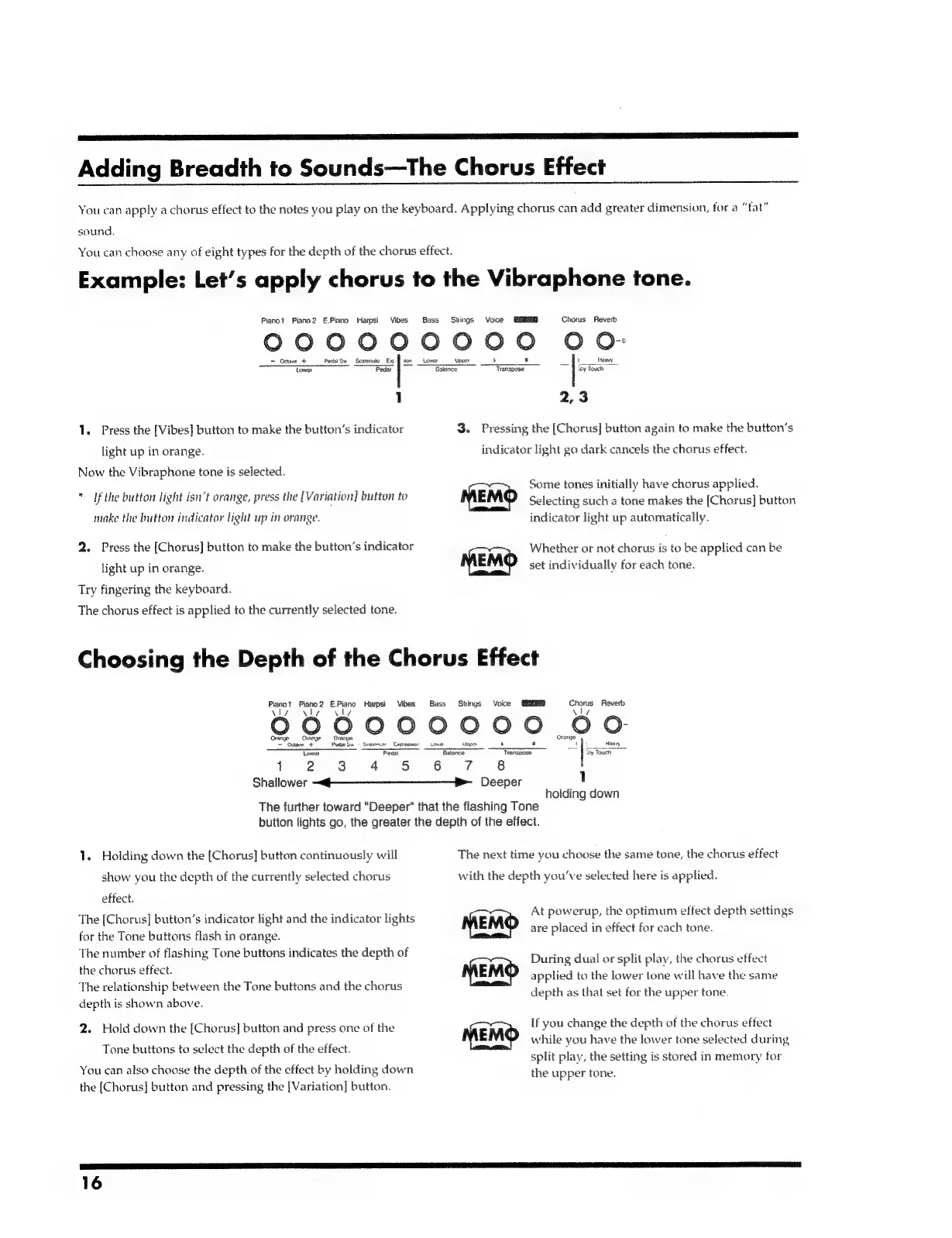
1
2,3
1.
Press
the
[Vibes]
button
to
make
the
button’s
indicator
3.
Pressing
the
[Chorus]
button
again
to
make
the
button’s
light
up
in
orange.
indicator
light
go
dark
cancels
the
chorus
effect.
Now
the
Vibraphone
tone
is
selected.
acts
ie.
Cue
2
he
Some
tones
initially
have
chorus
applied.
If
the
butfon
light
isn’t
orange,
press
the
[Variation]
button
to
MEMO
Selecting
such
a
tone
makes
the
[Chorus]
button
make
the
button
indicator
light
up
in
orange.
indicator
light
up
automatically.
2.
Press
the
[Chorus]
button
to
make
the
button’s
indicator
Whether
or
not
chorus
is
to
be
applied
can
be
light
up
in
orange.
MEMO
set
individually
for
each
tone.
Try
fingering
the
keyboard.
The
chorus
effect
is
applied
to
the
currently
selected
tone.
Choosing
the
Depth
of
the
Chorus
Effect
Pianat
Piano
2
ree
Harpsi
Vibes.
Bass
Stings
Voice
EINES
Chorus
Reverb
000000000
50
Orange
=
Orange
=
Ominge
Orange
~
Oceve
+
Pedal
Sy
=
Snstnute
Cepsessicr:
Lav
t
Heavy
Lower
Pedal
Baars
os
=
|
1
2 3
4
5
6
7
8
Shallower
~~
$$
Deeper
1
holding
down
The
further
toward
"Deeper"
that
the
flashing
Tone
button
lights
go,
the
greater
the
depth
of
the
effect.
1.
Holding
down
the
[Chorus]
button
continuously
will
The
next
time
you
choose
the
same
tone,
the
chorus
effect
show
you
the
depth
of
the
currently
selected
chorus
with
the
depth
you've
selected
here
is
applied.
effect.
At
powerup,
the
optimum
effect
depth
settings
The
[Chorus]
button’s
indicator
light
and
the
indicator
lights
:
;
7
are
placed
in
effect
for
cach
tone.
for
the
Tone
buttons
flash
in
orange.
The
number
of
flashing
Tone
buttons
indicates
the
depth
of
the
chorus
effect.
‘The
relationship
between
the
Tone
buttons
and
the
chorus
depth
is
shown
above.
During
dual
or
split
play,
the
chorus
effect
applied
to
the
lower
lone
will
have
the
same
depth
as
that
set
for
the
upper
tone.
2.
Hold
down
the
[Chorus]
button
and
press
one
of
the
if
you
change
the
depth
of
the
chorus
effect
while
you
have
the
lower
tone
selected
during
split
play,
the
setting
is
stored
in
memory
for
the
upper
tone.
3
Ip
Ie
Tone
buttons
to
select
the
depth
of
the
effect.
You
can
also
choose
the
depth
of
the
cffect
by
holding
down
the
[Chorus]
button
and
pressing
the
[Variation]
button.
16

Related product manuals