EasyManua.ls Logo

Roland FP-9 - Adding Echo to Sounds-The Reverb Effect

Roland FP-9
40 pages
Print Icon
To Next Page IconTo Next Page
To Previous Page IconTo Previous Page
Loading...
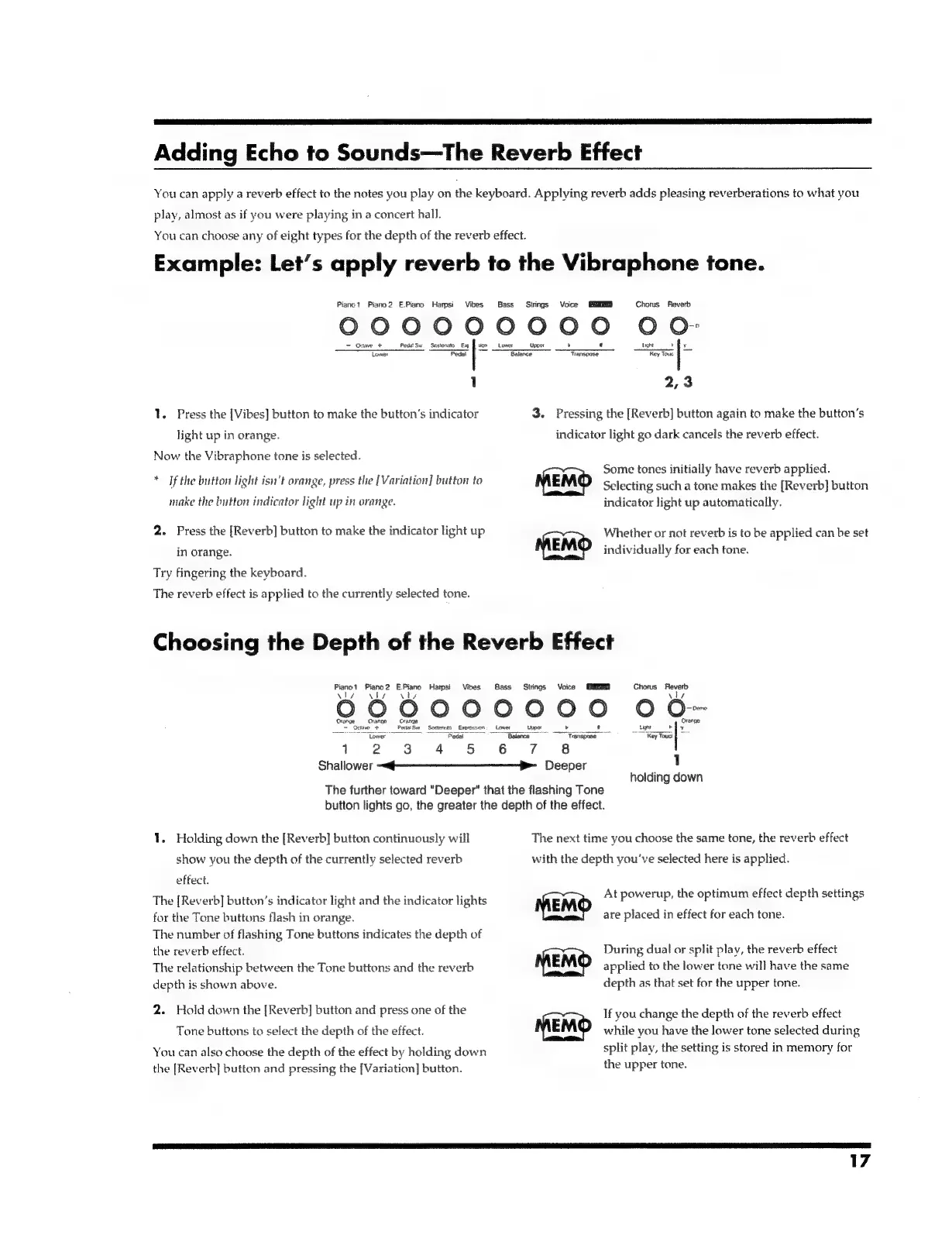
Adding
Echo
to
Sounds—The
Reverb
Effect
You
can
apply
a
reverb
effect
to
the
notes
you
play
on
the
keyboard.
Applying
reverb
adds
pleasing
reverberations
to
what
you
play,
almost
as
if
you
were
playing
in
a
concert
hall.
You
can
choose
any
of
eight
types
for
the
depth
of
the
reverb
effect.
Example:
Let’s
apply
reverb
to
the
Vibraphone
tone.
Piano?
Piano2
E.Piano
Harpsi
Vibes
Bass
Strings
Voice
Chorus
Reverb
O000900000
O
Oo
Octave
+
PedatSw
Sestenito
Ea
Upper
Light
tiv
Tower
Peas
f
Se
aE
Key
Tou
§
1
2,3
1.
Press
the
[Vibes]
button
to
make
the
button’s
indicator
3.
Pressing
the
[Reverb]
button
again
to
make
the
button’s
light
up
in
orange.
indicator
light
go
dark
cancels
the
reverb
effect.
Now
the
Vibraphone
tone
is
selected.
Some
tones
initially
have
reverb
applied.
%
i
.
oral,
.
.
an
7
seaks,
If
the
button
light
isn't
orange,
press
the
[Variation]
button
to
Selecting
such
a
tone
makes
the
[Reverb]
button
make
the
button
indicator
light
up
in
orange.
indicator
light
up
automatically.
2.
Press
the
[Reverb]
button
to
make
the
indicator
light
up
Whether
or
not
reverb
is
to
be
applied
can
be
set
in
orange.
MEMO
individually
for
each
tone.
Try
fingering
the
keyboard.
The
reverb
effect
is
applied
to
the
currently
selected
tone.
Choosing
the
Depth
of
the
Reverb
Effect
renet
Fane
reo
Hampsi
Vibes
ass
Strings
Voice
ME
Chorus
Reverb
\ly
vy
vl
\ly
99000000
O
O--
Orange
Orange
Orange
Pen
sia
Pe
So
sBocierite
Esoroerset
|
=
Loe
=
_
ta
rie
Lower
Pedal
Balance
eae”
Key
Touct
1
2
3
4
5
6
7
8
Shallower
~@-———---—_--—-—-B>-_
Deeper
1
holding
down
The
further
toward
"Deeper"
that
the
flashing
Tone
button
lights
go,
the
greater
the
depth
of
the
effect.
1.
Holding
down
the
[Reverb]
button
continuously
will
The
next
time
you
choose
the
same
tone,
the
reverb
effect
show
you
the
depth
of
the
currently
selected
reverb
with
the
depth
you've
selected
here
is
applied.
effect.
The
[Reverb]
button’s
indicator
light
and
the
indicator
lights
At
powerup,
the
optimum
effect
depth
settings
for
the
Tone
buttons
flash
in
orange.
are
placed
in
effect
for
each
tone.
The
number
of
flashing
Tone
buttons
indicates
the
depth
of
During
dual
or
split
play,
the
reverb
effect
applied
to
the
lower
tone
will
have
the
same
depth
as
that
set
for
the
upper
tone.
the
reverb
effect.
The
relationship
between
the
Tone
buttons
and
the
reverb
depth
is
shown
above.
2.
Hold
down
the
[Reverb]
button
and
press
one
of
the
If
you
change
the
depth
of
the
reverb
effect
while
you
have
the
lower
tone
selected
during
split
play,
the
setting
is
stored
in
memory
for
the
upper
tone.
Tone
buttons
to
select
the
depth
of
the
effect.
i)
1p
I
You
can
also
choose
the
depth
of
the
effect
by
holding
down
the
[Reverb]
button
and
pressing
the
[Variation]
button.

Related product manuals