EasyManua.ls Logo

Roland FP-9 - Setting the Channels for Exchanging MIDI Messages

Roland FP-9
40 pages
Print Icon
To Next Page IconTo Next Page
To Previous Page IconTo Previous Page
Loading...
Making
the
Connections
When
connecting
the
FP-9
to
an
external
MIDI
instrument,
be
sure
to
follow
the
steps
below
to
make
the
connections.
If
you
make
a
mistake
in
the
procedure,
the
FP-9
or
the
connected
device
may
not
operate
correctly.
1.
Switch
off
the
power
to
the
FP-9
and
the
device
you're
3.
Use
a
MIDI
cable
(the
Roland
MSC
series
or
the
like,
sold
about
to
connect.
separately)
to
connect
the
MIDI
connector
on
the
external
At
this
time,
turn
the
volume
all
the
way
down
on
each
of
the
instrument
to
the
MIDI
connector
on
the
FP-9.
veviSee:
4.
Switch
on
the
power
to
the
FP-9
and
the
connected
2.
Set
the
Computer
switch
on
the
back
of
the
unit
to
device.
“MIDL”
5.
Adjust
the
volume
level
on
the
FP-9
and
the
connected
Change
the
setting
of
the
Computer
switch
only
while
the
E
;
:
device.
power
to
the
unit
is
off.
Operation
may
not
be
correct
if
the
setting
is
changed
while
the
power
is
on.
6.
You
should
also
set
the
MIDI
channel
(see
p.
25)
and
switch
Local
Control
on
or
off
as
needed
(see
p.
26).
Setting
the
Channels
for
Exchanging
MIDI
Messages
MIDI
has
something
called
“channels,”
which
are
numbered
from
1
to
16.
If
you
hook
up
two
devices
with
a
MIDI
cable,
you
won't
be
able
to
exchange
MIDI
messages
unless
both
devices
are
set
to
the
same
MIDI
channel.
Make
the
setting
for
the
MIDI
channel
on
which
the
FP-9
sends
MIDI
information
and
receives
MIDI
information
from
external
instruments.
During
dual
play
or
split
play,
the
upper
tone
and
the
lower
tone
have
separate
MIDI
channels.
The
setting
you
make
here
is
only
the
MIDI
channel
for
the
upper
tone.
The
MIDI
channel
for
the
lower
tone
is
automatically
set
to
the
channel
number
that
is
one
higher
than
the
upper-tone
MIDI
channel.
On
the
FP-9,
the
send
channel
and
the
receive
channel
are
the
same.
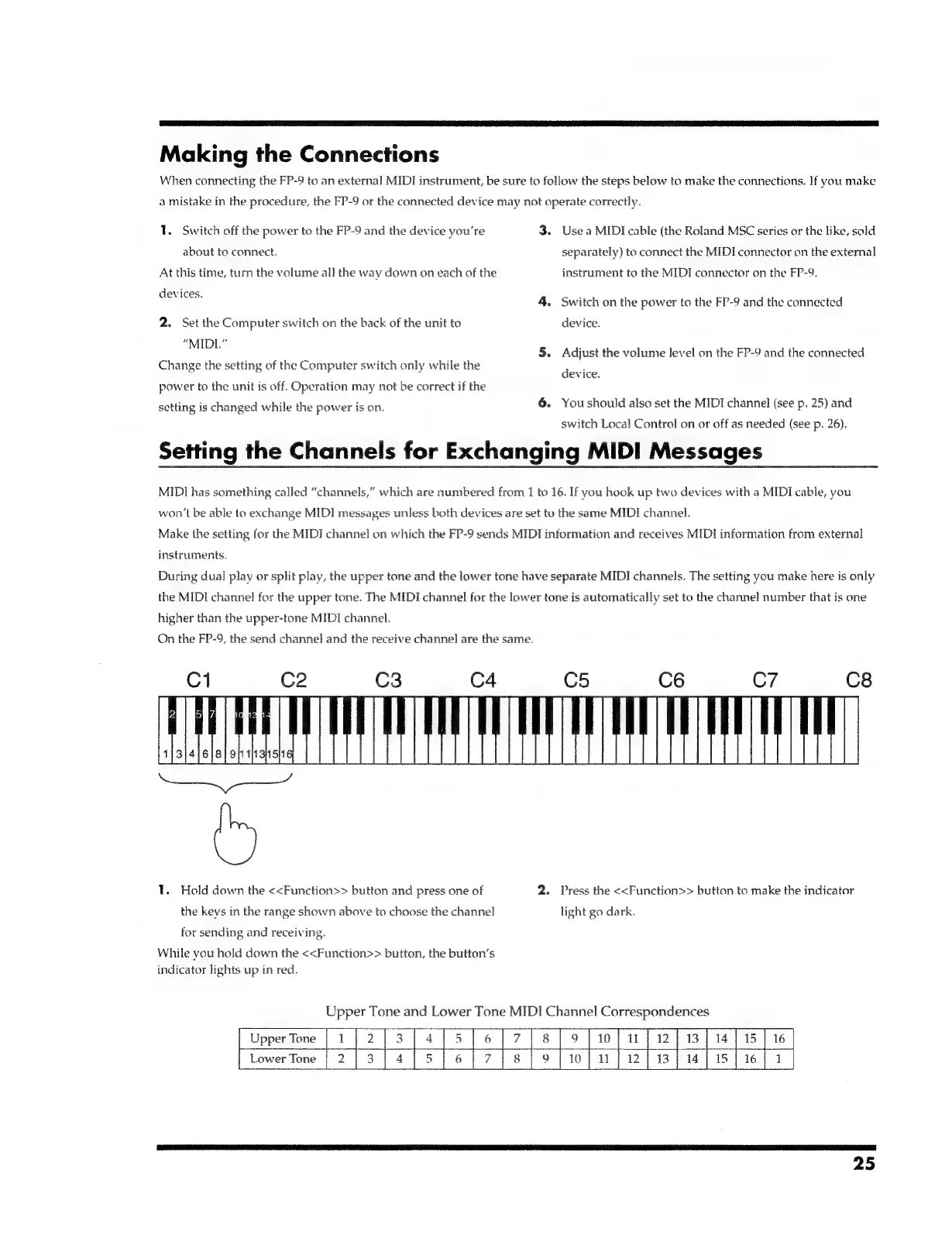
1.
Hold
down
the
<<Function>>
button
and
press
one
of
2.
Press
the
<<Function>>
button
to
make
the
indicator
the
keys
in
the
range
shown
above
to
choose
the
channel
light
go
dark.
for
sending
and
receiving.
While
you
hold
down
the
<<Function>>
button,
the
button’s
indicator
lights
up
in
red.
Up
BPS
Tone
and
Lower
Tone
MIDI
Channel
C
a
Upper
Tone
oe
5/617
{8
]9
|
10
13
|
14
Lower
Tone
6{/7]/slio9lilu
lead
25

Related product manuals