EasyManua.ls Logo

Roland FP-9 - Page 28

Roland FP-9
40 pages
Print Icon
To Next Page IconTo Next Page
To Previous Page IconTo Previous Page
Loading...
FE
eR
A
AN
Sending
Bank
Select
MSB
and
LSB
Messages
You
can
choose
up
to
128
types
of
tones
from
a
connected
MIDI
sound
device
by
using
Program
Change
messages.
With
a
MIDI
sound
device
that
has
more
than
128
on-board
tones,
however,
you
need
to
send
MIDI
information
called
a
“Bank
Select
message”
to
specify
the
Tone
Bank,
then
use
a
Program
Change
message
to
specify
the
number
of
the
tone
within
the
Bank.
Using
Bank
Select
and
Program
Change
messages,
you
can
choose
from
and
switch
to
a
larger
number
of
tones.
Bank
Select
messages
are
of
two
types:
MSB
and
LSB.
The
settings
for
MSB
and
LSB
are
both
at
“0”
when
the
FP-9
is
powered
up.
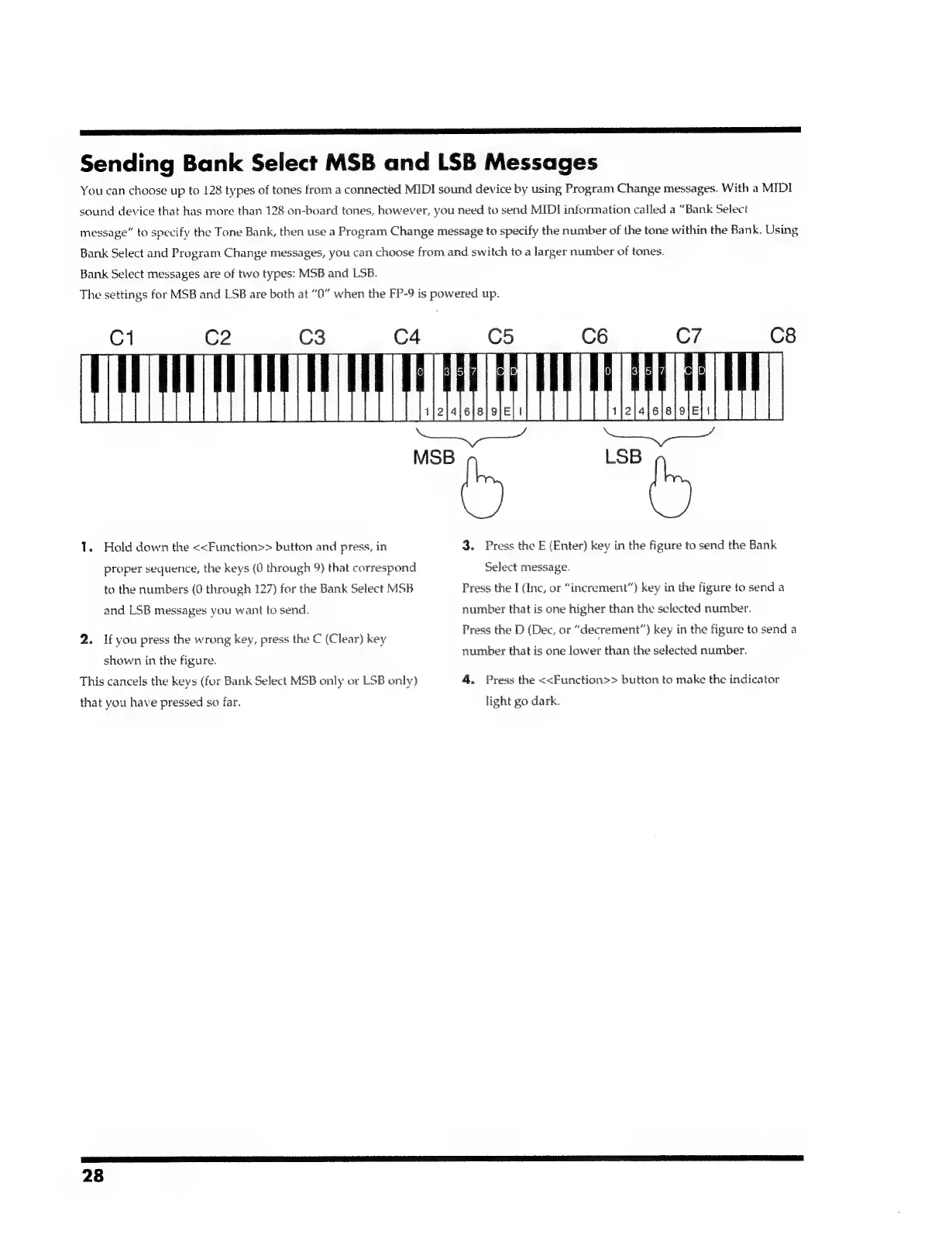
1.
Hold
down
the
<<Function>>
button
and
press,
in
3.
Press
the
E
(Enter)
key
in
the
figure
to
send
the
Bank
proper
sequence,
the
keys
(0
through
9)
that
correspond
Select
message.
to
the
numbers
(0
through
127)
for
the
Bank
Select
MSB
Press
the
I
(Inc,
or
“inerement”)
key
in
the
figure
to
send
a
and
LSB
messages
you
want
to
send.
number
that
is
one
higher
than
the
selected
number.
Bs
Press
the
D
(Dec,
or
“decrement”)
key
in
the
figure
to
send
a
2.
If
you
press
the
wrong
key,
press
the
C
(Clear)
key
Sot
r
vaEY
8
:
a
number
that
is
one
lower
than
the
selected
number.
shown
in
the
figure.
This
cancels
the
keys
(for
Bank
Select
MSB
only
or
LSB
only)
4.
Press
the
<<Function>>
button
to
make
the
indicator
that
you
have
pressed
so
far.
light
go
dark.
28

Related product manuals