EasyManua.ls Logo

Roland FP-9 - Page 27

Roland FP-9
40 pages
Print Icon
To Next Page IconTo Next Page
To Previous Page IconTo Previous Page
Loading...
Sending
Tone
Change
Information—Sending
Program
Change
and
Bank
Select
MSB
or
LSB
Messages
Sending
Program
Change
Messages
With
a
MIDI
instrument,
each
tone
is
assigned
a
number
from
1
to
128
called
a
Program
Number,
and
a
three-digit
number
that
is
a
combination
of
Group/Bank/Number.
A
Program
Change
message
is
MIDI
information
for
switching
tones
that
uses
either
this
Program
Number
or
this
Group
/Bank/Number
to
issue
an
instruction
on
the
number
to
switch
to.
You
can
change
tones
on
an
external
MIDI
instrument
by
sending
a
Program
Change
message.
The
setting
is
at
“1”
when
the
FP-9
is
powered
up.
MEMO
The
tones
that
correspond
to
the
Program
Change
numbers
may
differ
according
to
the
connected
instrument.
Verify
the
Program
Change
numbers
for
the
connected
instrument.
ICCC
1.
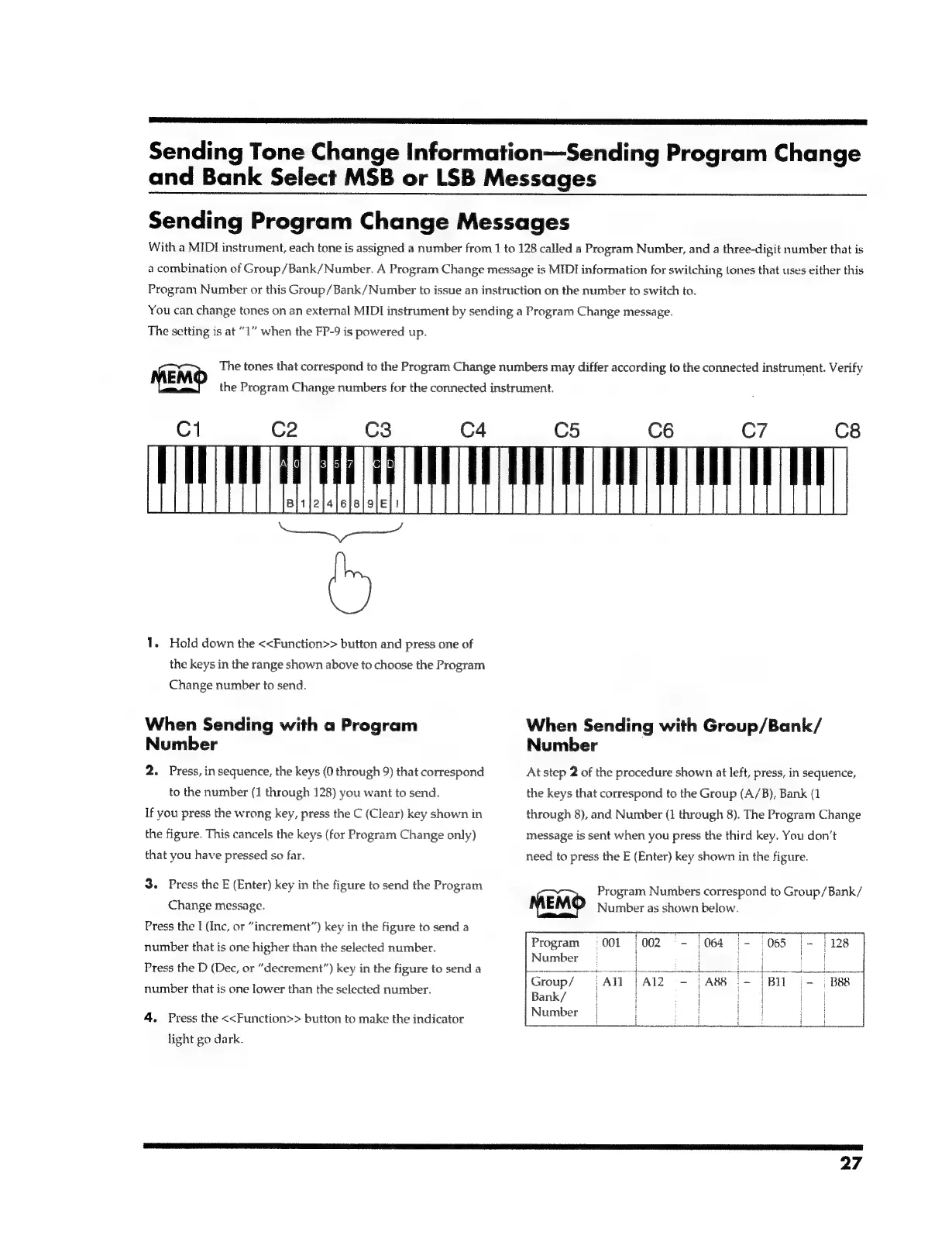
Hold
down
the
<<Function>>
button
and
press
one
of
the
keys
in
the
range
shown
above
to
choose
the
Program
Change
number
to
send.
When
Sending
with
a
Program
Number
2.
Press,
in
sequence,
the
keys
(0
through
9)
that
correspond
to
the
number
(1
through
128)
you
want
to
send.
If
you
press
the
wrong
key,
press
the
C
(Clear)
key
shown
in
the
figure.
This
cancels
the
keys
(for
Program
Change
only)
that
you
have
pressed
so
far.
3.
Press
the
E
(Enter)
key
in
the
figure
to
send
the
Program
Change
message.
Press
the
I
(Inc,
or
“increment”)
key
in
the
figure
to
send
a
number
that
is
one
higher
than
the
selected
number.
Press
the
D
(Dec,
or
“decrement”)
key
in
the
figure
to
send
a
number
that
is
one
lower
than
the
selected
number.
4.
Press
the
<<Function>>
button
to
make
the
indicator
light
go
dark.
When
Sending
with
Group/Bank/
Number
At
step
2
of
the
procedure
shown
at
left,
press,
in
sequence,
the
keys
that
correspond
to
the
Group
(A/B),
Bank
(1
through
8),
and
Number
(1
through
8).
The
Program
Change
message
is
sent
when
you
press
the
third
key.
You
don’t
need
to
press
the
E
(Enter)
key
shown
in
the
figure.
Number
as
shown
below.
MEMO
Program
Numbers
correspond
to
Group/Bank/
Program
001
|002
-
064
|-
065
|-
|
128
Number
|
ae
|
fot
Group/
Bank/
|
Number
|
i
ae
27

Related product manuals