EasyManua.ls Logo

Roland FP-9 - Page 23

Roland FP-9
40 pages
Print Icon
To Next Page IconTo Next Page
To Previous Page IconTo Previous Page
Loading...
Playing
Sounds
from
the
FP-9
on
an
Audio
Device
or
Using
an
Audio
Device
to
Record
What
You
Play—tThe
Line
Out
Jacks
and
Line
Out
Volume
Knob
If
you
want
to
play
the
sound
of
the
FP-9
on
an
audio
device
or
record
what
you
play
ora
tape
recorder,
then
connect
the
L
and
R
Line
Out
jacks
to
the
corresponding
L
and
R
Input
(or
Line
In
or
AUX
IN)
jacks
on
the
external
device.
Making
the
Connections
If
you're
using
the
Line
Out
jacks
to
connect
an
externa!
device,
follow
the
steps
below
to
make
the
connections.
If
this
is
not
done
in
the
correct
sequence,
you
risk
causing
malfunction
and/or
damage
to
speakers
on
the
FP-9
or
the
connected
device.
1.
Turn
the
volume
all
the
way
down
on
the
FP-9
and
on
3.
Use
a
connecting
cable
(such
as
the
PJ-1M,
sold
sepa-
the
device
you're
about
to
connect.
rately)
to
make
the
connection.
2.
Switch
off
the
power
to
the
FP-9
and
the
device
you're
4.
Switch
on
the
FP-9.
about
to
connect.
:
a
5.
Switch
on
the
connected
device.
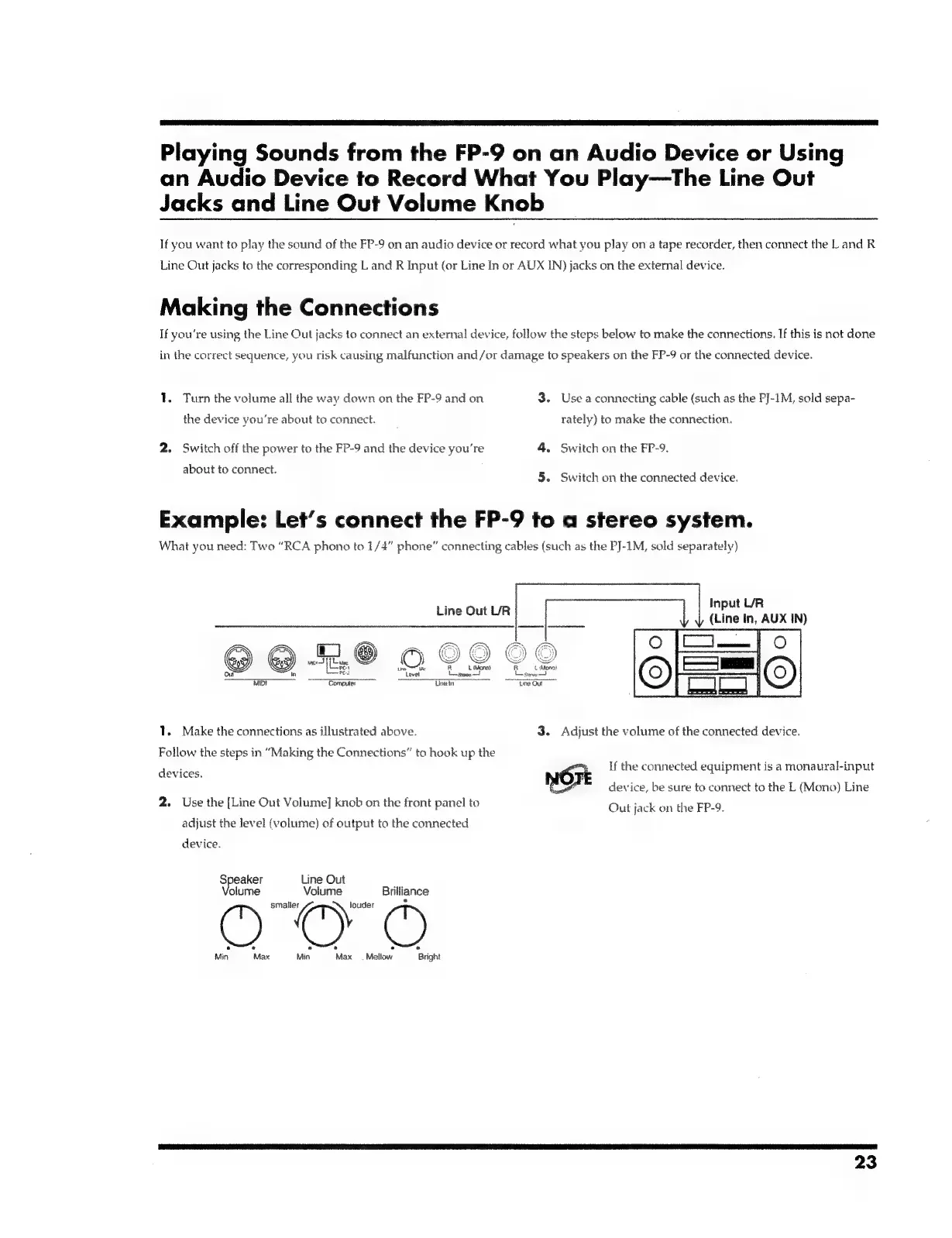
Example:
Let’s
connect
the
FP-9
to
a
stereo
system.
What
you
need:
Two
“RCA
phono
to
1/4”
phone”
connecting
cables
(such
as
the
PJ-1M,
sold
separately)
:
Input
L/R
tine
out
ur
es
oul
(Line
in,
AUX
IN)
i
aN
oo
~
Ba
fi]
@
PX
FY
Gs)
G9)
aid
(eal
©,
ad
om
in
Pes
ave
simee—!
MIDI
~~
Eomptiter
Tine
in
1.
Make
the
connections
as
illustrated
above.
3.
Adjust
the
volume
of
the
connected
device.
Follow
the
steps
in
“Making
the
Connections”
to
hook
up
the
If
the
connected
equipment
is a
monaural-input
devices.
7
NOTE
device,
be
sure
to
connect
to
the
L
(Mong)
Line
2.
Use
the
[Line
Out
Volume]
knob
on
the
front
panel
to
Out
jack
on
the
FP-9.
adjust
the
level
(volume)
of
output
to
the
connected
device.
Speaker
Line
Out
‘olume
Volume
Brilliance
Min
Max
Min
Max
=
Mallow
Bright
23

Related product manuals