110
Chapter 5 User Program Registration
Chapter 5
■ Loading Saved User Program
Sets
User Programs that have been saved on floppy disks or in
user memory can be called up, on an individual set basis, to
the [User Program] button.
* Note that calling up these User Programs results in the
deletion of all User Programs currently recorded to the [User
Program] button.
When loading a set of User Programs from a floppy disk,
first insert the floppy disk in the disk drive.
→ For more on working with the disk drive, refer to “Using
Floppy Disks” (p. 99).
1. Press the [User Program] button.
2. Touch <File>.
3. Touch <Load>.
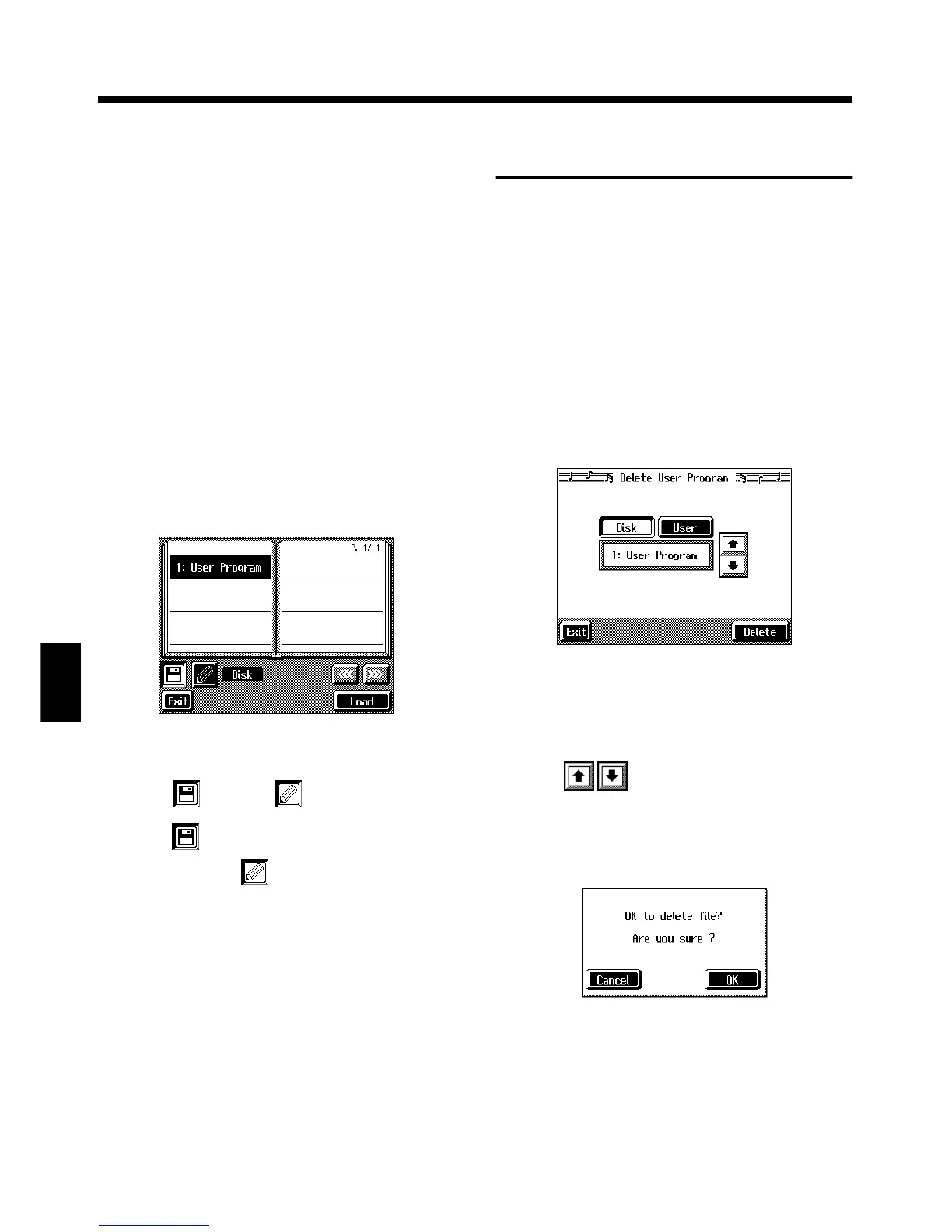
A “Load User Program screen” like the following
appears.
fig.d-upgload.eps_50
Specifying the set of User Programs to be
loaded
4. Touch < (Disk)> or < (User)>.
Touch < > if you are loading User Programs from a
floppy disk; touch < > if you are loading User
Programs from the user memory.
5. Touch the name of User Program to load.
6. Touch <Load>.
The confirmation message appears.
7. Touch <OK>.
The selected User Programs are loaded to the [User
Program] button.
* Never turn off the power or eject the floppy disk from the disk
drive while the operation is in progress. Doing so will damage
the KF-7’s internal memory, making it unusable.
Deleting Saved User
Program Sets
You can delete individual User Program sets saved to floppy
disks or in user memory.
When deleting a set of User Programs on a floppy disk, first
insert the floppy disk in the disk drive.
→ For more on the use of the disk drive, refer to “Using Floppy
Disks” (p. 99).
1. Press the [User Program] button.
2. Touch <File>.
3. Touch <Delete>.
A “Delete User Program screen” like the following
appears.
fig.d-upgdel.eps_50
4. Touch <Disk> or <User>.
Touch <Disk> if you are deleting User Programs from a
floppy disk; touch <User> if you are deleting User
Programs from the user memory.
5. Touch to select the set of User Programs to
be deleted.
6. Touch <Delete>.
A screen like the one shown below appears.
fig.msg_filedel
7. Touch <OK>.
The selected User Programs are deleted.
Touching <Cancel> cancels deleting the file.
* Never turn off the power or eject the floppy disk from the disk
drive while the operation is in progress. Doing so will damage
the KF-7’s internal memory, making it unusable.



 To Next Page