41
Chapter 1 Performance
Chapter 1
■ Changing the Metronome Settings
❍
Adjusting the tempo
You can adjust the tempo of the metronome. The tempo of the metronome changes
automatically if you use an Automatic Accompaniment or play back a song.
1. Press the Tempo [-] or [+] buttons to adjust a tempo.
You can adjust the metronome tempo over a range of = 20–250.
The metronome is automatically set to =108 when the power is turned on.
Pressing the [-] and [+] buttons simultaneously returns the selected song
accompaniment to the basic tempo.
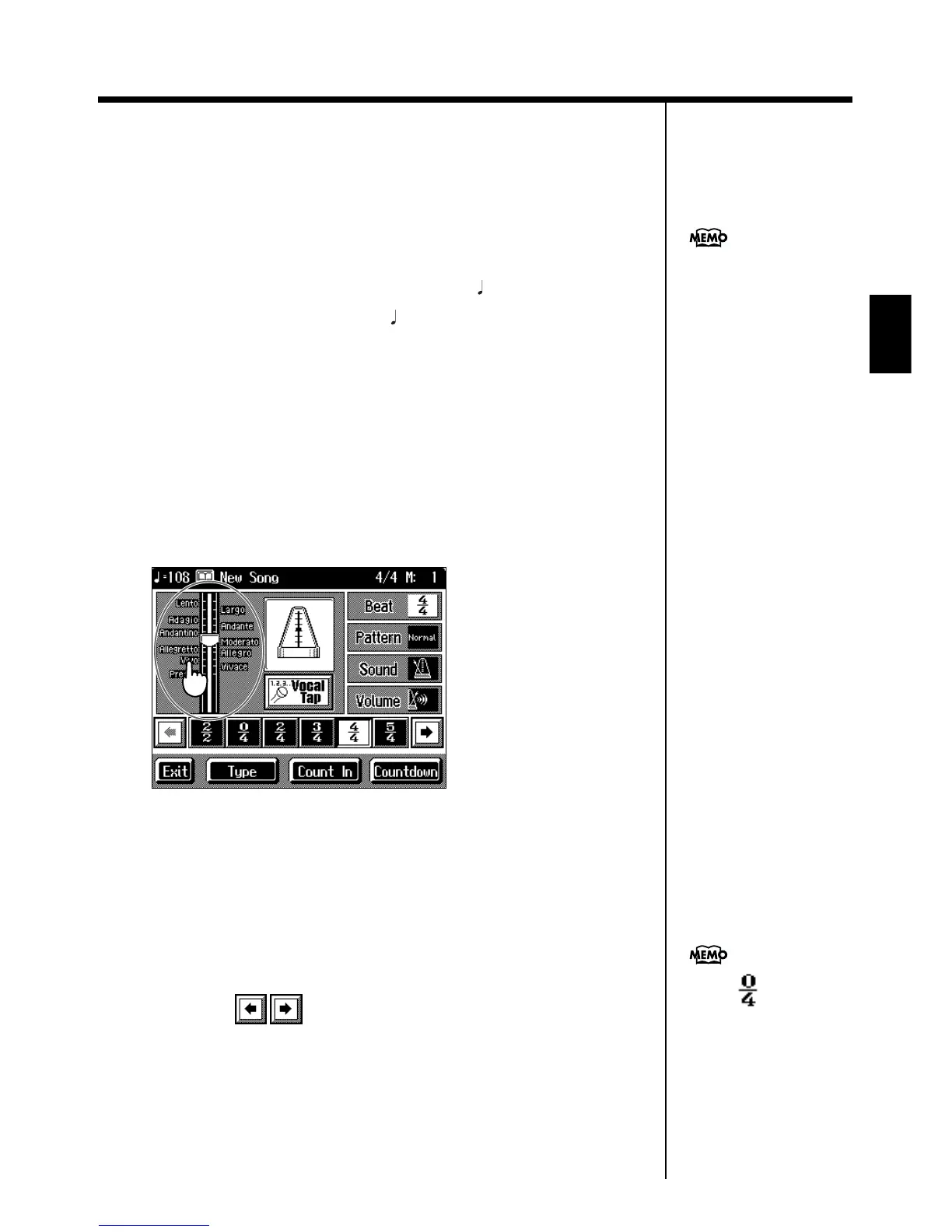
❍ Determining the tempo with tempo marks
You can set the tempo by choosing a tempo indicator, such as “Allegro,” indicated
on the score.
1. On the Metronome screen, touch the tempo indicator bar graph.
The tempo is set to match the tempo mark.
fig.d-metro.eps_60
❍ Changing the beat of the metronome
1. On the Metronome screen, touch <Beat>.
The available choices for the beat appear at the bottom of the screen.
2. Choose the beat from among the selections by touching your choice.
You can scroll the display to one side or the other and show other choices for the beat
by touching .
You can also use the dial to
adjust the tempo. Turn it
clockwise for a faster tempo, or
counterclockwise for a slower
tempo.
When is selected,
only the upbeat will sound.



 To Next Page