Installing the Ink Cartridges
7
1. Changes to the Setup Guide1. Changes to the Setup Guide
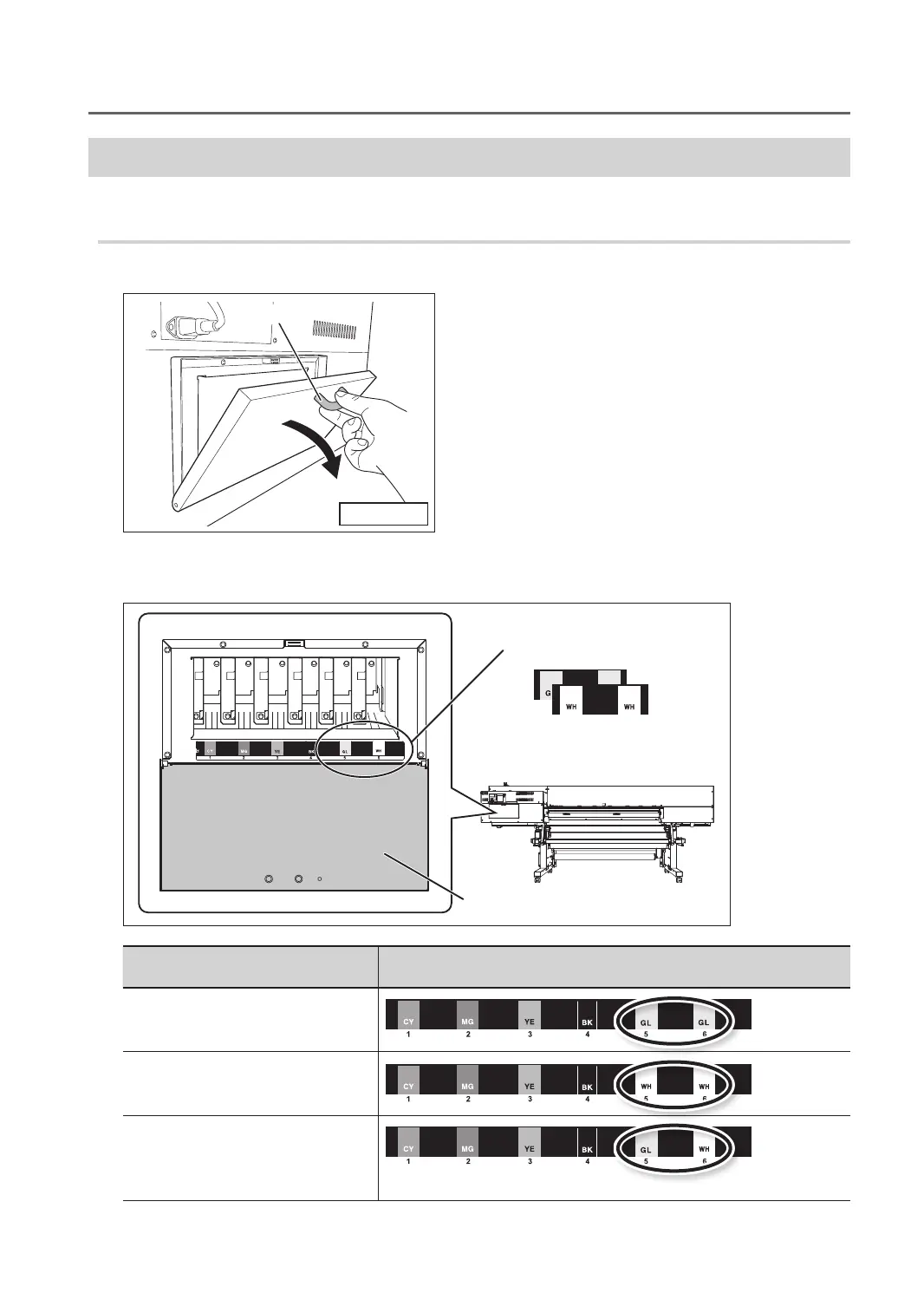
Afxing the Cartridge-slot Labels
* In the case of LEF-12, this operation is not required. Go on to “Installing the Ink Cartridges” (p. 8)
Procedure
1. Open the ink cartridge cover.
Hold the knob
Knob
2. Ax the cartridge-slot labels (supplied parts) appropriate for the selected ink mode to the location shown
in the gure.
Locations where the cartridge-slot
labels are axed
Ink cartridge cover
Back of the machine
Cartridge-slot labels (supplied parts)
Ink mode Cartridge-slot label
Gloss mode
White mode
EUVS ink mode
Gloss/White mode
* When the gloss/white mode is selected, there is no need to ax the cartridge-slot labels.



 To Next Page
 Loading...









