13
RolliBot RolliCool 208 Portable AC with Heater User Manual
4.3 Amazon Alexa Setup
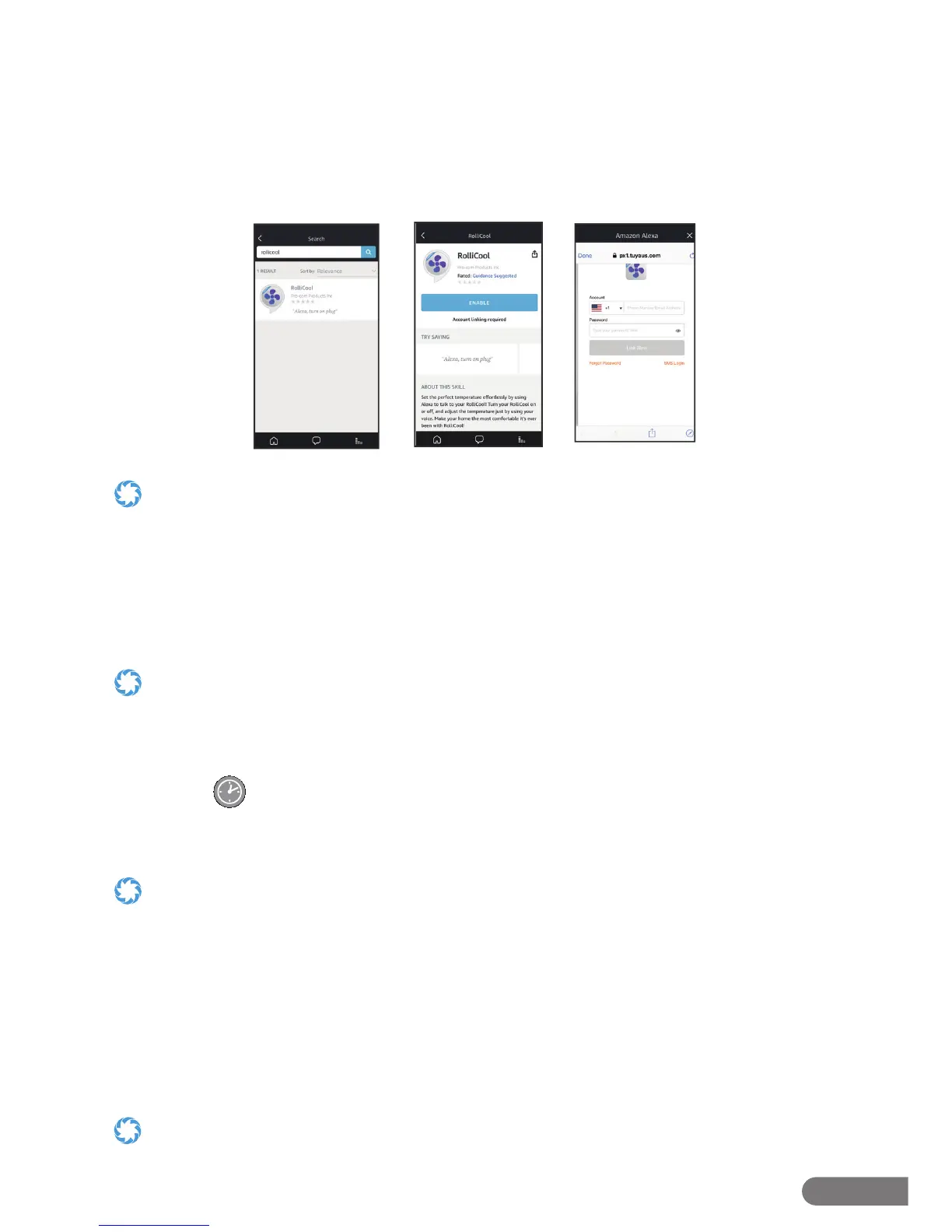
Step 1. Search “RolliCool“ in the Amazon Alexa app home screen ( g.4).
Step 2. Select the RolliCool app and tap “ENABLE“ ( g.5).
Step 3. Login your RolliCool account and tap ”Link Now”. Follow any additional in-app
instructions as needed ( g.6).
g.4
g.5 g.6
• Make sure Amazon Alexa app and RolliCool are connected to the same wi- otherwise Alexa may not be able to discover
your AC unit.
• Connect both your AC unit and Alexa to a stable wi- network. If your wi- is unstable, Alexa may disconnect and not work
correctly with your RolliCool.
Section 5. How to Use the RolliCool
The 208 features a number of ways to keep comfortable. Most features can be used by pressing
the buttons on the unit’s control panel, the remote, or via the app.
• In most cases where the remote can be used, the app can also be used as a substitute.
• To keep the COOL208 from lling up with water too quickly when certain modes are used, it may be best to attach the
drainage hose. It’s recommended to attach the hose to the upper opening when using cool or dehumidify modes and to
attach it to the the lower opening when using heat mode. See Section 6.2 for for information.
5.1 – Timer
With this mode, the unit will automatically turn on or o and regulate temperature according to
the selected times.
• Turning timer mode on when the unit is o means setting the time the unit will turn on.
• Turning timer mode on when the unit is on means setting the time the unit will run before it shuts o .
• After setting the timer, the AC unit will enter timer mode. While the unit is in timer mode, it will operate according to the
selected timer duration. Pressing the timer button again will turn timer mode o and cancel any duration setting.
To Set a Turn On Time
1. When the unit and remote are o , press the timer button on the control panel or the remote.
2. Use the up and down buttons to select the time the AC unit will turn on i.e. selecting “03” will
prompt the unit to turn on in 3 hours’ time etc.
3. After the selection is complete, the display’s TIMER light will turn on.
When a schedule is active, the unit will not turn on if the chosen temperature is higher than the indoor temperature.


 To Next Page