77
Reference Manual
00809-0100-4809, Rev DA
Section 4: Operation and Maintenance
September 2015
Operation and Maintenance
Remote mount
If an RTD needs to be replaced on a remote mounted Annubar Flowmeter, proceed as follows:
1. Close instrument valves to ensure that the pressure is isolated from the transmitter.
2. Open the bleed valves on the transmitter to remove all pressure.
3. Remove the cap from the temperature housing.
4. Remove the RTD wiring from the terminal block.
5. Remove the temperature housing from the head.
6. Pull the RTD wire out of the nipple and remove the RTD. The RTD is in a thermowell. No
live line pressure will be present.
7. Install the new RTD and thread the wires through the nipple.
8. Using the appropriate thread lubricant or tape, install the terminal housing onto the
remote head.
9. Reconnect the RTD wires to the terminal.
10. Open the instrument valves.
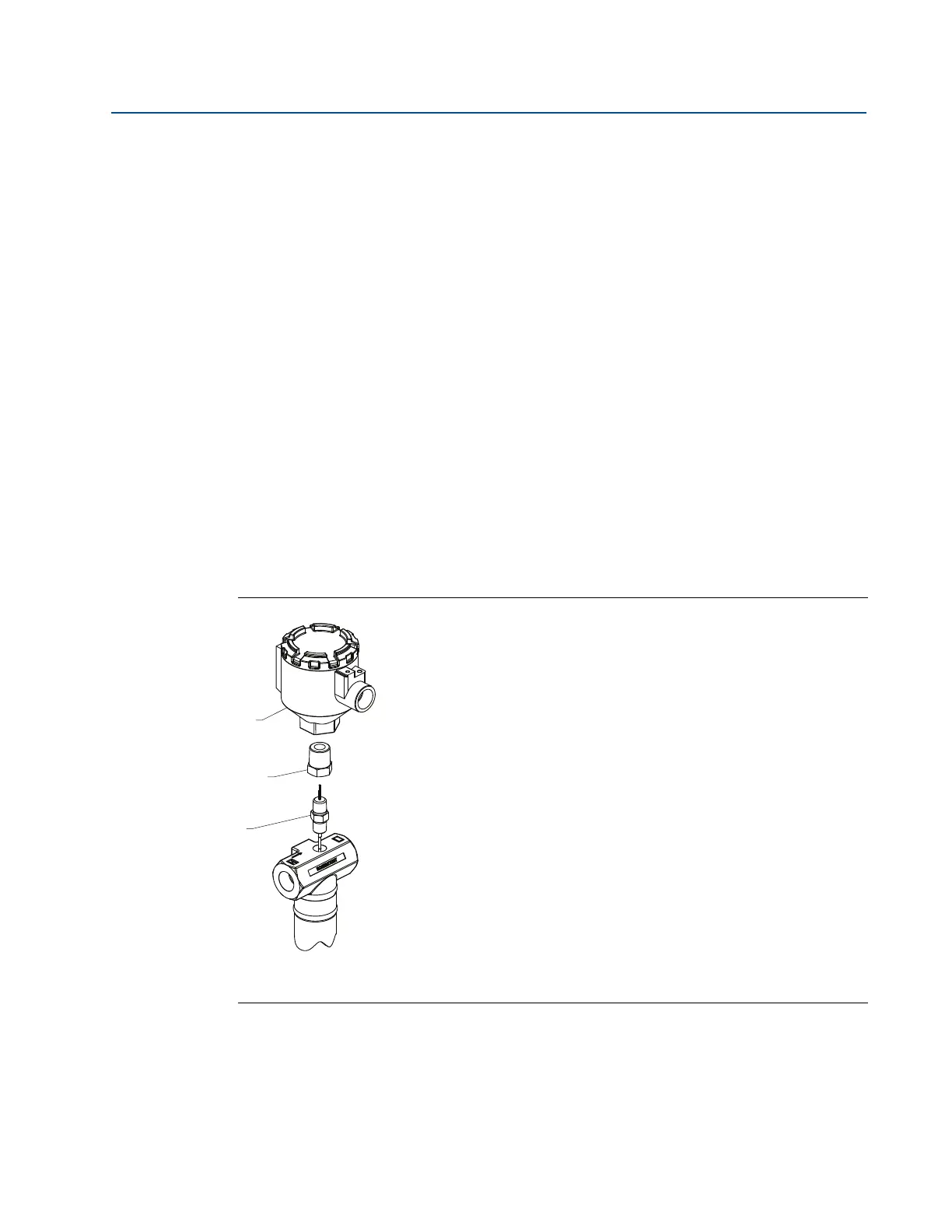
Figure 4-2. Exploded View of Remote Mounted Annubar Sensor, Integral RTD Installation
A. Temperature housing
B.
1
/4-in. FNPT ⫻
1
/2-in. MNPT adapter
C.
1
/4-in. MNPT ⫻
1
/4-in. MNPT RTD










 To Next Page