LOKA HAHB remote control
EN
92
Installation and user manual
15.QUERIES AND SETTINGS
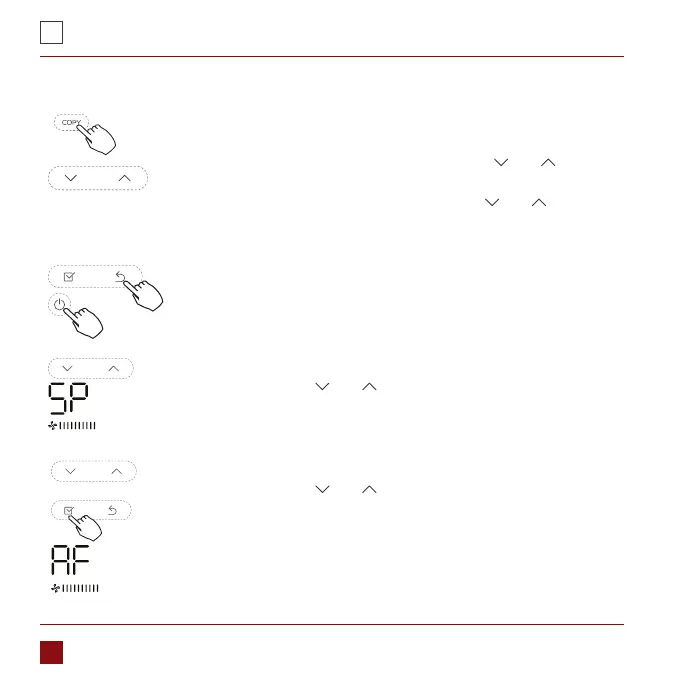
When the air conditioning unit is switch machine, Long press “COPY”
for 3 seconds , rst display P:00, if connected to an indoor unit, display
P:00, if connected to multiple indoor units, press „ ” or „ ”o display
P:01, P:02, and then press “Conrm” to enter the query indoor unit
Tn(T1~T4) temperature and fan fault(CF), press „ ” or „ ” to select.
Not operating keys 15 seconds or press “Back” or press “ON/FF”
drop out of query temperature.
When the air conditioning unit is o, into the query function of
temperature, press „ ” or „ ” to select SP, press “Conrm” to
adjust the static pressure value.
When the air conditioning unit is o, into the query function of
temperature, press „ ” or „ ”to select AF, press “Conrm” into
test mode, press “Back” or press “ON/OFF” or press “Conrm”drop
out of test mode.In AF mode, 3~6 minutes test completion
automatically exits, if the test process, press “Back” or press “ON/
OFF”or press “Conrm” , the test exits will be interrupted.



 To Next Page