8 Configuration
Installer reference guide
48
RVLQ05+08CAV4 + RHYHBH05AA + RHYHBH/X08AA +
RHYKOMB33AA
ROTEX HPU hybrid
4P355635-1 – 2013.05
Quick wizard: Set the system layout after first
power ON
After first power ON of the system, you are guided on the user
interface to do initial settings:
▪ language,
▪ date,
▪ time,
▪ system layout.
By confirming the system layout, you can proceed with the
installation and commissioning of the system.
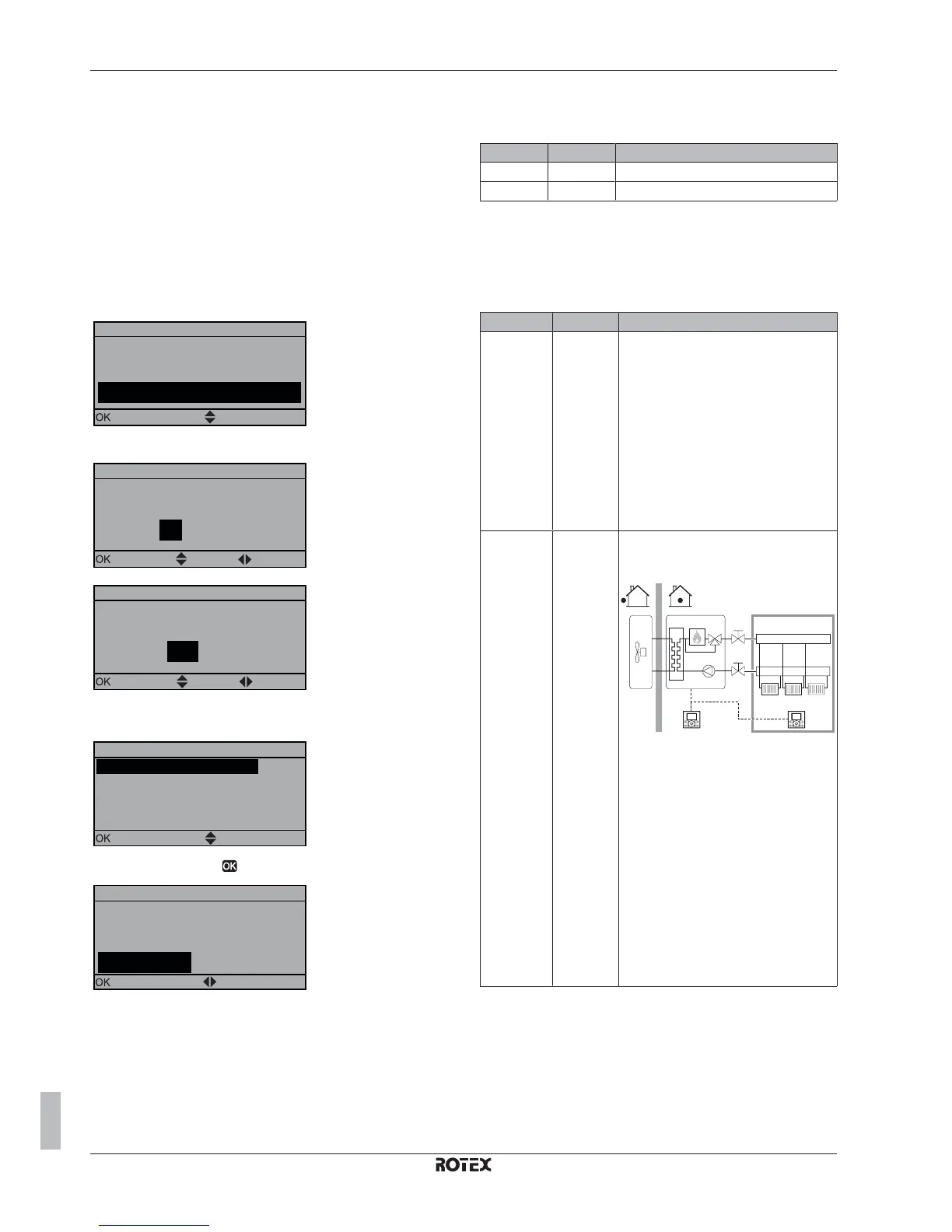
1 At power ON, the quick wizard starts as long as the system
layout was NOT confirmed yet, by setting the language.
/DQJXDJH
&RQILUP
6HOHFWWKHGHVLUHGODQJXDJH
$GMXVW
2 Set the current date and time.
'DWH
&RQILUP
:KDWLVWKHGDWHWRGD\"
$GMXVW 6FUROO
7XH -DQ
7LPH
:KDWLVWKHFXUUHQWWLPH"
&RQILUP $GMXVW 6FUROO
3 Set the system layout settings: Standard, Options, Capacities.
For more details, see "8.1.2 Basic configuration" on page 48.
6\VWHPOD\RXW
6HOHFW
2SWLRQV
6FUROO
&DSDFLWLHV
$
&RQILUPOD\RXW
6WDQGDUG
4 Confirm by pressing .
&RQILUPOD\RXW
3OHDVHFRQILUPWKHV\VWHP
OD\RXW7KHV\VWHPZLOO
2.
UHVWDUWDQGZLOOEHUHDG\IRU
&DQFHO
ILUVWVWDUWXS
&RQILUP $GMXVW
5 The user interface re-initialises and you can proceed the
installation by setting the other applicable settings and
commissioning of the system.
When the installer settings are changed, the system will request to
confirm. When confirmation is complete, the screen will shortly turn
OFF and "busy" will be displayed for several seconds.
8.1.2 Basic configuration
Quick wizard: Language / time and date
# Code Description
[A.1] N/A Language
[1] N/A Time and date
Quick wizard: Standard
Space heating/cooling settings
The system can heat up or cool down a space. Depending on the
type of application, the space heating/cooling settings must be made
accordingly.
# Code Description
[A.2.1.7] [C-07] Unit temperature control:
▪ 0 (LWT control): Unit operation is
decided based on the leaving water
temperature regardless the actual
room temperature and/or heating or
cooling demand of the room.
▪ 1 (Ext RT control): Unit operation is
decided by the external thermostat or
equivalent (e.g. heat pump convector).
▪ 2 (RT control)(default): Unit operation
is decided based on the ambient
temperature of the user interface.
[A.2.1.B] N/A Only if there are 2 user interfaces (1
installed in the room, 1 installed at the
indoor unit):
a
b
▪ a: At unit
▪ b: In room as room thermostat
User interface location:
▪ At unit: this user interface is used to
control the unit. The other user
interface is automatically set to In
room.
▪ In room (default): this user interface
acts as room thermostat. The other
user interface is automatically set to At
unit.


 To Next Page
 Loading...